
Why did my scanned image fail with "exceeded file size" error?
Issue: When scanning a large JPG image, the following error appears in the logs:
sanitized: FAILED
result: "_{"output_file_path":"","process_details":{"details":"Decompressed image size would be 1314979770 bytes, exceeding size limit of 268435456 bytes.","failure_category":"exceeded file size_"}
Cause: The decompressed image size (≈1.3 GB) exceeds the configured Image Size Limit (256 MB by default).
Resolution: Update the Image Size Limit configuration to allow processing of larger images.
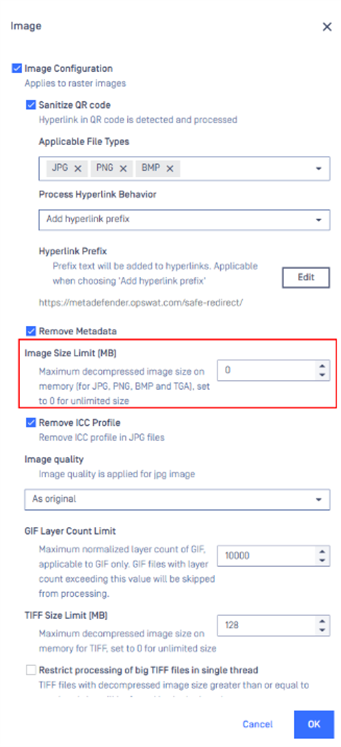
Notes:
Always set the limit slightly higher than the failing image size to avoid repeat issues.
Increasing this value may require additional memory and disk resources—adjust system capacity as needed.
If Further Assistance is required, please proceed to log a support case or chatting with our support engineer.