
How to generate an API key on the Core deployment?
This article applies to all MetaDefender Core V4 and V5 releases deployed on Windows and Linux systems.
In order to be able to generate an API key on the Core console the following steps are necessary:
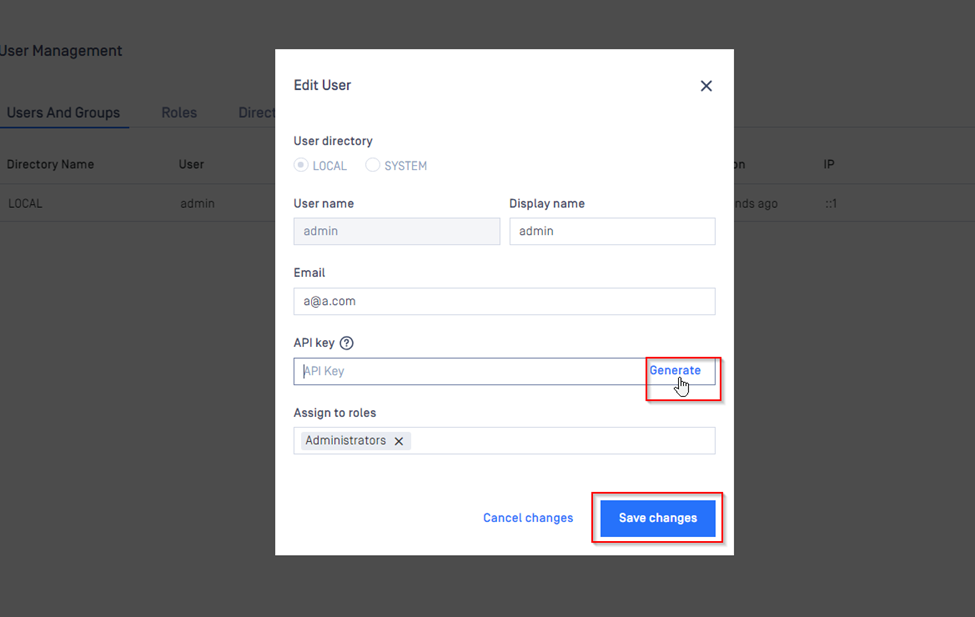
Navigate to the core console (Console\User Management\Users and Groups) $plugin[ho0ghi6yeer]
Select an available administrator type user.
Navigate to the API key tab and click on the “generate” tab.
Users can also input an API key as long as it has an accepted format.
Must have exact 36 characters. Must contain numeric and lowercase letter characters only [0-9 a-f]. Must contain at least 10 lower case letter characters. Must contain at least 10 numeric characters. Not allowed to contain more than 3 consecutive numeric characters. Not allowed to contain more than 3 consecutive lower case letter characters.
Once the key is generated you will need to click on the “Save changes” tab for the changes to take effect.
If Further Assistance is required, please proceed to create a support case or chat with our support engineer.