
This article applies to all MetaDefender Core V4 and V5 releases deployed on Windows or Linux systems.
Cause
This error occurs when there is connection issue between MetaDefender Core and the update server, such as proxy server not configured correctly, update server unreachable, or SSL issues.
Solution: If MetaDefender Core is updating from the Internet
MetaDefender Core pulls engine updates from update.dl.opswat.com when Internet update is configured, to avoid issue:
Make sure that update.dl.opswat.com is reachable from the MetaDefender Core server.
If a proxy is used, please make sure it’s configured correctly in Proxy configuration.
Although the Trusted Root Certificate Authorities store is updated frequently from Microsoft’s repository by the operating system, in some rare cases, the SSL certificate used by update.dl.opswat.com might be missing from the MetaDefender Core server’s trust store.
When the above certificate error occurs for update.dl.opswat.com, you might find the following in core.log:
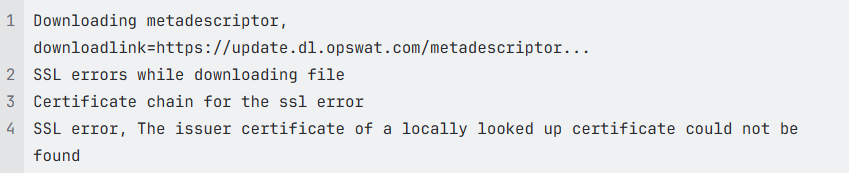
To remediate this issue, manually access https://update.dl.opswat.com from a browser, and download the certificate chain:
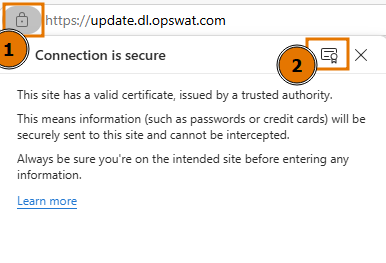
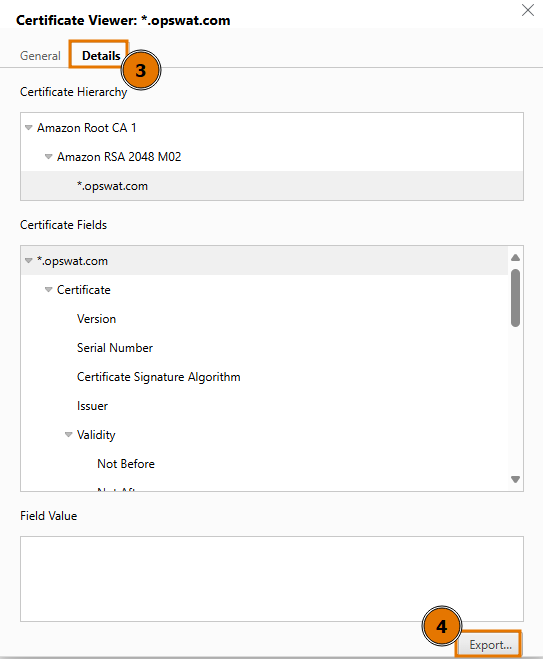
Once the certificate chain is downloaded, export the root and intermediate certificates:
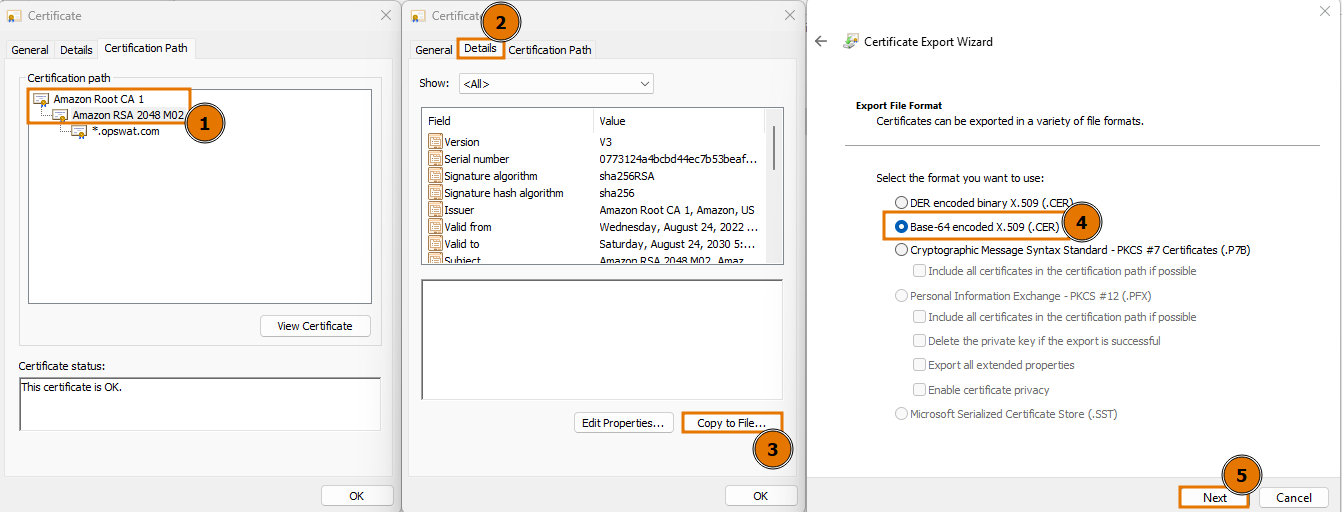
Then, manually import each certificate in the chain (including root and intermediate certificates) into the server’s trust store:
Windows:
Double-click the .crt file → opens "Certificate".
Click "Install Certificate...".
Choose "Local Machine" (You will need Administrator rights).
Choose "Place all certificates in the following store"
Click Browse → select Trusted Root Certification Authorities.
Click Next, then Finish.
Debian:
Copy your certificate to the trusted directory:
sudo cp mycert.crt /usr/local/share/ca-certificates/Update CA store:
sudo update-ca-certificates
RedHat Enterprise Linux:
Copy the certificate:
sudo cp mycert.crt /etc/pki/ca-trust/source/anchors/Update CA Trust: sudo update-ca-trust extract
After that, restart “OPSWAT MetaDefender Core” service, and the certificate for update.dl.opswat.com should be trusted.
Solution: If MetaDefender Core is managed by OPSWAT Central Management
MetaDefender Core is pulling module updates from OCM, to avoid SSL issue:
If OCM is using a certificate for HTTPS connection, make sure that the certificate subject’s common name matches the OCM server’s URL.
The OCM server’s certificate must also be trusted on the MetaDefender Core server by importing to the server’s trust store.
The OCM server’s address must be resolvable from the MetaDefender Core server.
If you have followed the instructions above but are still unable to update MetaDefender Core modules with the error message “Error parsing metadescriptor, message='Could not download metadescriptor'”, please follow these instructions on How to Create Support Package With Bundle Tools?, before creating a support case or chatting with our support engineer.