
Why are Japanese TXT files detected as "application/octet-stream" instead of "text/plain"?
This article applies to all MetaDefender Core V5 releases deployed on Windows or Linux systems using FileType engine version 7.3 and later.
Issue: When processing plain text files containing Shift-JIS encoded characters (e.g., Japanese text), the files are detected as "data" (application/octet-stream) instead of "ASCII text" (text/plain).
Root Cause: This occurs because Shift-JIS recognition is not enabled by default in the FileType engine.
Remediation Steps:
To ensure Shift-JIS encoded text files are properly detected as text, follow these steps:
Open MetaDefender Core configuration settings.
Navigate to:
Workflow → File Type → Text-based detection
Enable the option:
Detect Shift-JIS text
Save the configuration changes.
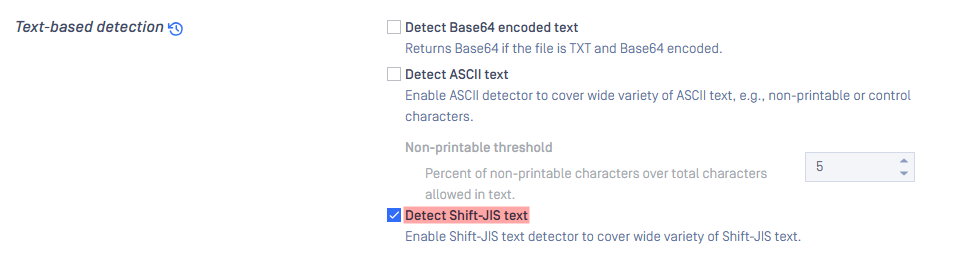
With this configuration, Shift-JIS encoded files will be accurately recognized as "text/plain" instead of "application/octet-stream".
Additional Information: This feature is available in FileType engine version 7.3 and later. If you are using an older version, please refer to the documentation for instructions on configuring the Engines Update.
If you have followed through this article but are still unable to remediate Japanese TXT files detected as “application/octet-stream”, please follow these instructions on How to Create Support Package, before creating a support case or chatting with our support engineer.