
Why are hyperlinks sometimes still present in documents opened in Microsoft Office or PDF Reader after Deep CDR sanitization?
This article is applied to Deep CDR releases deployed on Windows and Linux systems.
Issue:
After Deep CDR sanitization, visible text resembling a URL in documents opened in Microsoft Office or PDF Reader is automatically reconstructed as a hyperlink, even though the underlying hyperlink was removed.
Resolution:
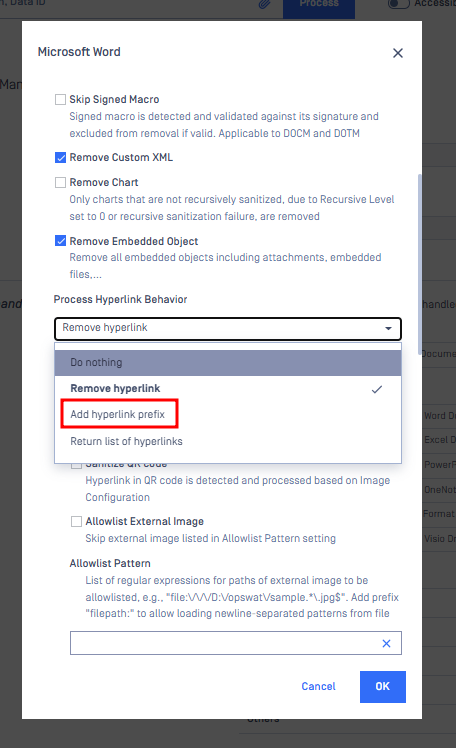
Office Documents
Enable the option "Add hyperlink prefix". This modifies the hyperlink format (e.g., from http:// to OPSWAThttp://), rendering it unclickable while still preserving the original text for reference.
Workflow > Management > Choose a workflow > Deep CDR > File type handling > Office Document > Choose an Office file type > Process Hyperlink Behavior > Add hyperlink prefix
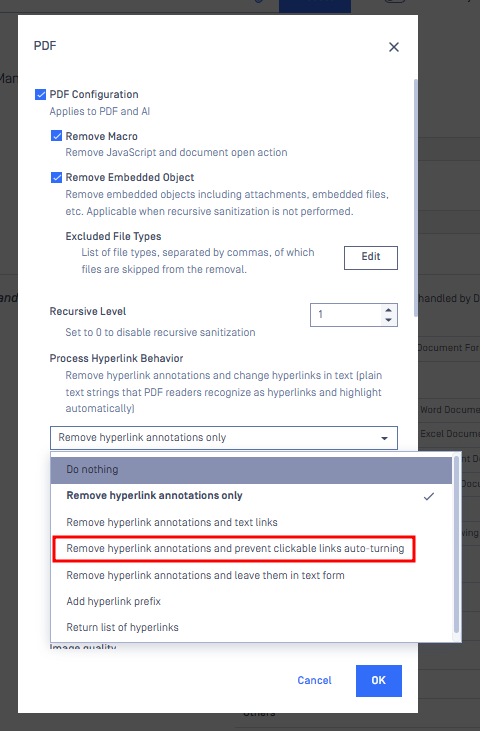
PDF
Enable the option “Remove hyperlink annotations and prevent clickable links auto-turning.” This setting removes existing hyperlinks and prevents them from being automatically recreated.
Workflow > Management > Choose a workflow > Deep CDR > File type handling > Adobe > Choose PDF > Process Hyperlink Behavior > Remove hyperlink annotations and prevent clickable links auto-turning
If Further Assistance is required, please proceed to log a support case or chatting with our support engineer.