
Can an Admin Check Per-User Storage Usage in MetaDefender Managed File Transfer?
Check Your Version:
This article applies to all MetaDefender Managed File Transfer releases.
MetaDefender Managed File Transfer does not have a dedicated report listing storage usage per user. To track an individual user's usage, enable the Upload Quota feature under Settings > File Settings. Once enabled, each user's current storage status is shown in their user information dropdown.
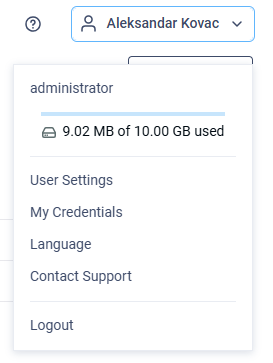
For overall capacity, the System Dashboard shows used and free space across all storage types, but this is system-wide and not broken down by user.
Support:
If you have questions, concerns or issues regarding MetaDefender Managed File Transfer, please open a Support Case with the OPSWAT team via phone, online chat or form, or feel free to ask the community on our OPSWAT Expert Forum.