
Check your version
This article applies to all MFT releases.
This particular error in MFT of this type is caused by the combination of SMB share and NTFS permissions on the OS that hosts the service, as you might see in opswat.mft.next.service.log the following:System.IO.IOException: Deleting file returned STATUS_ACCESS_DENIED
This will be reported also in the UI of the MFT under your “Automation > Jobs”, as the MFT will report the unavailability for every file that it fails to remove “Error removing item … “:
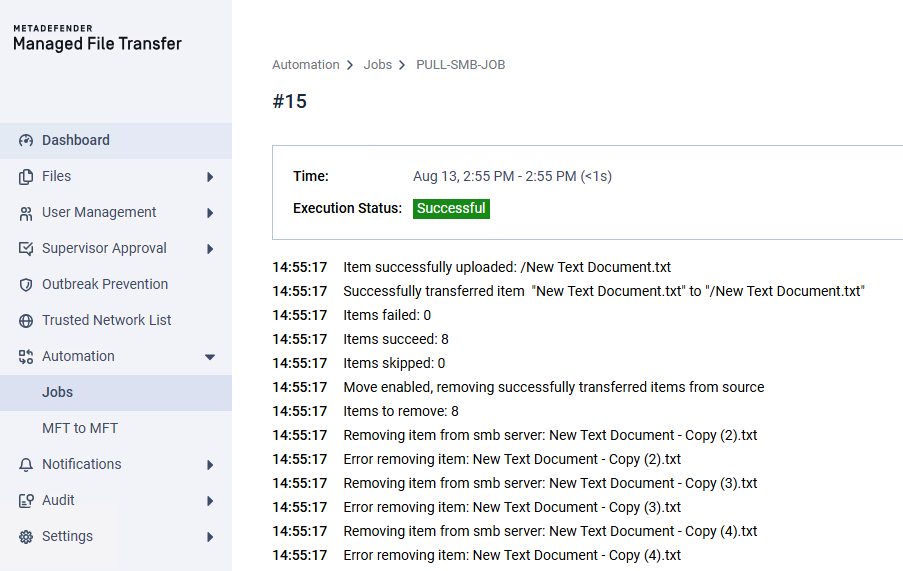
We would first need to target the proper SMB share, which you can derive by:

Then check access:

An SMB share permission set to “Change” grants a user or group complete ability to read, write, modify data, and change access control lists (ACLs) for the shared folder. When combined with file system permissions, effective access equals the most restrictive combination of share and local permissions, so proceed with caution.
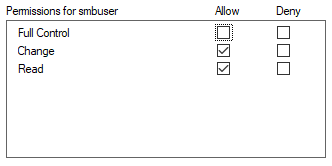
The MFT account, or a group containing it, normally needs at least “Change” at the share level. Read is insufficient for source deletion.
Therefore consider adjusting under “Advanced Sharing → Permissions → Full Control:”
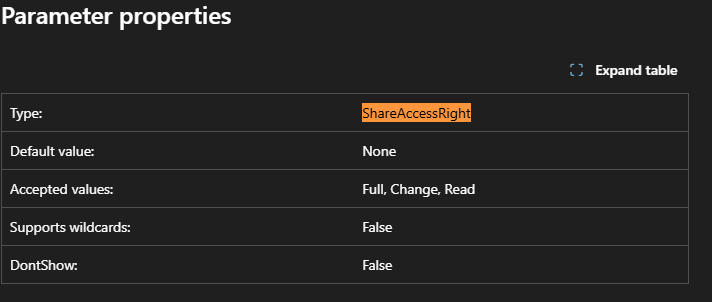
or through PowerShell:
Once that is set we can take care of the actual NTFS permissions:
You would need to ensure that the SMB user has the “modify” permission under:“Properties → Security → Edit → SMB User → Allow “modify”
or through the PowerShell:
icacls <SMB_FOLDER> /grant "${<SMB_USER>}:(OI)(CI)M"

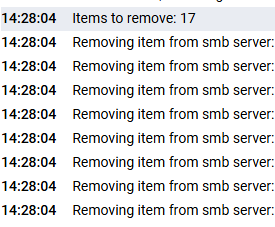
Finally, if we re-schedule the job and test again, we would be matching the requirements and MFT would be in the position to remove the files from the source:
Support
For any issues or queries regarding supported versions of our {{product_name_short}} solution, please open a Support Case with the OPSWAT team via phone, online chat or form, or feel free to ask the community on our OPSWAT Expert Forum.