
After enabling the ClamAV daemon log file, you may encounter the error message: Permanently failed
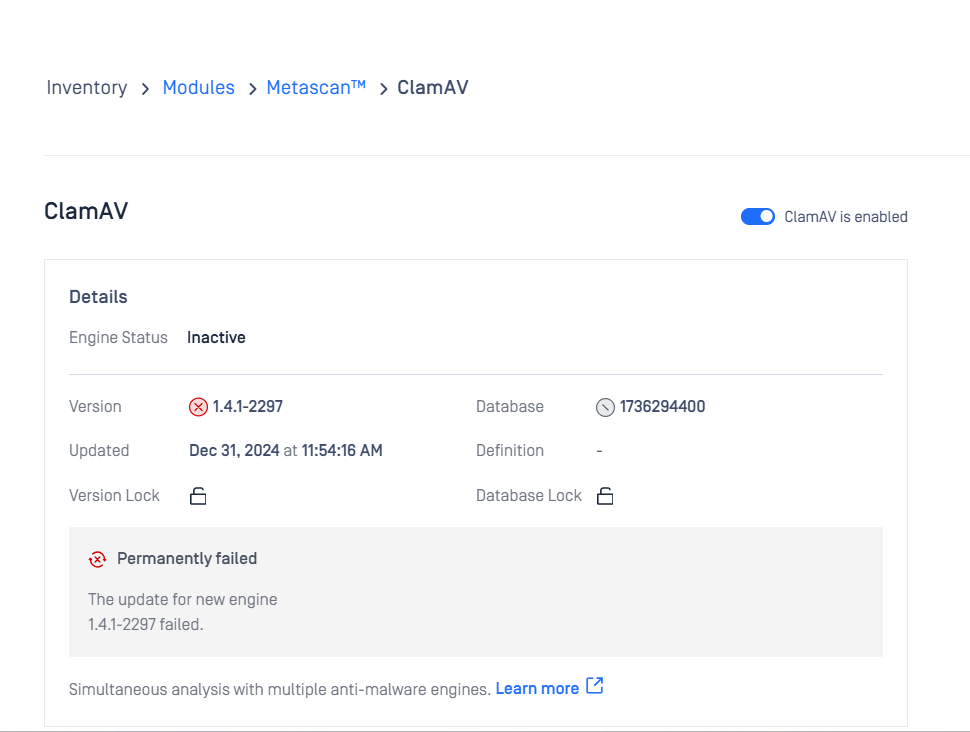
This error occurs because no valid path for the log file has been specified.
This is intended behavior. The ClamAV engine requires a valid path for the daemon log file to function correctly. Without it, the daemon cannot initialize properly.
Steps to Resolve
Specify the Destination Path and Log File Name Select a destination path and specify a file name for the ClamAV daemon log file. Example:
C:\Users\user.name\Desktop\AV\clamav.logUpdate Configuration Navigate to MetaDefender Core > ClamAV > Configuration and update the Path of the ClamAV daemon log file with the chosen path and file name.
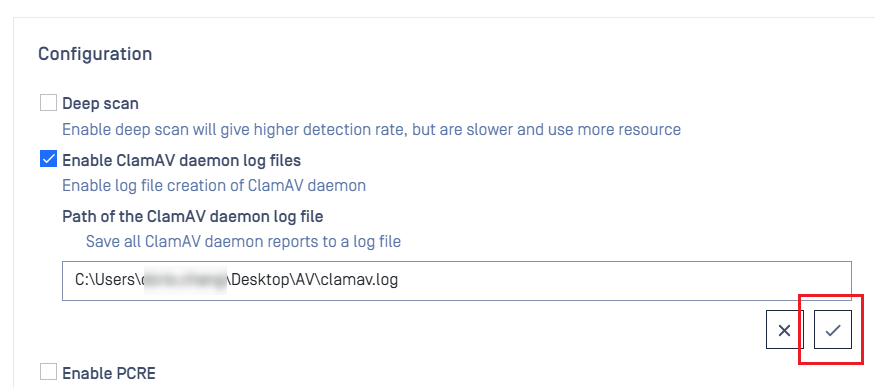
Re-enable the ClamAV Engine After saving the changes, disable the ClamAV engine and then re-enable it. This forces the daemon to reinitialize with the updated configuration.
Log File | Description |
|---|---|
oms_clamav.log | Located at |
Daemon Log File | The ClamAV daemon’s own log file, offering detailed information for debugging ClamAV-specific issues. |
The daemon log file is particularly useful for troubleshooting issues specific to the ClamAV engine, while the oms_clamav.log focuses on MetaDefender Core’s operations.
If you have any further questions please proceed to create a support case or chat with our support engineer.