Knowledge Base
v5.13.2
Search this version
Knowledge Base
Knowledge Base
Configuration and Settings
Errors and Troubleshooting
Features and Functionality
Licensing, Setup and Deployment
Updates, Patches and Bug Fixes
Title
Message
Create new category
What is the title of your new category?
Edit page index title
What is the title of the page index?
Edit category
What is the new title of your category?
Edit link
What is the new title and URL of your link?
How can the Temp folder be changed?
Copy Markdown
Open in ChatGPT
Open in Claude
This article applies to all MetaDefender Core V4 and V5 releases deployed on Windows and Linux systems.
- Temporary folder is used to store temporary files processed by MetaDefender Core and its engines.
- The temporary files will be cleaned up once the processing is done.
- The use of high speed IO disk for temp folder is recommended.
- Ensure sufficient space is allocated for the temp drive.
It can be changed by configuring your MetaDefender Core settings as below:
Linux
- Add
tempdirectoryparameter under[global]section of the configuration file for the server is located in/etc/ometascan/ometascan.conf
Windows
- Open Regedit
- Under
HKEY_LOCAL_MACHINE\SOFTWARE\OPSWAT\Metascan\globaladd new string value namedtempdirectory
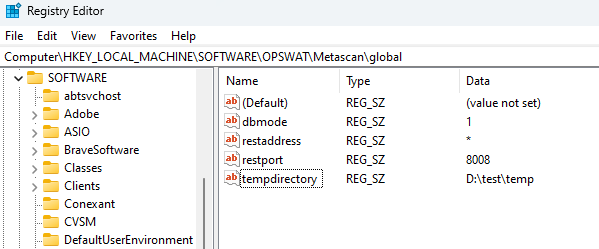
- Restart MetaDefender Core service
If you need help configuring TEMP folder, please create a support case or chat with our support engineer.
Type to search, ESC to discard
Last updated on
Was this page helpful?
Next to read:
How can I increase parallel count and Max queue size?Discard Changes
Do you want to discard your current changes and overwrite with the template?
Archive Synced Block
Message
Create new Template
What is this template's title?
Delete Template
Message
