
This article applies to all MetaDefender Core V4 and V5 releases deployed on Windows or Linux systems.
There are certain hardware, software and system requirements that must be met in order for your MetaDefender Core install to run smoothly through to completion.
meeting third-party requirements
downloading and running the official .msi or .deb installer package
ensuring sufficient network bandwidth and host access.
Always check the system resource requirements and release notes for known limitation first before installing / upgrading Core.
When the installation failed for whatever reasons, it’s worth looking into OS system log / event log to find a clue.
If it does not help, then rerun the installation again with logging enabled (e.g. msiexec /i "C:\installer\ometascan-5.2.1-1-x64.msi.msi" /L*V "C:\log\example.log") to capture verbose installation log, and escalate to OPSWAT support.
Should you not be running an OS that is supported under your licenced MetaDefender Core release, you will be unable to run the MetaDefender Core .msi or .deb package installer that is covered later in this article.
To learn more, please read our article on Recommended System Configuration.
If you are using an unsupported browser, you might assume that your install has failed because you are unable to access the Management Console and use MetaDefender Core, so please be mindful of this requirement.
Allowing sufficient storage space and resources
For both Windows and Linux systems, it is highly recommended that you install MetaDefender Core on machines with SSD drives, as optimal speeds are required for seamless install and swift file processing, particularly when high throughput is expected.
Furthermore, for all MetaDefender Core V5 releases installed on Windows or Linux systems, the following CPU, RAM and Storage specs must be met:
Package | CPU cores | Free System RAM | Free Disk Space |
|---|---|---|---|
MetaDefender Core 8 | 8 | 8 GB | 16 GB |
MetaDefender Core 12 | 16 | 16 GB | 24 GB |
MetaDefender Core 16 | 16 | 16 GB | 32 GB |
MetaDefender Core 20 | 32 | 16 GB | 40 GB |
MetaDefender Core 32 | 32 | 32 GB | 120 GB |
Should you not meet these minimum MetaDefender Core V.5 system requirements, you will likely encounter problems installing and/or using MetaDefender Core.
To learn more about these requirements, please read our article on Recommended System Configuration.
In addition to the above, you will also require a minimum of 4.5GB for each 1M analysis reports generated, as well as additional space for sanitized and quarantined files, depending on the nature of your throughput; but failing to meet this requirement will not impact the install process.
Meeting third-party requirements
Even when all other requirements are met, MetaDefender Core will fail to install and/or function when certain third-party dependencies are not met.
In many cases, your Windows version or Linux distro will already include all or a few of these dependencies but, in some cases, you will need to install them.
For this reason, we recommend that you check your OS against this third-party dependency list and install any missing components on your system before you run the MetaDefender Core installer.
Third-party dependencies are as follows:
Windows Third-Party Dependencies | Linux Third-Party Dependencies |
|---|---|
.NET framework 4.5 or above | OpenSSL |
Microsoft Visual C++ Redistributable for Visual Studio 2010 | grep |
Microsoft Visual C++ Redistributable for Visual Studio 2013 | lib32stdc++6 (>= 4.5) |
Microsoft Visual C++ Redistributable for Visual Studio 2017 | libc6-i386 (>= 2.10) |
PostgreSQL 12.x (at least 12.3) and 14.11
| procps |
zlib1g | |
libcurl3 (>= 7.19.7) | |
libcurl4 | |
PostgreSQL 12 (>= 12.3) or 14 (14.11) |
There are also various engine-specific third-party dependencies that should be met and, while not meeting these will impact your ability to utilize the various scan engines included under your package, will not interrupt the MetaDefender Core install process.
To learn more about engine-specific dependencies, please Read This.
Downloading and running the official .msi or .deb installer package
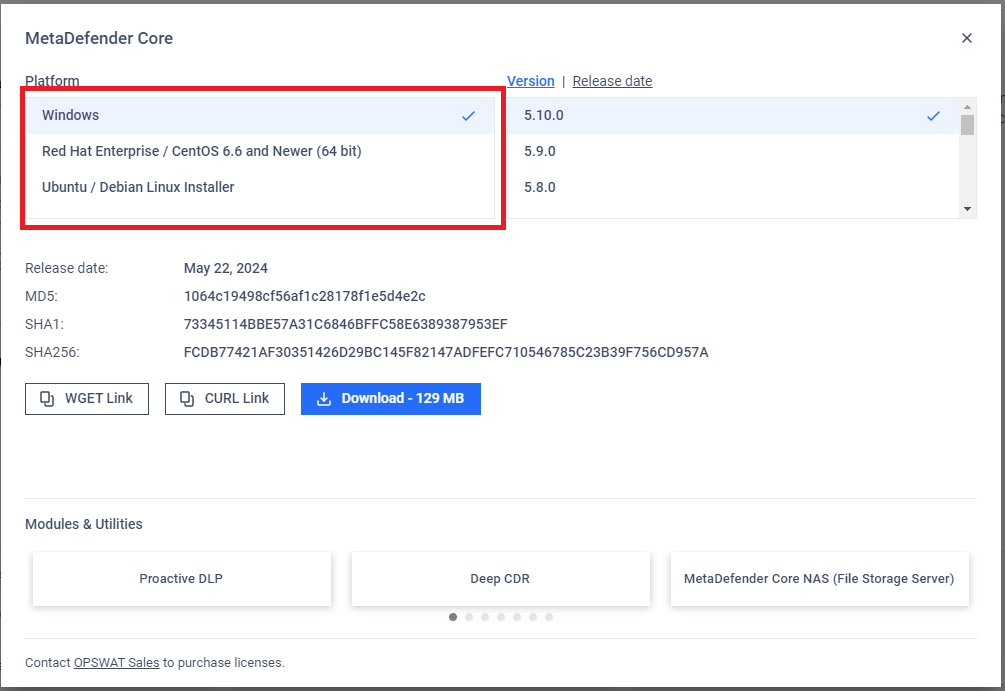
To install MetaDefender Core on any compatible system, you must download the relevant verified installer package directly from the OPSWAT Portal>Products>MetaDefender Core page.
This .msi (for Windows) or .deb (for Linux) file features both the MetaDefender Core software package and the install wizard for seamless setup and launch.
You should also ensure that you download the installer package that is associated with your OS, as illustrated in the screenshots below.
Not making these necessary adjustments to your firewall and security settings will interrupt the install and deployment process
You will be unable to launch the MetaDefender Core Management Console and use the product unless these hosts are allowed.
If you have followed the instructions above but are still Unable To Install Metadefender Core on Your System, please reach out by creating a support case or chatting with our support engineer.