
This article applies to all MetaDefender V5 releases deployed on Windows or Linux systems.
Under normal circumstances, all active engines scan every file.
However, there are some situations in which scanning might be impacted and a “failed to scan” result is observed. In such situations, the behavior may be caused by a number of factors:
Some engines failed to scan, and exceeded the scan failure threshold settings in place on the Core side.
Core itself has a fatal problem e.g. Core service crashed.
Due to configurations:
Failed the scan when sanitization timeout or failed.
Failed the scan when archive extraction failed.
MetaDefender V5 include an option that modifies the behavior of the product when a specific engine fails to scan - such as in the case mentioned above.
Here, MetaDefender Core can be configured to fail the scan if any of the engines report problems. In other words, it can toss out all partially complete scans.
Failing to disable this option can give the illusion that MetaDefender Core is failing to scan large amounts of files.
Metadefender Core V5 Releases
To disable this option on V5, follow these steps:
In your web browser, navigate to the MetaDefender Core Management Console at http://localhost:8008/ (you may need to log in under admin privilege)
On the left menu, navigate to Workflow Management → Workflow to list all available rules
Click on a workflow you are using for the current scan to modify the setting
Click on the Metascan tab
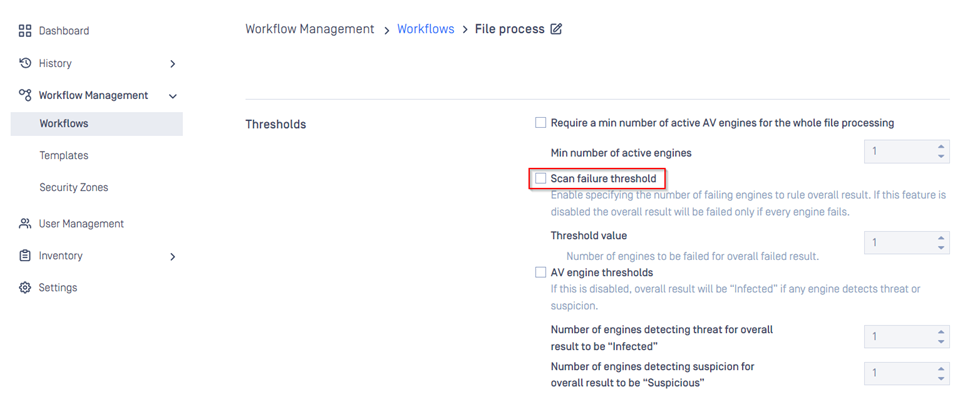
Uncheck the option Scan Failure Threshold shown below.
If you have followed the instructions above but are still seeing a high number of files logged as Failed to Scan, please follow these instructions on How To Create a Support Package, before creating a support case or chatting with our support engineer.