
Version | 5.12.0 |
|---|---|
Release date | 30 September 2024 |
Scope | A major version focused on new features, enhancements, usability improvements, security enhancements, and stability bug fixes. |
Making sure to check out the Known Limitations
New Features, Improvements and Enhancements
Details | |
|---|---|
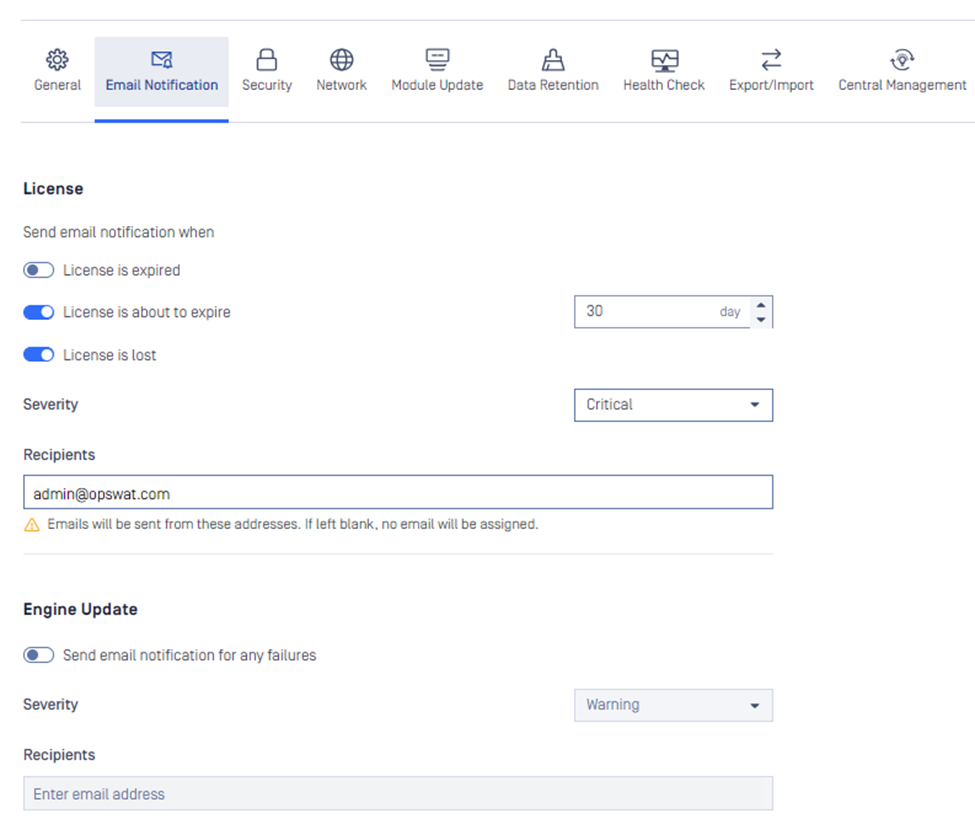
Email notification | Users will now receive email notifications for detected threats and incidents, providing real-time updates on potential security risks.
|
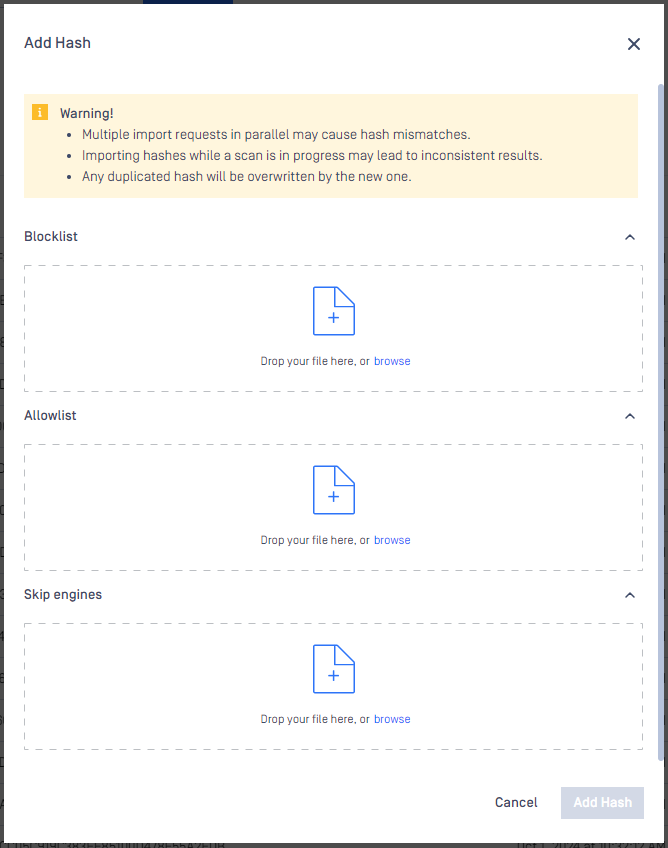
CSV upload for feature Skip-by-Hash | Users can now upload CSV files to the "Skip by Hash" list including “Skip Engines”, “Allowlist” and “Blocklist”. It allows users to improve scanning efficiency by focusing resources on potentially harmful files instead of known safe entities.
|
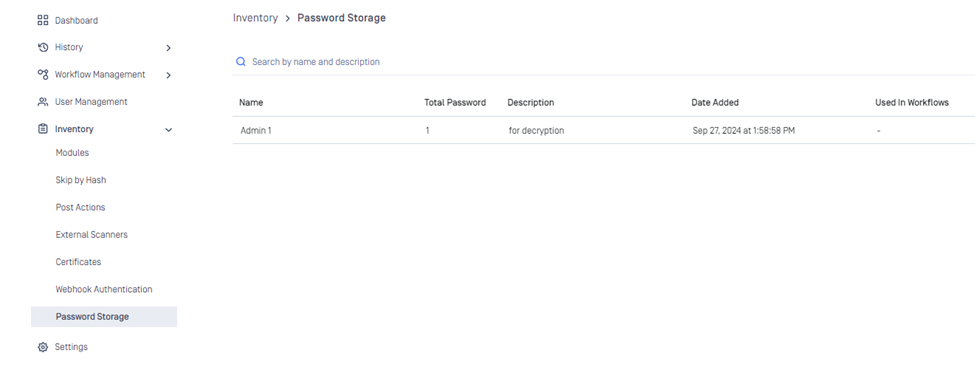
Password storage for handling encrypted file | Introducing a new feature for encrypted file. Users can define and manage lists of passwords used for file decryption, streamlining the process when handling encrypted or password-protected files.
|
SBOM License Enforcement | By default, the workflow rule "MetaDefender Software Supply Chain" now includes SBOM license enforcement, enhancing compliance and security. |
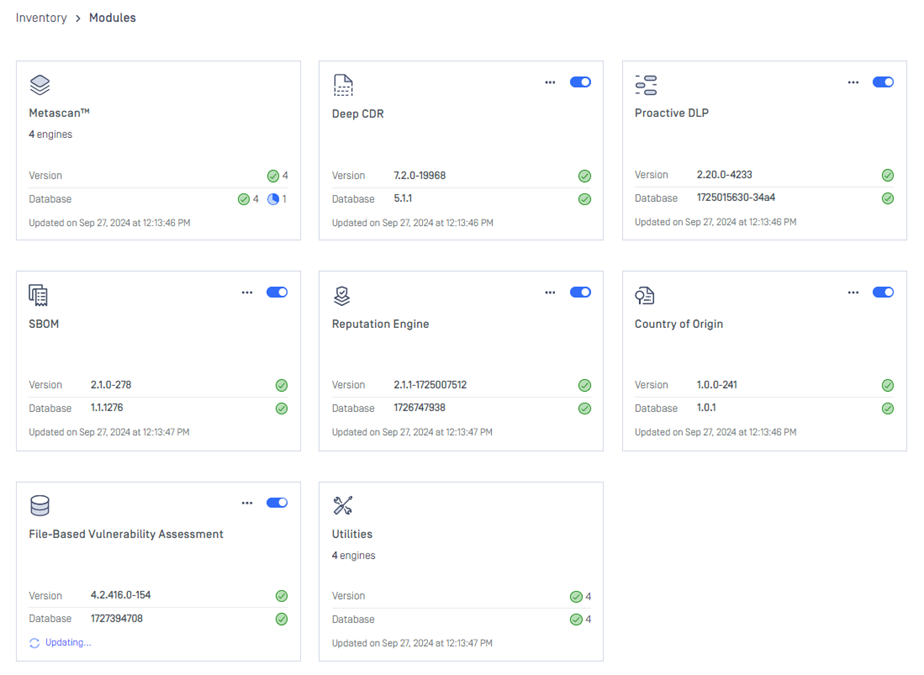
Improved UI/UX for Inventory -> Modules | Refines the user interface for Modules to enhance usability and streamline workflows.
|
Continuous support for My OPSWAT integration | Now you can manage and configure "Post Actions", "External Scanners", "Webhook Authentication" and "Health Check" from My OPSWAT. |
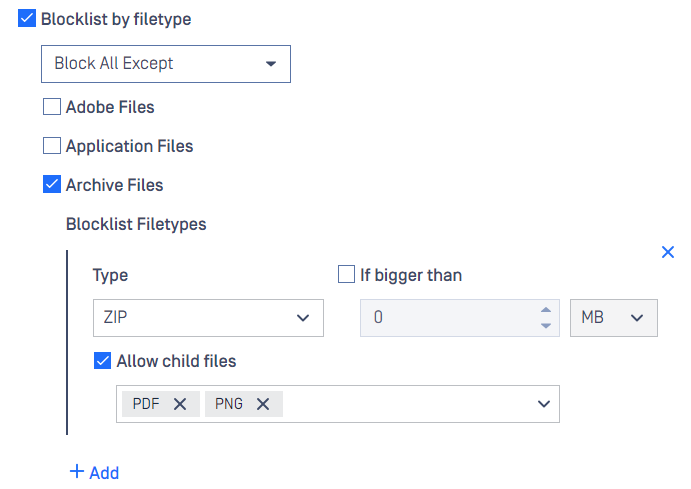
Blocklist All Except treats child file types in separate ways | For Archive Files under Block-All-Except, there is an ability to further process predefined child file types and instantly block other child file types. For example, PDF and PNG child files of ZIP file will be processed, meanwhile, other file types else will be blocklisted.
|
Usability enhancements / changes |
|
Security improvements |
|
Docker enhancements |
|
Central Hub enhancements | Support new header |
UI updates |
|
Bug Fixes
Details | |
|---|---|
Fixes on product stability issues |
|
Other minor bug fixes | Implemented UI enhancements and resolved minor bugs. |
Known Limitations
Details | |
|---|---|
Sometimes cannot import a CSV of hashes when using Firefox browser | When using Firefox browser, users sometimes cannot import CSV of hashes to Skip-by-hash feature. Error message: "File format is invalid. Please upload a CSV file." |
Database connection failure in a particular circumstance after upgrading to v5.11.0 | This issue is resolved in version 5.11.1. This issue does not affect all cases when upgrading to v5.11.0. After applying authentication method scram-sha-256 to enhance security for bundled PostgreSQL, a database connection issue starts occurring after upgrade, in a particular circumstance.
We prepare a KB for troubleshooting the issue and bring the system back to work: How to Troubleshoot an Error related to Connection to Database Failing after an Upgrade to v5.11.0? In the following cases, users will not experience the issue:
|
Reuse processing result by hash might be slow in high load situation | This issue is resolved in version 5.10.1. Since introduced in v5.8.0, this feature helps improve overall performance and reduce considerable load when processing similar files. However, we have realized this feature might run slowly in high load against large DB size. |
The temporary files in the resource folder may not be properly cleaned up if the Archive Extraction engine crashes | Starting from MetaDefender Core version 5.10.1 and onward, when the Archive Extraction engine crashes, MetaDefender Core might not handle this edge case effectively. This could result in temporary files from specific extraction transactions remaining in the resource folder without proper cleanup. However, the likelihood of this issue occurring is relatively low. |
Reject importing non-empty required_engines setting in containerized environment | Occurs only in containerized environments. If the config zip file includes non-empty required_engines setting, MetaDefender Core will reject the import. Workaround:
|
Button "Revert to Default" in Workflow Rule might not work properly | This issue is resolved in version 5.6.0. When modifying settings in Workflow Rule, sometimes button "Revert to Default" disappears and cannot work properly. This behavior might be encountered in version 5.5.0. |
Engine Update feature sometimes does not work properly in particular environment | We have observed that the Engine Update feature may not work properly in an environment that is protected by a [Palo Alto firewall](Palo Alto firewall). In log file, you might find this message "SslHandshakeFailedError". In case that upgrading to the latest version of MetaDefender Core does not help, please consider setting up MetaDefender Update Downloader product. This product is responsible for downloading engines, and MetaDefender Core will pick and update its engines from there. |
UI inconvenience on small resolution screen | This issue is resolved in version 5.5.1. MetaDefender Core 5.5.0 introduces a lot of changes for supporting UI accessibility. Unfortunately, this leads to an inconvenience issue when displaying Workflow Rule on small/zoomed-in resolution screen. Some tabs at the bottom of the list will not be displayed properly. Workaround: zooming out a little bit on the browser. |
Performance degradation against big archive files | This issue is resolved in MD Core v5.5.0 and Archive v6.2.1.
|
Stability issue when encountering malformed data created by FileType engine | This issue is resolved in version 5.4.1. FileType version 6.0.2 sometimes created malformed data. After being written into PostgreSQL database, those malformed data cause negative impacts to MetaDefender Core v5.4.0 or older:
If you encounter similar symptoms, please find the following troubleshooting to resolve the issue: Rectify malformed FileType data in PostgreSQL database |
Stability issues on Red Hat / CentOS with its kernel version 372.13 | MetaDefender Core 5.2.1 or later versions might not function correctly with Red Hat or CentOS operating systems using kernel 372.13. Red Hat appears to be addressing the kernel issues. Please try upgrading to kernel version 372.26. |
PostgreSQL and MetaDefender Core services cannot initialize in specific containerized environment | In containerized environment, MetaDefender Core 5.2.0 or newer cannot work properly when:
Workarounds:
|
MetaDefender Core's NGINX web server will not start if using weak cipher suites for HTTPS | On MetaDefender Core 5.2.0 and later versions, OpenSSL 1.x has been replaced by OpenSSL 3.x within the product and its dependencies (PostgreSQL, NGINX) to enhance security and address known vulnerabilities in OpenSSL 1.x. However, NGINX's implementation of OpenSSL 3.x in MetaDefender Core enforces strong encryption by rejecting all weak cipher suites. It only accepts "HIGH" encryption cipher suites as defined by OpenSSL https://www.openssl.org/docs/man1.1.1/man1/ciphers.html. This means ciphers based on MD5 and SHA1 hashing are no longer supported. Consequently, if you previously configured MetaDefender Core for HTTPS connections using a weak SSL cipher with your certificate, the service will not start due to NGINX's OpenSSL 3.x security enforcement. For prevention and remediation before upgrading MetaDefender Core, learn more at HTTPS Failure on MetaDefender Core 5.2.0 (or newer) |