
Executive Summary
The Identity Publisher feature in MetaDefender NAC enables administrators to forward authentication-related events from the NAC Edge VM to external systems such as SIEMs, firewalls, and log management platforms (currently supported vendor: External Syslog, Palo Alto firewall). This capability supports enhanced visibility, compliance tracking, and integration with existing security infrastructure.
Identity Publishers operate through a cloud-based management console, where administrators configure publisher profiles. These profiles are then pushed to the on-premise NAC Edge VM, which performs the actual log forwarding. This ensures consistent configuration, centralized management, and secure control of data flow.
Key Benefits:
Provides real-time visibility into authentication, authorization, and disconnection events
Supports integrations with security ecosystems (Syslog servers, Palo Alto firewalls)
Simplifies event forwarding through centrally managed profiles
Ensures compliance with audit, monitoring, and incident response requirements
Offers flexible filtering via subnet filters and publisher-specific configuration fields
Prerequisites
Before configuring an Identity Publisher, ensure the following conditions are met.
Required Access Permissions
Administrative access to My OPSWAT Central Management
RADIUS NAC → Configuration permissions
System Requirements
A deployed MetaDefender NAC Edge VM with:
Syslog forwarding service enabled
Stable connectivity between the VM and external Syslog or Palo Alto endpoints
NAC Edge VM version 1.14.0 or later
Feature Overview
What Identity Publishers Do
Identity Publishers define where NAC should forward events generated when a device:
Authenticates to the network
Disconnects or times out
Fails authentication
Triggers identity-related activities
The publisher configuration lives in the cloud console and is synchronized to the NAC Edge VM, which performs the actual event forwarding.
Available Publisher Types
Syslog Standard syslog integration supporting configurable:
Address
Port
Facility
Severity Level
Format (e.g., CEF) The VM-level syslog service listens for NAC events and forwards them to the configured destination.
Palo Alto Sends Host Information Profile (HIP) and authentication metadata to Palo Alto Networks firewalls. Supports:
URL
API Key
Optional HIP report include
Subnet filtering
Publish interval configuration
Use Cases
Primary Use Cases
Security Monitoring: Forward authentication logs to SIEM for incident detection
Network Access Tracking: Record when devices join or leave the network
Firewall Enforcement: Send contextual identity information to Palo Alto for policy enforcement
Compliance Auditing: Maintain consistent records of user and device network authentication
When to Use Syslog Publisher
Use Syslog when you need:
Integration with SIEM/SOC platforms
Standardized CEF/LEEF/syslog-formatted logs
Lightweight monitoring for authentication events
When to Use Palo Alto Publisher
Use Palo Alto when:
The organization uses Palo Alto NGFW
Dynamic Access Policies depend on HIP information
You need automation of identity updates into firewall policy layers
Identity Publisher Configuration Procedures
Accessing the Identity Publisher Page
Go to My OPSWAT Central Management → RADIUS NAC → Configuration
Select Identity Publisher
Step-by-Step Procedure
Click Add
From Publisher Type, select Syslog
Fill in the required fields:
Name
Address (Syslog server IP)
Port (1–65535)
Facility (e.g., LOG AUTH)
Level (e.g., LOG INFO)
Format (e.g., CEF)
(Optional) Enable Debug Mode
Click Save
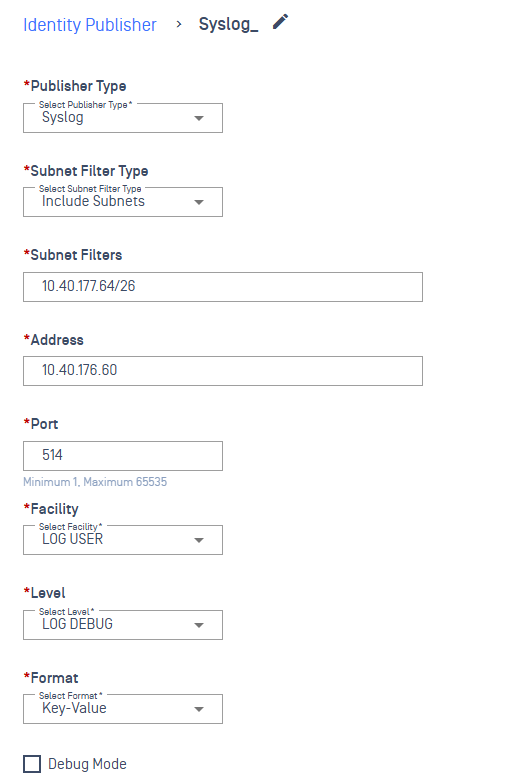
Upon saving, the publisher appears in the Identity Publisher list.
Validation Rules
Required Fields
All of the following must be filled:
Name
Address
Port
Facility
Level
Format
The UI displays error messages when any required field is missing.
Port Validation
Minimum: 1
Maximum: 65535
Values outside this range trigger validation errors.
Subnet Filter Type Behavior
Syslog and Palo Alto publishers support subnet filtering:
No Subnet Filter
Subnet Filters field is hidden
Include Subnets
Subnet Filters field is shown
Exclude Subnets
Subnet Filters field is shown
Subnet Filters Accepted Formats
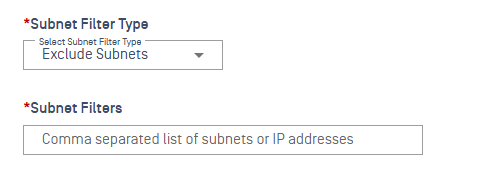
Single IP (e.g.,
192.168.1.10)Multiple IPs separated by commas
CIDR ranges (e.g.,
192.168.1.0/24)
All above formats are accepted without error messages.
Editing a Syslog Publisher
Select an existing publisher
Modify any of the fields:
Name
Port
Facility
Level
Click Save
The system updates the publisher with the new values.
Deleting a Syslog Publisher
Select the target publisher
Click Delete
Confirm deletion
The publisher is permanently removed and no longer appears in the list.
Discarding Unsaved Changes
When creating or editing:
Click Discard/Cancel
Confirm the action
Changes are removed and no publisher is added or modified.
Step-by-Step Procedure
Click Add
Select Publisher Type: Palo Alto
Configure required fields:
Name
Subnet Filter Type
URL
API Key
Publish Interval (ms)
(Optional) Enable:
Include HIP Report
Debug Mode
Click Save
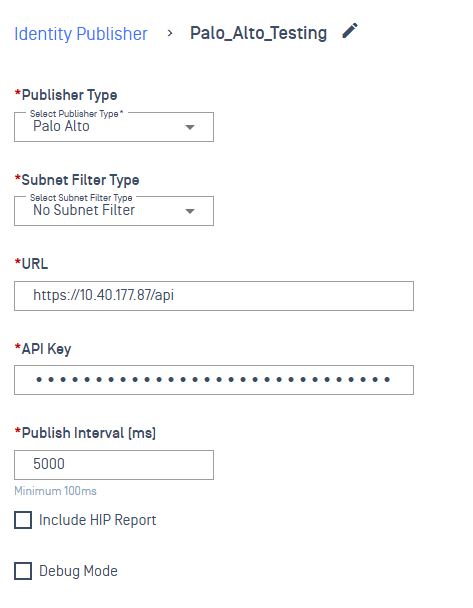
Upon saving, the Palo Alto publisher is pushed to the NAC Edge VM.
Validation Rules
Required Fields
Name
URL
API Key
Publish Interval
Subnet filter behavior (if applicable)
Duplicate Name Validation
Creating a publisher with an existing name triggers an error: “Publisher with this name already exists.”
HIP Report Support
If Include HIP Report is selected:
NAC will include Host Information Profile data during event publishing
Publishing interval applies to HIP data as well
Debug Mode
Debug Mode can be enabled for Syslog and Palo Alto publishers.
When enabled:
Additional diagnostic logs are generated
VM may forward extra fields useful for troubleshooting
Recommended only for testing or debugging scenarios
Post-Configuration Behavior
Publisher configurations are transmitted from cloud console → NAC Edge VM
VM updates the Syslog or Palo Alto integration parameters
Events start forwarding immediately as clients authenticate or disconnect
Subnet filtering rules are enforced at the VM level