
You can access a managed device’s status by following the steps below:
Log into your My OPSWAT Central Management Console and navigate to Inventory>Devices.
From the inventory page, click on the relevant device to open the detailed view. Here you will find the Device Status towards the top right-hand corner of the screen, just below the Actions menu, as illustrated below.
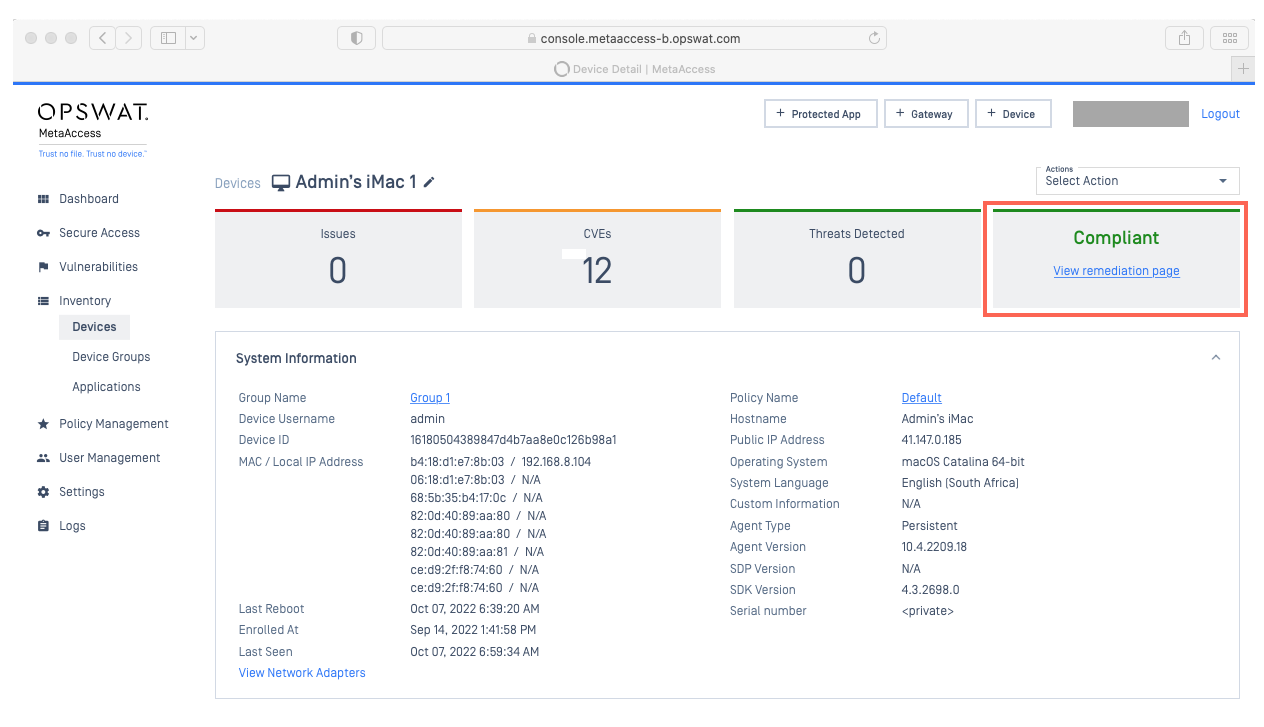
From there, users can view the detailed Remediation Page, which includes guidelines and links to solutions, by clicking the access link below the Status reading, illustrated below.

Device statuses may vary, depending on a range of factors, and a device can display as any of the following:
Compliant | The device complies with your defined, associated policy. |
Non-Compliant | The device does not comply with your defined, associated policy. |
Exempted | The device may or may not comply with your defined, associated policy, but an administrator has allowlisted the device, and it is exempt. |
Out Of License Usage | You have exceeded the managed device limit for your account. Your options are to uninstall Client on some of your devices, or to contact OPSWAT Sales to expand your license. |
Unknown | There appears to be no MetaDefender Endpoint installed on the device. |
Ignored | An unknown device has been purposefully ignored by the account’s administrators. |
For further queries or concerns regarding Device Statuses And Issue Remediation , please open a Support Case with the OPSWAT team via phone, online chat or form, or feel free to ask the community on our OPSWAT Expert Forum.