
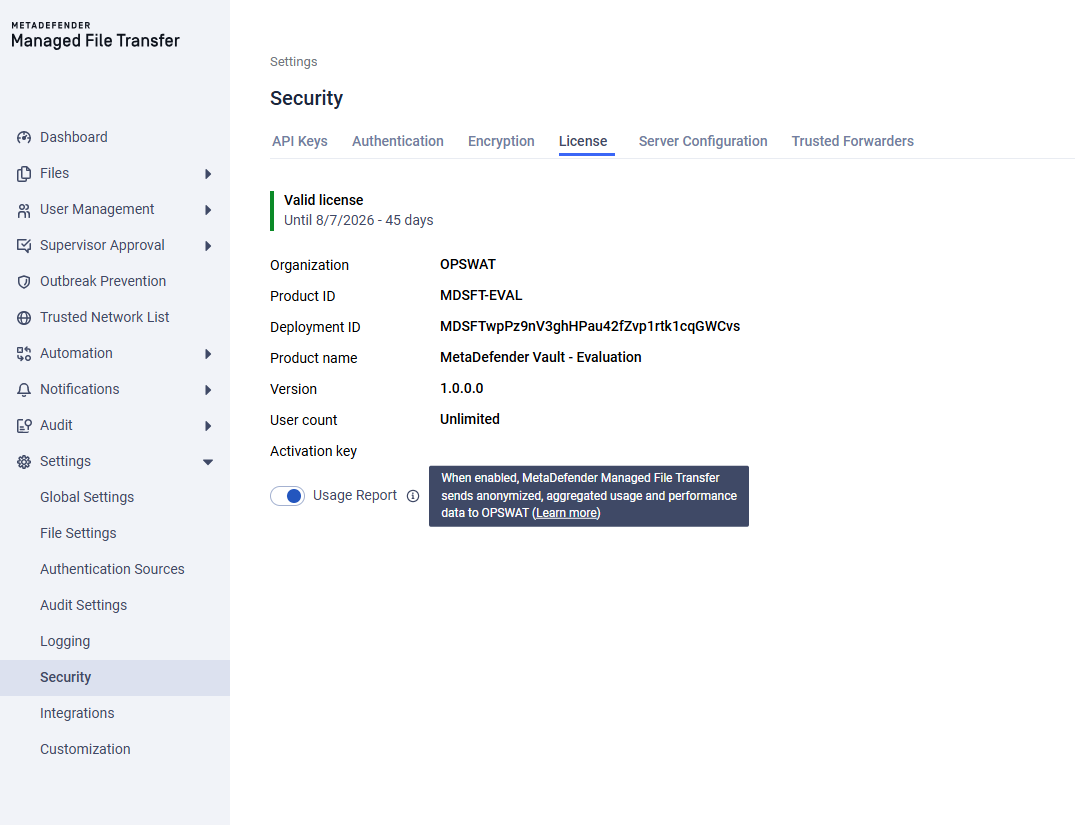
MetaDefender Managed File Transfer™ optionally reports anonymous aggregated data about general usage to help OPSWAT® improve its products. In the product, this is controlled by the Usage Report setting.
Participation in this program is optional. You may disable Usage Report at any time if you would prefer not to report any Aggregated Data.
What is Aggregated Data?
As defined in the OPSWAT Terms of Service, "Aggregated Data" means statistics, measures, and other information or data that is anonymous - that is, de-identified, aggregated, or otherwise rendered not reasonably identifiable to any person or entity.
Why is Aggregated Data collected?
Usage Report is used solely to help OPSWAT® improve its products, including product performance, reliability, and the features customers rely on most. Understanding how features are used in aggregate allows OPSWAT® to prioritize improvements and resolve issues faster. For full details, see the OPSWAT Terms of Service.
What is being collected?
OPSWAT® takes privacy and security seriously. Usage Report tracks general, anonymized usage information, which may include:
Product information: product name, edition, and version, and license validity period.
Deployment profile: high-availability configuration and node count, and aggregate storage usage.
Feature and configuration usage: which capabilities are enabled (e.g., CDR, DLP, single sign-on, multi-factor authentication, supervisor approval, Active Directory sync) and policy settings such as file retention period.
Activity volume: counts of files uploaded, downloaded, and scanned, total bytes transferred, transfer-job and automation-job executions, and aggregate user counts by type.
Security outcomes: number of threats detected, files sanitized, and data-loss-prevention policy matches.
Performance and reliability measures: file-processing throughput and duration, processing-queue rates, login and API request rates, and error/failure counts.
All reported data is anonymous and aggregated in accordance with the definition of "Aggregated Data" in the OPSWAT Terms of Service.
What about sensitive data?
Usage Report does not collect any information that could reasonably identify a person or entity, including but not limited to: credentials, file contents, scanned data, file paths, environment variables, or personally identifiable information.
How do I disable Usage Report?
The steps to disable Usage Report are specific to MetaDefender Managed File Transfer™. Follow the instructions below.
Go to Settings → Security.
Select the License tab.
Locate the Usage Report option.
Turn the toggle off.
Your preference is saved automatically. Once disabled, no aggregated usage or performance data is sent to OPSWAT®. You can re-enable it at any time by switching the toggle back on.
Changing this setting requires administrator privileges. If the Usage Report toggle is unavailable, contact your system administrator.