
Sometimes MetaDefender Managed File Transfer™ applications are deployed behind one or more load balancers or reverse proxies. These intermediaries frequently rewrite or replace source IP information, causing your application to see the proxy’s IP (e.g., an AWS ALB) instead of the true client IP. To correctly capture the original client IP — for auditing, security controls, rate limiting, logging, and compliance — your system must trust only the headers added by known trusted proxies.
When a proxy appends a header like:
X-Forwarded-For: <clientIP>, <proxy1>, <proxy2>
The left-most IP is the originating client IP. However, headers like X-Forwarded-For can be forged if not controlled or validated. To avoid trusting spoofed headers, your system should only trust headers from known proxies or load balancers — this is what the Trusted Forwarders configuration does.
Example
In this example the client's request is passed through ProxyA and ProxyB before it gets to MetaDefender® MFT.
Client → ProxyA → ProxyB → MFT
Each proxy appends its address to the X-Forwarded-For header. A request arrives with a header such as:
X-Forwarded-For: 203.0.113.17, 10.10.0.5, 10.20.1.9
203.0.113.17 — the real client IP
10.10.0.5 —
ProxyA10.20.1.9 —
ProxyB
In this case both ProxyA and ProxyB should be configured as Trusted Forwarder, so MetaDefender® MFT can parse the real client IP from the X-Forwarded-For header.
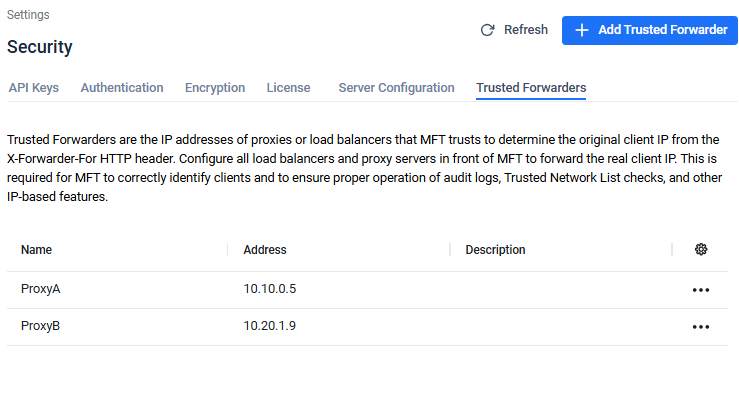
With this configuration MetaDefender® MFT will use the real client IP (203.0.113.17) for audit logging and for other IP related features.
Overview of the Trusted Forwarders Page
The Trusted Forwarders page enables an administrator to manage a list of trusted proxy IP addresses or CIDR ranges. These IPs will be used when generating the NGINX configuration for handling client IP headers.
From this page, administrators can:
Create a new trusted forwarder entry
Edit an existing trusted forwarder
Delete a trusted forwarder
Once saved, MetaDefender® MFT will use this list when generating the NGINX proxy_set_header and related configuration so that only traffic from these trusted IPs influences client IP resolution.
When to Use Trusted Forwarders
Use this feature in the following scenarios:
You are using MetaDefender® MFT in high availability setup, you can find more information here.
Your application is behind one or more load balancers (e.g., AWS ALB/NLB, GCP LB, F5)
You have a reverse proxy layer (NGINX, HAProxy, or CDN) in front of the application
Security Considerations
Do not add public or untrusted ranges (e.g., 0.0.0.0/0) as trusted — doing so defeats the purpose of trusting forwarders. Only include IPs/CIDRs for systems you control (e.g., load balancer nodes).
Only include IPs you control — adding untrusted ranges lets attackers spoof client IPs.
If you change your network topology (e.g., new load balancer pools), update the trusted forwarders list accordingly.
After updates, verify correct behavior by inspecting audit logs for expected client IP addresses.