KIOSK Hardened Image 25.06.0 | |
|---|---|
21 Jun 2025 | |
MD KIOSK version | 4.7.6. 3642 Release Notes |
MD Core version | 5.14.1 Release Notes |
Windows OS version | Windows 10 IoT Enterprise LTSC (21H2, Build 19044.5965) |
BIOS version |
|
What's new | |
Application and system updates | Updated applications and system components to the latest versions (Windows 10 IoT Enterprise LTSC (21H2, Build 19044.5965), MD Kiosk 4.7.6.3642, MD Core 5.14.1) to ensure optimal performance, security, and compatibility. Include Critical BIOS updates that address stability of 13th and 14th generation Intel processors in some models. |
New version of Deployment Tool | New version of Deployment Tool is required to deploy Kiosk Hardened Image 25.06.0. Refer to the full document for deployment instruction here |
Fixed issue with graphic driver | Fixed an issue where incorrect drivers caused graphic display problems on some devices. All required drivers are now properly installed. |
Fixed issue with outdated BIOS | Fixed an issue where the device BIOS was not automatically checked or triggered for update when outdated. |
Fixed OOBE reappearing after the setup was completed | Fixed an issue where Out-of-Box Experience (OOBE) screen reappeared after rebooting the device, even after the setup was completed. |
KIOSK Hardened Image 25.05.0 | |
|---|---|
30 May 2025 | |
MD KIOSK version | 4.7.6 Release Notes |
MD Core version | 5.14.1 Release Notes |
Windows OS version | Windows 10 IoT Enterprise LTSC (21H2, Build 19044.5854) |
What's new | |
Application and system updates | Updated applications and system components to the latest versions (Windows 10 IoT Enterprise LTSC (21H2, Build 19044.5854), MD Kiosk 4.7.6, MD Core 5.14.1) to ensure optimal performance, security, and compatibility. |
Support model Dell Pro 24 All-in-One Plus Desktop | Kiosk Hardened Image now supports a new model - Dell Pro 24 All-in-One Plus Desktop |
Enabling App & Browser Control to for security enhancement | App & Browser Control is now enabled by default in the Kiosk Hardened Image, enhancing protection against untrusted apps, files, and websites. |
Disabling handwriting feature | Handwriting feature is disabled to simplifies the user interface and removes unnecessary input options. |
Disabling WSearch | WSearch and its associated DCOM services are disabled to improve system stability |
KIOSK Hardened Image 25.04.0 | |
|---|---|
19 April 2025 | |
MD KIOSK version | 4.7.5 Release Notes |
MD Core version | 5.13.3 Release Notes |
Windows OS version | Windows 10 IoT Enterprise LTSC (21H2, Build 19044.5737) |
What's new | |
Application and system updates | Updated applications and system components to the latest versions (Windows 10 IoT Enterprise LTSC (21H2, Build 19044.5737)), MD Kiosk 4.7.5, MD Core 5.13.3) to ensure optimal performance, security, and compatibility. |
Improved Out-of-box Experience Initial Setup Wizard | The UX of Out-of-box Experience is redesigned to provide more intuitive, streamlined, and visually improved interface. The new user experience makes it easier and faster to get started. |
Enhanced Auto-Upgrade process for Kiosk Hardened Image | The auto-upgrade for Kiosk Hardened image has been improved for greater stability. This release also includes refined messages and visual enhancements for a better user experience. Certificates stored in .SSH folder will be fully backup. |
Kiosk Hardened Image upgrade supports in My OPSWAT | Kiosk Hardened Image upgrade options are now supported in My OPSWAT, allowing administrators to manage software updates more efficiently |
Included required dependency for SBOM engine | JDK dependency is included to ensure SBOM engine will deploys successfully without requiring any additional steps |
Improve USB detection time in Kiosk devices with floppy drive connected | Optimized USB detection performance in environments where floppy disk drive is present. |
KIOSK Hardened Image 25.03.0 | |
|---|---|
28 February 2025 | |
MD KIOSK version | 4.7.4 Release Notes |
MD Core version | 5.13.3 Release notes |
Windows OS version | Windows 10 IoT Enterprise LTSC (21H2, Build 10944.5608) |
What's new | |
Application and system updates | Updated applications and system components to the latest versions (Windows 10 IoT Enterprise LTSC (21H2, Build 10944.5608), MD Kiosk 4.7.4, MD Core 5.13.3) to ensure optimal performance, security, and compatibility. |
Updated BIOS version | Updated BIOS to the latest version. |
Include BIOS version information in description | BIOS version information is included in the Hardened Image description to enhance troubleshooting process. |
KIOSK Hardened Image 25.02.0 | |
|---|---|
28 February 2025 | |
MD KIOSK version | 4.7.4 Release Notes |
MD Core version | 5.13.2 Release notes |
Windows OS version | Windows 10 IoT Enterprise LTSC (21H2, Build 19044.5371) |
What's new | |
Application and system updates | Updated applications and system components to the latest versions (Windows 10 IoT Enterprise LTSC (21H2, Build 19044.5487), MD Kiosk 4.7.4, MD Core 5.13.2) to ensure optimal performance, security, and compatibility. |
Initial Setup Wizard | On the first startup, Kiosk automatically launches an initial setup wizard, allowing the administrator to create an account and activate the license |
Enhanced Auto-Upgrade for Kiosk Hardened Image | The auto-upgrade for Kiosk Hardened image has been improved for greater stability. This release also includes refined wording and visual enhancements for a better user experience. |
Disable camera on Kiosk K1001 | Camera is disabled on Kiosk K1001 by default |
KIOSK Hardened Image 25.01.1 | |
|---|---|
7 February 2025 | |
MD KIOSK version | 4.7.3 Release Notes |
MD Core version | 5.13.0 Release notes |
Windows OS version | Windows 10 IoT Enterprise LTSC (21H2, Build 19044.5371) |
What's new | |
System updates | Updated system components to the latest versions to ensure optimal performance, security, and compatibility. |
Backup and restore IP address of MD Core | Kiosk backups include and restore the configured IP address of MD Core |
KIOSK Hardened Image 25.01.0 | |
|---|---|
| |
MD KIOSK version | 4.7.3 Release Notes |
MD Core version | 5.13.0 Release notes |
Windows OS version | Windows 10 IoT Enterprise LTSC (21H2, Build 19044.5247) |
What's new | |
System updates | Updated system components to the latest versions to ensure optimal performance, security, and compatibility. |
Auto Upgrade Kiosk Hardened Image | With MetaDefender Kiosk 4.7.3 bundled in Kiosk Hardened Image 25.01.0, administrators can initiate the upgrade for Kiosk Hardened Image (25.01.0 or later) directly from Kiosk WebMC. The upgrade process backs up essential system and product configurations, automatically downloads the latest version of Kiosk Hardened Image, and performs the upgrade. In case of failure, Kiosk would automatically revert to the previous version to ensure continuity. |
Enable RDP (Remote Desktop Protocol) from Kiosk WebMC | Administrators can enable RDP (Remote Desktop Protocol) through Kiosk WebMC. Once enabled, Kiosk will modify the necessary services and settings. |

KIOSK Hardened Image 24.09.0 | |
|---|---|
30 September 2024 | |
MD KIOSK version | 4.7.1.9897 Release Notes |
MD Core version | 5.11.1 Release notes |
Windows OS version | Windows 10 IoT Enterprise LTSC (21H2, Build 19044.4894) |
What's new | |
System updates | Updated system components to the latest versions to ensure optimal performance, security, and compatibility. |
KIOSK Hardened Image 24.06.0 | |
|---|---|
27 June 2024 | |
MD KIOSK version | 4.6.8 Release Notes |
MD Core version | 5.10.0 Release notes |
Windows OS version | Windows 10 IoT Enterprise TLSC 21H2 (Build 19044.4529) |
What's new | |
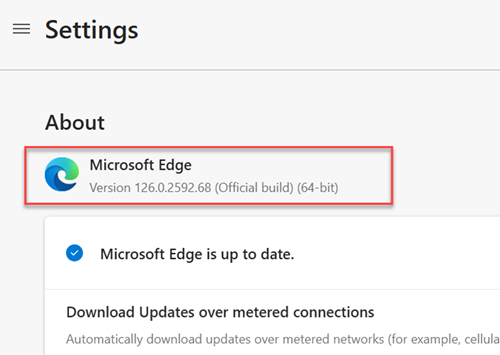
Update MS Edge Application | In the new hardened image, only the MS Edge browser is included, and it has been updated to the latest version. |
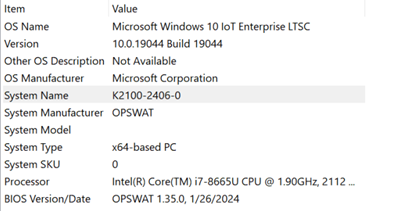
Hostname Naming Convention | The hardened image version information will be included in the hostname of the hardened image. This will help customers easily identify the version of the hardened image deployed on the KIOSK machine. The format is:
|
Enhanced Hardening for KIOSK | In this version, additional hardening measures have been applied to enhance the security of the KIOSK device. |