
MetaDefender Kiosk 4.7.8 | |
|---|---|
28 July 2025 (Kiosk 4.7.8.4064) | |
New Features | |
Support custom script during the OOBE auto-deployment [Kiosk Hardened Image 25.07.1] | Out-of-Box Experience (OOBE) auto-deployment now supports running a custom script during the auto setup process. If a script is defined in the OOBE initialization file, the Kiosk will automatically trigger and execute the script during the deployment process. This allows additional customization and automation as part of the Out-of-Box Experience. |
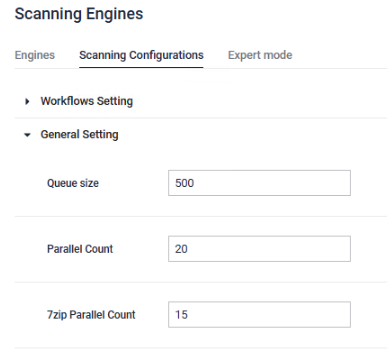
Configure Core tunning via Kiosk Console | Kiosk now supports applying MetaDefender Core tuning configurations directly from the Kiosk console. This includes settings of parallel scan counts and queue size, allowing easier performance optimization without needing direct access to Core.
|
Enhancements | |
Enhanced Auto-Upgrade process for Kiosk Hardened Image - Excluded engines, Host name [Kiosk Hardened Image 25.07.1] | The auto-upgrade for Kiosk Hardened image has been improved for greater stability.
|
Hostname as device naming in Central Management | Kiosk now registers with Central Management (CM10) using its hostname as the device Name, instead of the Deployment ID. This change enhances clarity for users managing multiple Kiosk devices in CM. |
Kiosk reports associated Core Deployment ID to Central Management | Kiosk now sends the Deployment ID of the connected MetaDefender Core to Central Management (CM) during enrollment. This enables accurate device correlation and seamless access to scan reports from CM. |
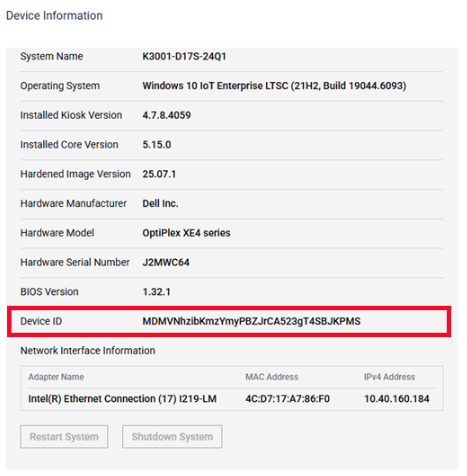
Device ID now shown on About Page | The Kiosk Device ID (Deployment ID) is now displayed on the About page, making it easier to identify the device. Especially when managing multiple Kiosks through Central Management
|
Bugs | |
VMDK files failed to mount due to missing drivers (Kiosk 4.7.4 or newer) | Fixed an issue in Kiosk 4.7.4 or newer where VMDK files could not be process due to required drivers are not being included during the Kiosk installation. |
Known issues | |
Black screen on domain login without local Admin rights | When the Kiosk is joined to a domain, logging in with an AD user account that is not a member of the local Administrators group will result in a black screen after login. Ensure that any domain account intended to log in and operate the Kiosk is added to the local Administrators group on the Kiosk device. |
MetaDefender KIOSK Documentation
The users can consult this web page or, alternatively, they can download the manual in pdf format from the link below:
MetaDefender KIOSK manual (SHA256: 404339BCE0F3E4C5EFA52F55903C8C617C0F9630D01E2020EC09EA6CDC1304C7).
OPSWAT MetaDefender AGD Documentation_v1.6 (SHA256: 78A69F89D3C0D0FCA8A4B8D30B2C92E55D80CC559583F23AC61158F67CE04988).