
How to Use a RAMDISK for the tempdirectory?
This article applies to all MetaDefender Core V4 and V5 releases deployed on Windows systems.
In order to improve the file scan speed, a custom tempdirectory can be set for Metadefender Core.
Instructions for Windows
Step 1:
Create a RAMDISK on your system.
We recommend the following tool for this: http://www.ltr-data.se/opencode.html/#ImDisk
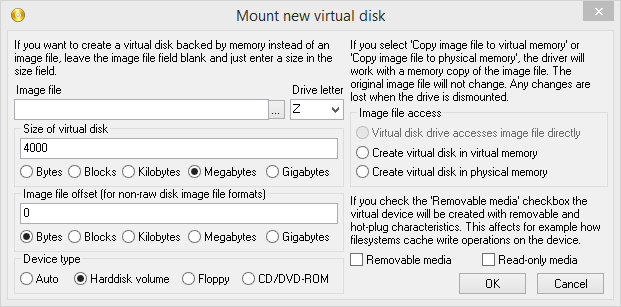
After installation, use the ImDisk Virtual Disk Driver application, to create a new RAMDISK.
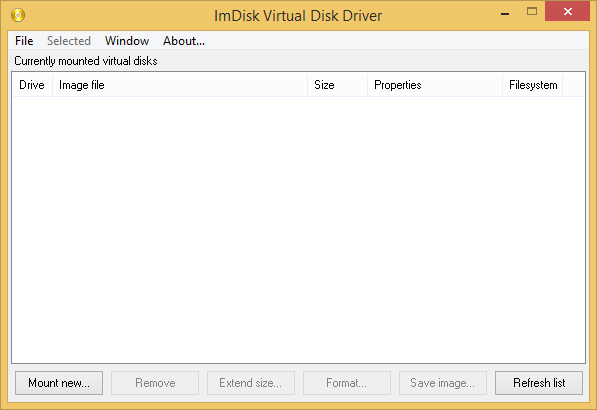
Mount new virtual disk:
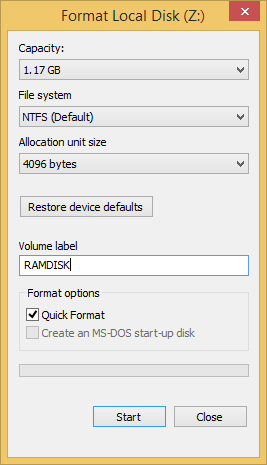
After disk creation, windows will ask you to format the new disk.
Step 2:
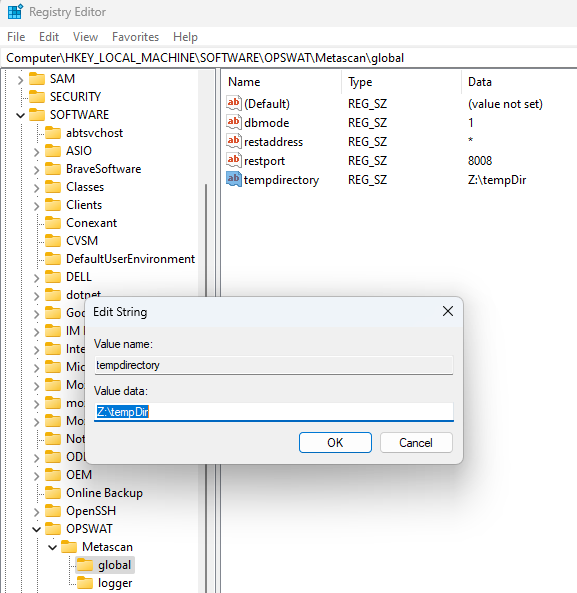
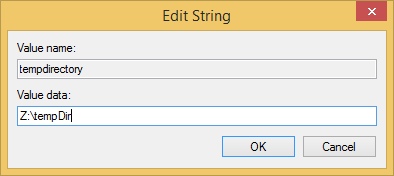
Create, or edit the following registry entry:
HKEY_LOCAL_MACHINE\SOFTWARE\OPSWAT\Metascan\global\tempdirectory
where tempdirectory should be a string value with a desired location, for example: Z:\tempDir
The recommended minimum size for the tempdirectory is at least 10GB, and also:
For non archive files: the average file size * 40
For archive files: the average archive size * 200
Step 3:
The changes to take effect restart the ometascan service.
After the service restart, your custom directory will be used for temporary file storage during file scan.
If Further Assistance is required, please proceed to create a support case or chat with our support engineer.