
This article captures the minimum firewall rules required when PI traffic traverses an OPSWAT NetWall for either Pi Replication & Pi-to-Pi Transfer
If you change the configurable Config port on either side, update your rules accordingly.
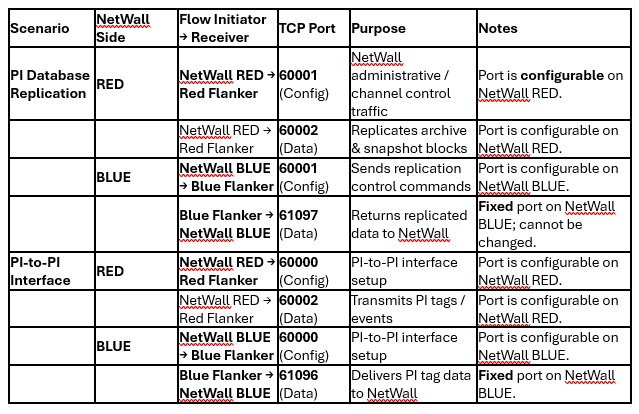
Additional PI Server Rule
Both Red and Blue Flankers connect to their respective on-prem PI Data Archive servers on TCP 5450 (OSIsoft default). Make sure this path is already allowed; see OSIsoft port matrix for other optional endpoints.
Rule-Creation Checklist
Outbound from NetWall RED
Allow TCP 60001 and 60002 to the Red Flanker IP.
Outbound from NetWall BLUE
Allow TCP 60001 (replication) or 60000 (PI-to-PI) to the Blue Flanker IP.
Inbound to NetWall BLUE
Allow TCP 61097 (replication) or 61096 (PI-to-PI) from the Blue Flanker IP to NetWall BLUE.
This is the only rule in which the Flanker initiates the session.
Confirm PI Server Access
Permit each Flanker to reach its local PI Data Archive on TCP 5450 (and any other PI services you use).
If Further Assistance is required, please proceed to log a support case or chatting with our support engineer.