Configuration and Management
4.4.2
Search this version
Configuration and Management
Title
Message
Create new category
What is the title of your new category?
Edit page index title
What is the title of the page index?
Edit category
What is the new title of your category?
Edit link
What is the new title and URL of your link?
File scanned RabbitMQ notifications
Copy Markdown
Open in ChatGPT
Open in Claude
Overview
File Scanned RabbitMQ notifications allow you to receive real-time alerts whenever a file has been scanned by MetaDefender Storage Security. This feature is useful if you need to:
- Enable cross-MDSS instance scanning where one MDSS instance publishes scan results and another automatically rescans the file
Setup
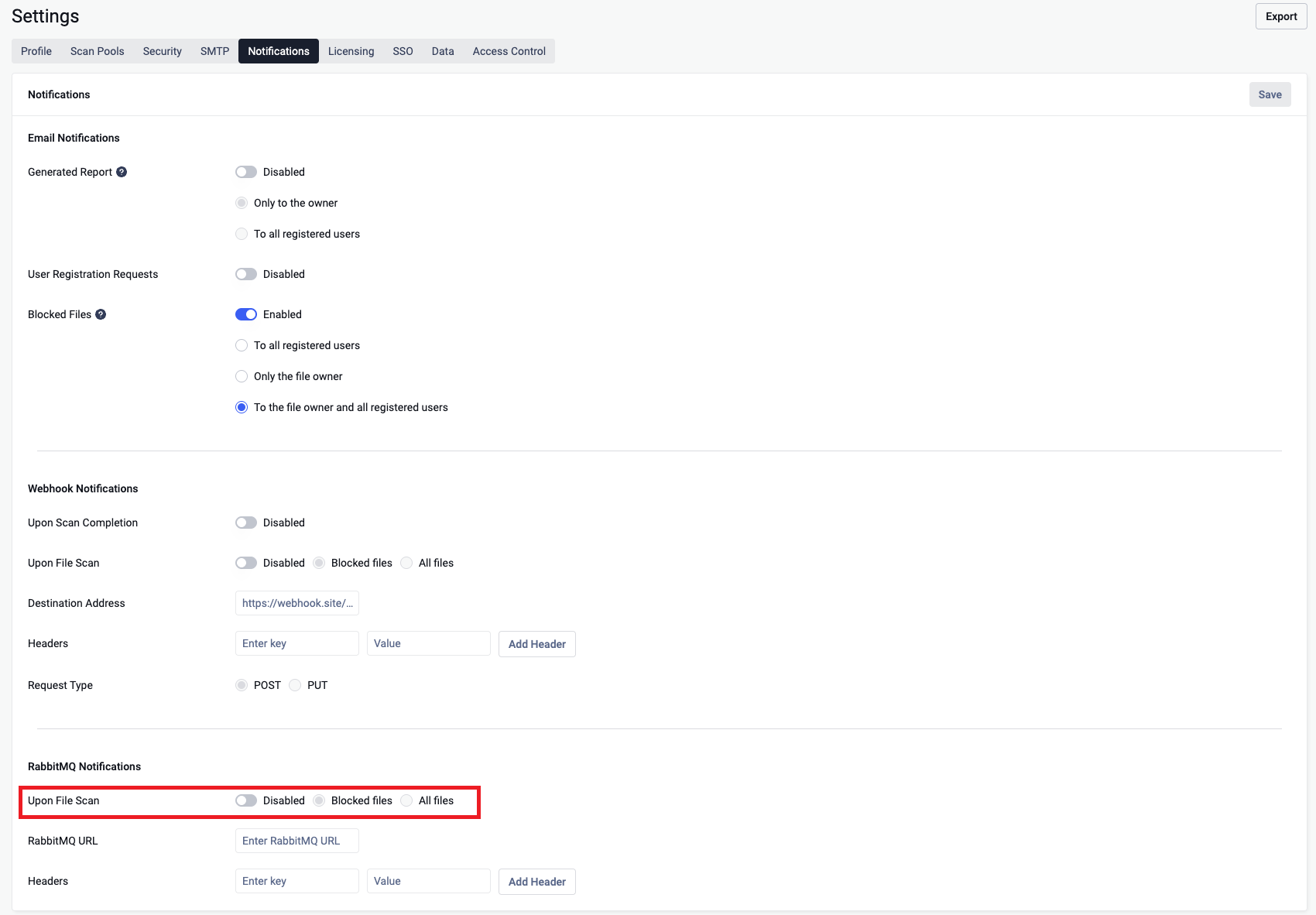
- Go to Settings > Notifications in the MetaDefender Storage Security console.
- Select Send a RabbitMQ notification when a file is scanned under the RabbitMQ Notifications section
- Choose whether you want to receive notifications for all scanned files or only blocked files.
- Enter the RabbitMQ URL (your endpoint).
- (Optional) Add any custom headers.
- Save the configuration.

Configuration Details
RabbitMQ URL – The URL of the receiving system (ex: amqp://username:passowrd@localhost:27049).
Headers – Optional key-value pairs (e.g.,
StorageClientId: string; ScanId: string).- StorageClientId - destination storage client Id
- ScanId - destination scanId
Notification scope – Choose between:
- All scanned files → You will receive a notification for every file scanned.
- Blocked only → You will only receive notifications when a file is marked as blocked in MetaDefender Storage Security (see File Definition)
RabbitMQ Payload
When triggered, the RabbitMQ sends a JSON request body to your configured endpoint.
RabbitMq payload
MetadataToBuild
{ "isPublicWebhook": false, "metadata": { "serializedEventMetadata": "" }, "metadataToBuild": { "serializedEventMetadata": "{\"FileId\":\"019a0b68-1c71-7b7b-ac39-8357658c3220\",\"FileName\":\"text1.txt\",\"FilePath\":\"folder1/text1.txt\",\"FileStatus\":\"Allowed\",\"CoreScanResult\":\"No Threat Detected\",\"FileState\":\"Available\",\"RemediationResult\":[],\"ScanCompletedTimeStamp\":\"2025-10-22T10:12:49.647929Z\",\"WorkflowName\":\"Default Workflow\",\"Rules\":[\"MetaDefender Storage Security\"],\"ExceptionDetails\":\"System.ObjectDisposedException: The CancellationTokenSource has been disposed.\\r\\n at System.Threading.CancellationTokenSource.get_Token()\\r\\n at opswat.mdcs.scanning.service.ScanningService.HandleScanResults(IPipeline`2 getScanResultsQueryPipeline, IMediator mediator, ObjectReadyForScanEvent message, ScanningData scanningData, CancellationTokenSource cts, InitiateScanCommandResponse initiateScanCommandResponse) in C:\\\\Projects\\\\md-cloud-services\\\\Backend\\\\src\\\\opswat.mdcs.scanning.service\\\\Services\\\\Classes\\\\ScanningService.cs:line 427\\r\\n at opswat.mdcs.scanning.service.ScanningService.ObjectReadyForScanEventHandler(ObjectReadyForScanEvent message, CancellationToken cancellationToken) in C:\\\\Projects\\\\md-cloud-services\\\\Backend\\\\src\\\\opswat.mdcs.scanning.service\\\\Services\\\\Classes\\\\ScanningService.cs:line 357\",\"RemediationErrors\":[],\"WebhookNotificationType\":\"FileScanned\"}" }, "scanId": "01985f77-2bf6-7895-bf6f-ceced4c95a87", "storageClientId": "01985f77-2b01-764a-bc6e-6cc3e38f3761"}Field Reference
| Field | Type | Example Value | Description |
|---|---|---|---|
ScanId | string (UUID) | 01985f77-2b01-764a-bc6e-6cc3e38f3761 | Unique identifier of the destination scan. |
StorageClientId | string | 01985f77-2b01-764a-bc6e-6cc3e38f3761 | Unique identifier of the destination storage client. |
IsPublicWebhook | bool | false | Used only for webhook |
Metadata | WebHookMetadataRtp | "" | Empty for RabbitMQ notification |
MetadataToBuild | WebHookMetadataRtp | Serialized FileScannedNotificationDetails | Populated with FileScannedNotificationDetails |
Delivery Behavior
- Cross-MDSS Instance Scanning: When MDSS Instance A completes a scan and publishes to RabbitMQ, Instance B consumes the notification and automatically triggers an Event-Based RTP scan for the same file.
- Delivery is best-effort → if the destination is invalid, the request is logged in the Audit page, but no retries are performed.
Security Considerations
- The RabbitMQ URL is stored encrypted
Troubleshooting
- No RabbitMQ message received → Verify the endpoint URL and headers you configured.
- Audit shows delivery failed → Endpoint is invalid. Fix and test again.
Type to search, ESC to discard
Last updated on
Was this page helpful?
Next to read:
External Loggers Configurationnull
Discard Changes
Do you want to discard your current changes and overwrite with the template?
Archive Synced Block
Message
Create new Template
What is this template's title?
Delete Template
Message