Configuration and Management
4.2.0
Search this version
Configuration and Management
Title
Message
Create new category
What is the title of your new category?
Edit page index title
What is the title of the page index?
Edit category
What is the new title of your category?
Edit link
What is the new title and URL of your link?
Single Sign On
Copy Markdown
Open in ChatGPT
Open in Claude
In order to configure Single Sign On:
- Navigate to Settings -> Single Sign On
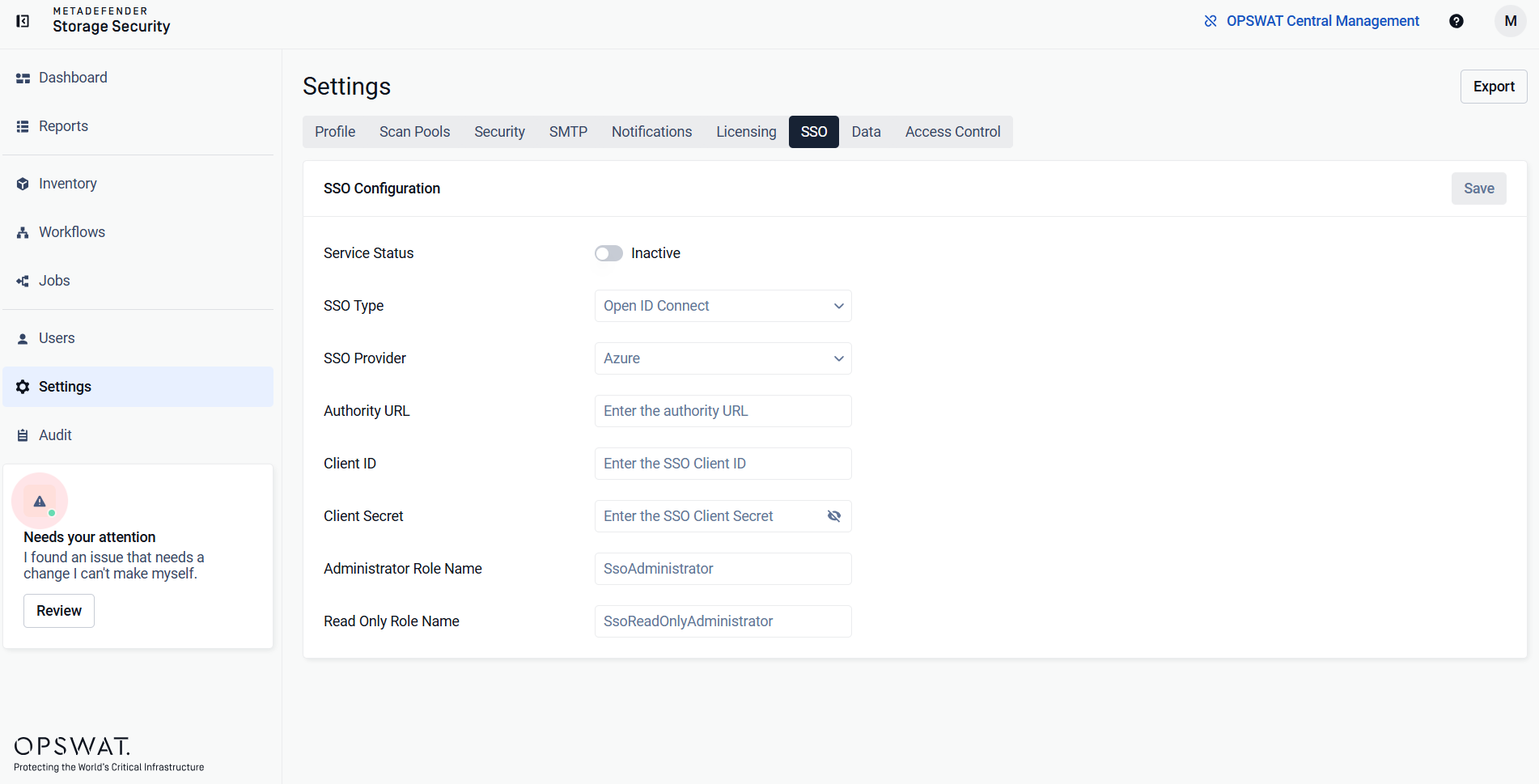
- Enable the Single Sign On toggle
- Select the desired Single Sign On Provider
- Select the desired Single Sign On Type
- Enter the Client ID
- Enter the Client Secret
- Enter the Authority URL
For the purpose of secure authentication, when configuring any SSO provider, either HTTPS need to be enabled for MDSS, or the web interface needs to be accessed through localhost instead of the deployment machine's IP.
Type to search, ESC to discard
Last updated on
Was this page helpful?
Next to read:
AD FS Specific ConfigurationDiscard Changes
Do you want to discard your current changes and overwrite with the template?
Archive Synced Block
Message
Create new Template
What is this template's title?
Delete Template
Message
