Automatic Empty Folder Deletion After Remediation
The Delete Empty Folders feature automatically removes directories that become empty following remediation actions. This feature helps maintain a clean and organized file system by eliminating unnecessary empty folders.
NFS, SMB and SFTP
Deletion Behavior
Empty folder deletion occurs after a scan completes and then every 10 minutes.
A folder will NOT be deleted if it contains any files or folders after the remediation.
A folder will NOT be deleted if it was empty before the remediation.
Configuring Empty Folder Deletion
The node is disabled if there is no prior remediation configured with Move/Delete. If Delete Empty Folders is enabled, and there is only one remediation configured with Move/Delete, that remediation cannot be changed to Keep/Copy.
Navigate to Workflows from the left-side navigation menu
Select the workflow for which you want to configure empty folder deletion
Click the Other remediations node
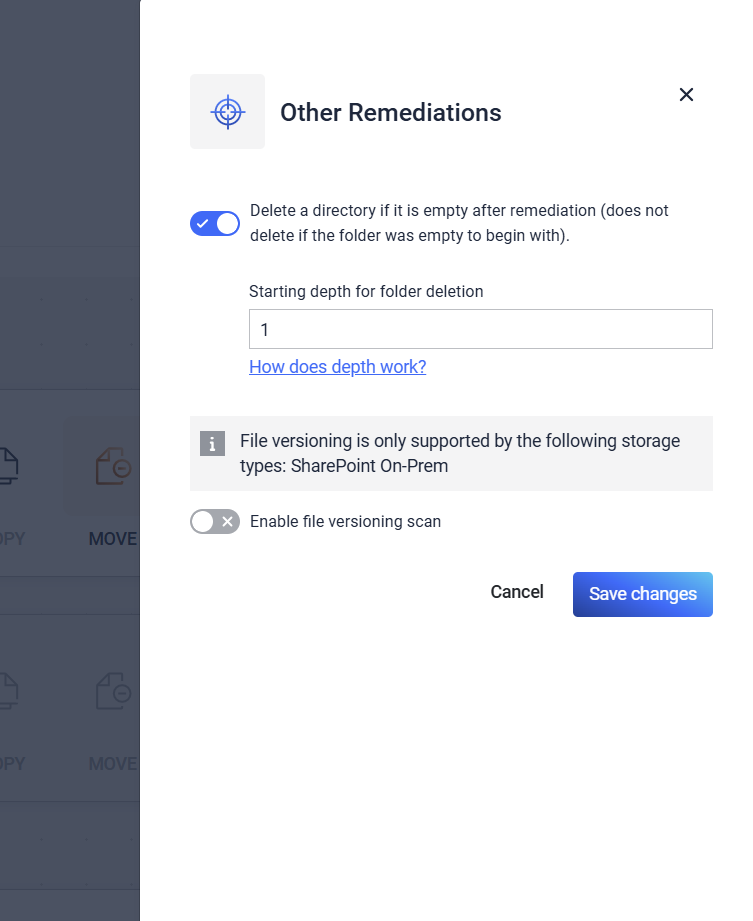
In the modal window opened, toggle the "Delete a directory if it is empty after remediation" option
Enable the option: Delete a directory if it is empty after remediation - this does not delete if the folder was empty to begin with.
Depth Parameter
The depth parameter is used to determine where deletion of empty folders starts. It is a value in the range 1-10000
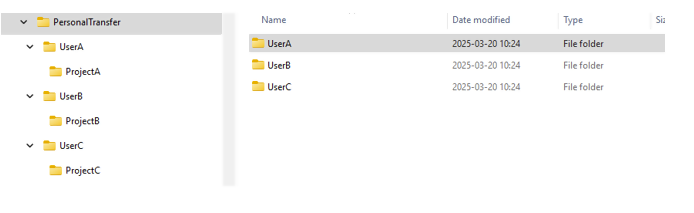
For example in the picture below we have a folder structure. Let's say that there is an nfs storage that has the sharePath PersonalTransfer.
Default - Depth = 1 -> PersonalTransfer Folder (which is also root) is kept, the rest of the empty folders are deleted
Depth = 2 -> UserA, UserB and UserC are kept, the rest of the empty folders are deleted
Depth = 3 -> UserA, UserB, UserC, ProjectA, ProjectB and ProjectC are kept, the rest of the empty folders are deleted