
Can I Disable the Welcome Screen in MetaDefender Kiosk?
This article applies to MetaDefender Kiosk version 4.8.0 and later.
Overview
Starting from version 4.8.0, MetaDefender Kiosk introduces a configuration option that allows administrators to disable the Welcome Screen.
This helps streamline the user experience by skipping the initial screen and taking users directly to the media detection prompt.
Why Disable the Welcome Screen?
Disabling the Welcome Screen can be useful in environments where:
Users are already familiar with the workflow
Faster interaction is required (e.g., high-traffic kiosks)
The initial instructions are not necessary
How to Disable the Welcome Screen
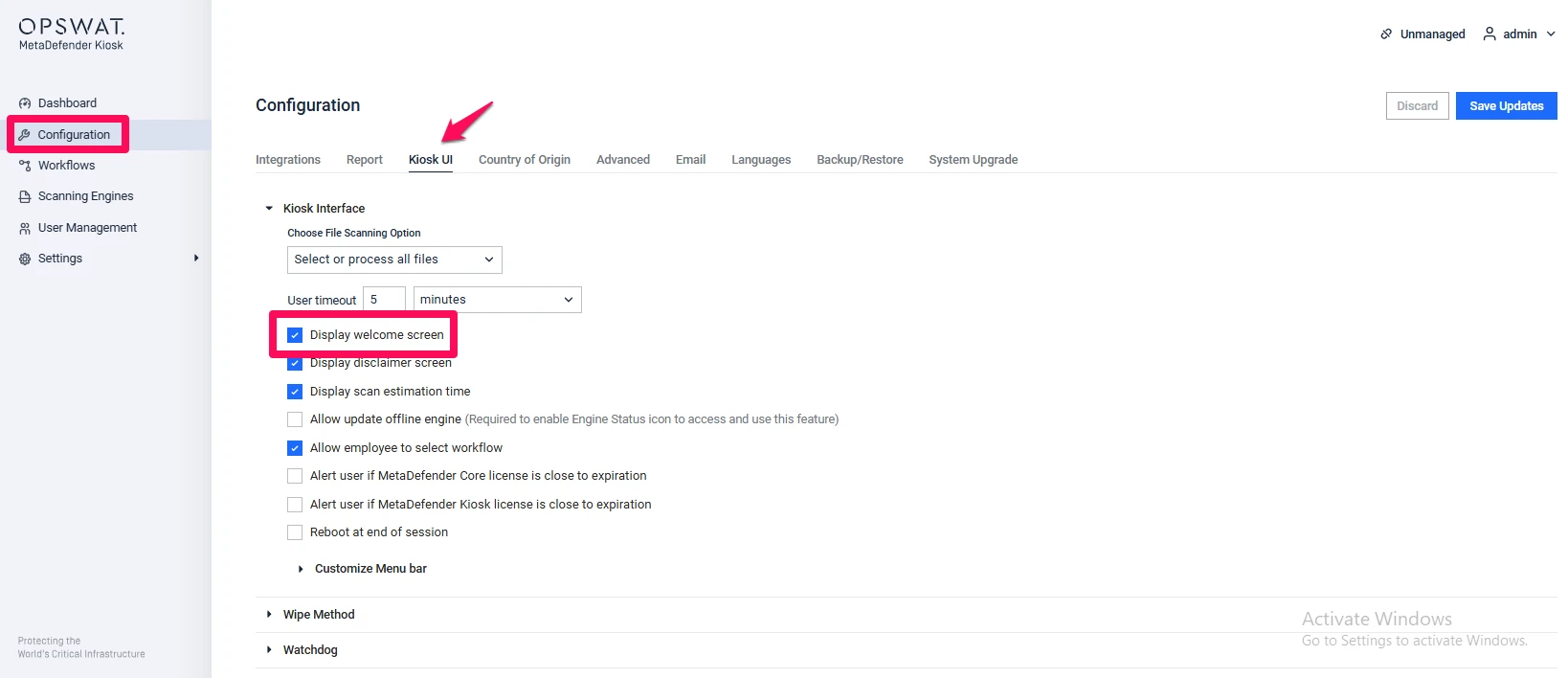
Go to the Configuration tab (left sidebar)
Navigate to the Kiosk UI tab
Locate the Kiosk Interface section
Untick the option for displaying the Welcome Screen
Behavior After Disabling
Once disabled:
The Welcome Screen will no longer appear
Users will be taken directly to the media detection prompt
The scanning workflow becomes faster and more streamlined
If Further Assistance is required, please proceed to create a support case or chat with our support engineer.