
This article applies to all MetaDefender Kiosk Hardened/Secure Image releases deployed on Windows systems.
There are a few ways to check the version of an “install.wim” image, without having to deploy the image on a Kiosk hardware:
Solution 1:
Calculating the hash of the “install.wim” image and comparing it to the published hash on My OPSWAT
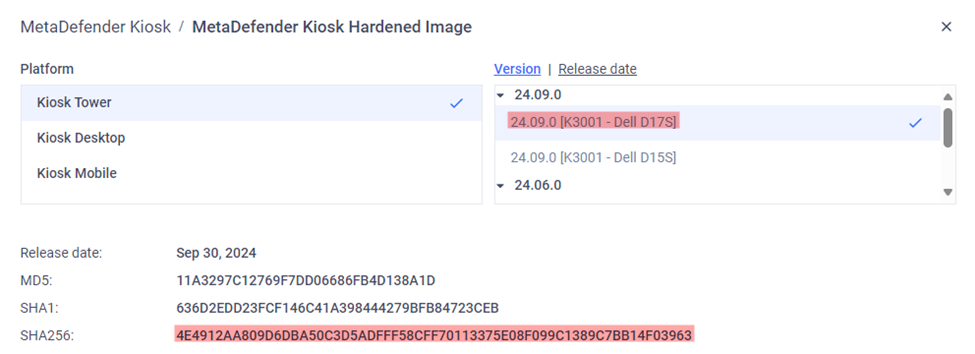
In this example, the hash of “install.wim” matches the hash for Kiosk Hardened Image 24.09 K3001.
Solution 2: For Secure Image only
Run the Get-WimInfo command to check the description of an “install.wim” image:
Solution 3: For Hardened Image 24.06.0 and later
Mount the “install.wim” image and check its registry directly.
You can mount the image by using DISM GUI.
Alternatively, mount the image with the following commands:
Replace <path_to_wim_file> with the path to your .wim file, <index_number> with the index of the image you want to mount (e.g., 1 for "Windows 10 Kiosk Image"), and <mount_directory> with the directory where you want to mount the image.
Inspect the registry:
Open the registry editor.
Load the registry hive from the mounted image:
Select HKEY_LOCAL_MACHINE.
Go to File > Load Hive.
Navigate to the mounted directory and open Windows\System32\Config\SYSTEM.
Give it a temporary name (e.g., MountedSystem).
Find the hostname:
Navigate to HKEY_LOCAL_MACHINE\MountedSystem\ControlSet001\Services\Tcpip\Parameters.
Look for the Hostname and NV Hostname values.
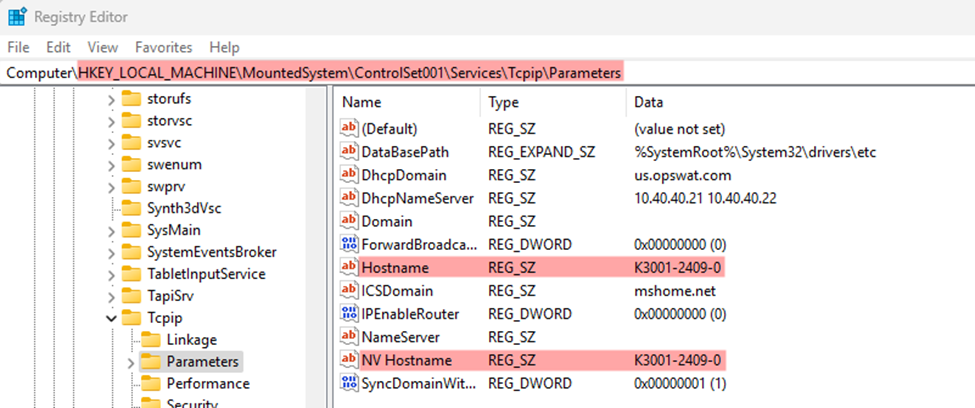
In this example, the hostname of this “install.wim” is K3001-2409-0, so that is its Hardened Image version.
Unload the registry hive:
Select the loaded hive (e.g., MountedSystem).
Go to File > Unload Hive.
After this, unmount the “install.wim” image:
Unmount from the DISM GUI (if you mounted it using this method).
Or, with the following command:
If you have followed the instructions above but are still unable determine the version of the “install.wim” image for Kiosk Hardened/Secure Image, please follow these instructions on How To Create a Support Package, before creating a support case or chatting with our support engineer.