
Solution
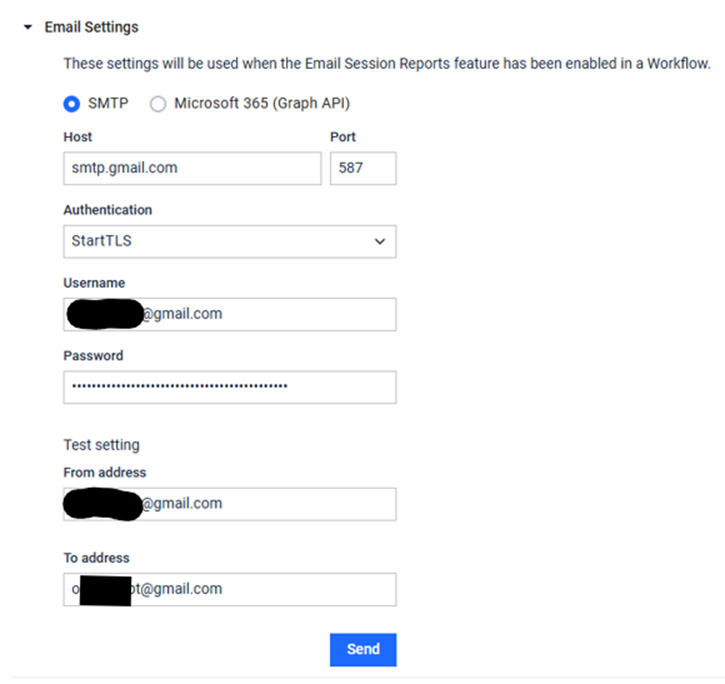
To be able to send notification to your Gmail mailbox from MetaDefender Kiosk, the following fields should be configured properly:
Email settings: SMTP
Host: smtp.gmail.com
Port: 587
Authentication: StartTLS
Username: username of the Gmail mailbox which will be used as a sender.
Password: App password created for Gmail mailbox provided under “Username” field.
From address: Need to provide the same email address
In order to achieve that, the following configuration should be done on Gmail mailbox account:
Create App password for Gmail account
Under "Signing in to Google":
Enable 2-Step Verification
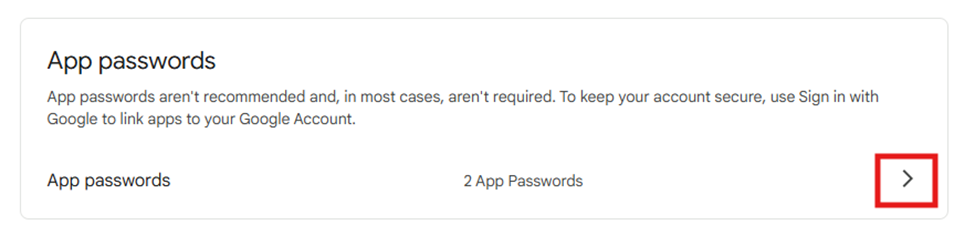
Scroll down to section “App passwords” and click arrow in front of “App passwords”
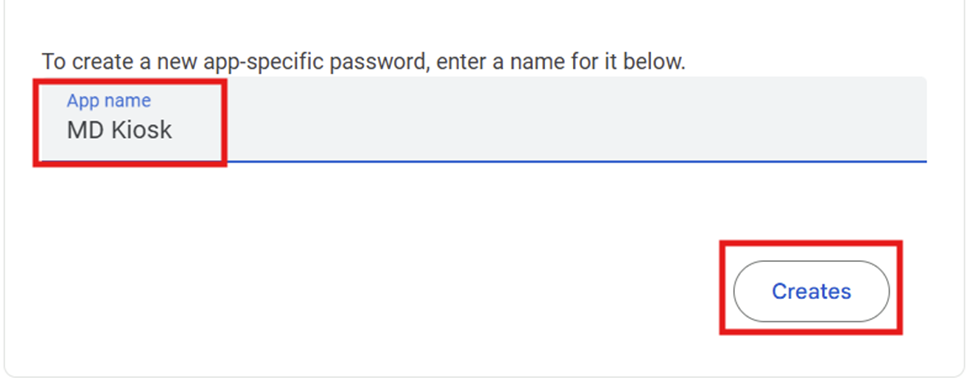
In the new page opened, write a name for your App password and click "Creates"
Save the App password generated and click “Finished”. Further we will use the App password generated as password for mailbox used for MetaDefender Core configuration as mentioned above and as in below example.
Example:
IMPORTANT: For field “Password” use App password created under Gmail account and not use the password which you use to login on Gmail mailbox.
If Further Assistance is required, please proceed to log a support case or chatting with our support engineer.