Deep CDR
v5.16.0
Search this version
Deep CDR
Deep CDR
Title
Message
Create new category
What is the title of your new category?
Edit page index title
What is the title of the page index?
Edit category
What is the new title of your category?
Edit link
What is the new title and URL of your link?
Base64-encoded data in JSON
Copy Markdown
Open in ChatGPT
Open in Claude
JSON data can contain base64-encoded data within certain attributes. For example:
Json
{ "user": { "id": "12345", "name": "John Doe", "profilePicture": "data:image/png;base64,iVBORw0KGgoAAAAN...", "photos": [ { "id": "photo1", "description": "A scenic view", "image": "data:image/jpeg;base64,/9j/4AAQSkZJRgABAQEAYAB..." }, { "id": "photo2", "description": "A portrait", "image": "data:image/jpeg;base64,/9j/4AAQSkZJRgABAQ..." } ] }, "metadata": { "timestamp": "2024-12-24T12:00:00Z", "source": "Generated Example" }, "data": { "image1": "R0lGODlhAQABAIAAAISwxwAAACwAAAAAAQABAAACAkQBADs=", "image2": "iVBORw0KGgoAAAANSUhEUgAAABAAAAAQAgMAAABinRfyAA...", "images": [ "/9j/4AAQSkZJRgABAQEAeAB4AAD/4QAiRXhpZgAATU0AKg...", "iVBORw0KGgoAAAANSUhEUgAAABAA..." ] }}Deep CDR can be configured to perform an in-depth inspection of such data by:
- Decoding base64-encoded content.
- Recursively sanitizing the extracted data.
- Re-encoding the sanitized data in base64.
- Reinserting the processed data back into the JSON structure.
Configuration
This feature can be enabled at Workflow Management> Workflows > [Workflow name] > Deep CDR > Advanced configuration > File type handling > Others > JSON > Process Base64 encoded data.
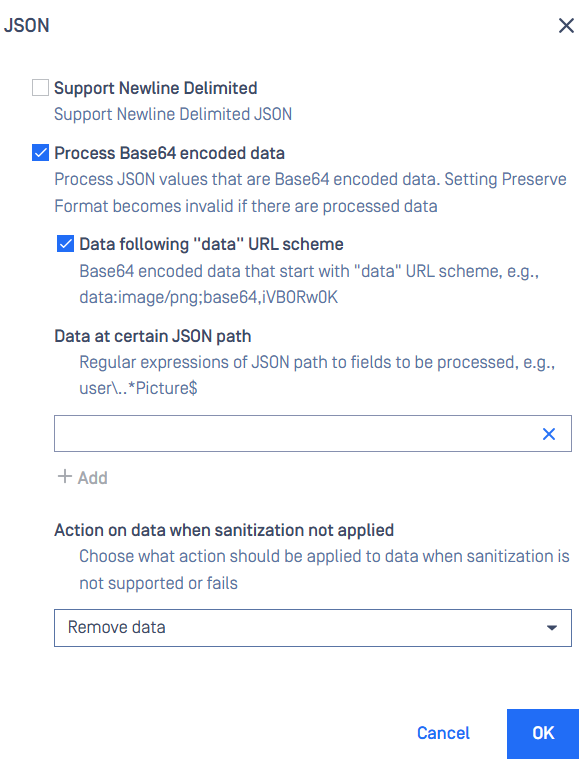
- Data following "data" URL scheme: Base64 encoded data that start with "data" URL scheme, e.g., data:image/png;base64,iVBORw0K.
- Data at certain JSON path: Regular expressions of JSON path to fields to be processed, e.g., user..*Picture$.
- Action on data when sanitization not applied: Choose what action should be applied to data when sanitization is not supported or fails
Regular expression examples
Below are some examples on regular expressions and corresponding JSON nodes from an example JSON that match with the expressions.
JSON
{ "data": { "image1": "R0lGODlhAQABAIAAAISwxwAAACwAAAAAAQABAAACAkQBADs=", "image2": "iVBORw0KGgoAAAANSUhEUgAAABAAAAAQAgMAAABinRfyAA...", "images": [ "/9j/4AAQSkZJRgABAQEAeAB4AAD/4QAiRXhpZgAATU0AKg...", "iVBORw0KGgoAAAANSUhEUgAAABAA..." ] }}| Expression | JSON node at path that matches |
|---|---|
| data\.image1 | data.image1 |
| data\.images\.0 | data.images[0] |
| data\.images\..* | data.images[0], data.images[1] |
| data\.image.* | data.image1, data.image2, data.images[0], data.images[1] |
Node: item index in a JSON array starts from 0.
Type to search, ESC to discard
Last updated on
Was this page helpful?
Next to read:
Remove invisible characters in TXTDiscard Changes
Do you want to discard your current changes and overwrite with the template?
Archive Synced Block
Message
Create new Template
What is this template's title?
Delete Template
Message
