
Check your version:
This article applies to MetaDefender Core and is applicable to all MetaDefender Core V5 releases deployed on Windows and Linux systems.
During product activation through the MyOPSWAT Portal, the number of agents requested may be set higher than intended. To ensure that only a single license slot is utilized per MetaDefender Core deployment, the Requested Number Of Agents field should be set to 1 (default).
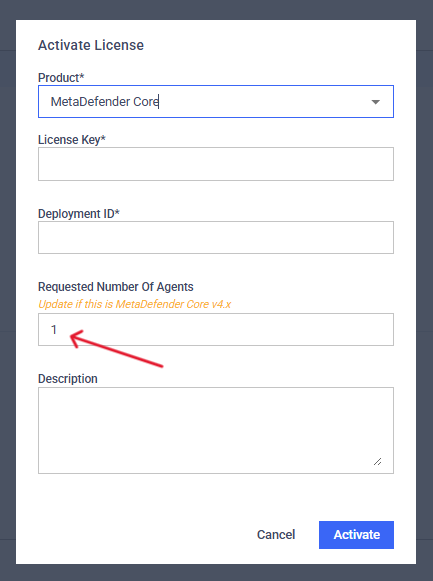
Ensure the Number of Agents is set to 1 unless using Core v4.x deployments.
If a higher number is selected, multiple license slots may be allocated to a single deployment, even if only one instance is in use. The only exception to this is MetaDefender Core deployments running version v4.x, where multiple agents may be required depending on the configuration.
If you notice that more product license slots are being consumed than expected, please reach out to OPSWAT Customer Support. Our team can review your activation and adjust the license allocation on our end to ensure it accurately reflects your deployment.
Support:
If you have questions, concerns or issues regarding MetaDefender Core, please open a Support Case with the OPSWAT team via phone, online chat or form, or feel free to ask the community on our OPSWAT Expert Forum.