
This article applies to all MetaDefender ICAP Server releases deployed on Windows and Linux systems.
According to the MetaDefender ICAP Server documentation, integrating Squid with ICAP using versions 5.5 through 6.11 may result in a known bug that affects the user experience during file downloads via the RESPMOD request. This issue has been resolved in Squid version 7 and later, and currently Squid doesn’t have a pre-compiled installation package for this version.
You can also use Squid 4.13 or 6.13 to avoid having this bug.
1. Installing prerequisite packages to compile
From Squid 6, you will need any compiler that is C++17-compiliant. These should be available on latest unix and linux distributions. (Read more at Squid Official Guide).
2. Download latest Squid v7 release
squid : Optimising Web Delivery
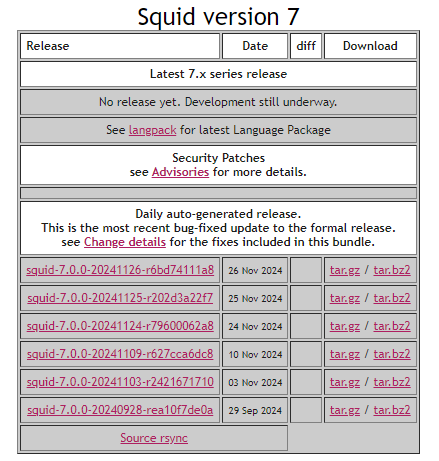
After downloading the archive, extract the contents of the tar file and navigate into the extracted directory.
Configure Squid options
You must have “--enable-ssl --enable-security-file-certgen --with-openssl" options if you wish to use ICAPS (ICAP Secured with TLS).
Explanation of Key Options
--prefix,--localstatedir,--sysconfdir: Define installation paths for Squid binaries, configuration files, logs, and runtime data.--with-default-user=proxy: Runs Squid under theproxyuser for better security isolation.--enable-icap-client: Enables ICAP protocol support for content adaptation.--enable-ssl,--with-openssl: Adds SSL/TLS support, required for HTTPS and ICAPS.--enable-security-file-certgen: Enables on-the-fly certificate generation for SSL bumping.--enable-http-violations: Allows flexibility in HTTP protocol behavior, useful for advanced proxy configurations.--enable-linux-netfilter: Enables Netfilter (iptables) integration for transparent proxying.
Output Paths
Once configured and built with the options above:
Configuration files will be located at:
/etc/squid/squid.confLog files will be available at:
/var/log/squid
3. Compile & Install Squid
To compile Squid, run the below command:
After the compilation has finished, run the below command to install Squid into your system:
4. Verify Squid installation
You can verify Squid has been installed successfully by using squid -v command

If Further Assistance is required, please proceed to log a support case or chatting with our support engineer.