Prerequisites
This documentation is based on Check Point Security Gateway R81 and is the minimum configuration required to integrate Check Point and MetaDefender ICAP Server. For more information, please contact Check Point Support.
Check Point Security Gateway R81 and above
MetaDefender ICAP Server v5.x (or later) is installed and license is activated
For installation and configuration quick guidelines see:
Quick Start with MetaDefender ICAP Server
Installing or Upgrading MetaDefender ICAP Server
4.MetaDefender ICAP Server must have a valid license to function correctly. For license configuration details see MetaDefender ICAP Server Licensing
MetaDefender Core is installed and license is activated
Command line access to Check Point Security Gateway - Expert Mode. Please refer to the Check Point documentation for details on how to access the command line.
Integration Steps
Access the command line in Expert mode
Review and agree to the ICAP user-disclaimer
Backup the default ICAP configuration file
Configure the ICAP Client parameters in the configuration file
Save the configuration
Sample ICAP Client configuration file
The sample configuration provided below is for reference only and must be modified according to the network environment and ICAP funcitonality . The configuration will enable REQMOD with GET, PUT and POST methods for port 8080 and 8443 traffic. The variable src_ip_ranges has also been configured for network-level filtering. Please refer to the Check Point documentation for more information on the ICAP client configuration file.
Additional Configuration
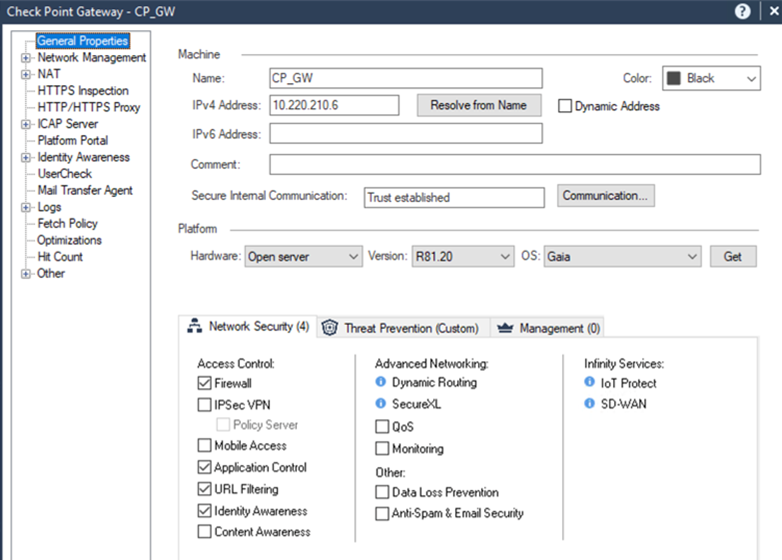
To include X-Headers in ICAP requests, you must enable Identity Awareness in the Check Point Security Gateway UI, General Properties, Network Security tab:
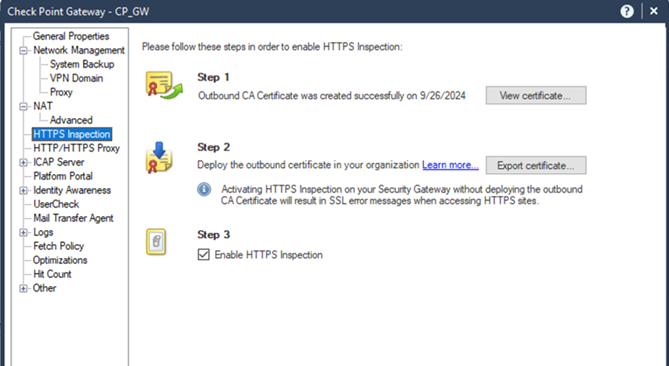
To enable inspection of SSL-encrypted traffic, import the SSL certificate using the Check Point Security Gateway UI: HTTPS Inspection.