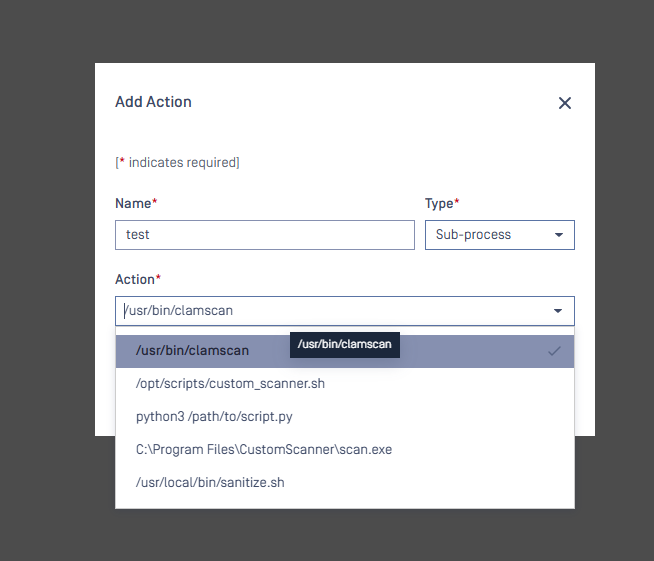
Since MetaDefender Core v5.14.1, we have introduced a security hardening feature that allows administrators to restrict which commands can be used in External Scanners and Post Actions. This guide will help you set up and configure that external command allowlist.
Benefits of Command Allowlisting
Enhanced Security: Prevents the execution of unauthorized or potentially harmful commands
Controlled Environment: Ensures only approved commands are used in your workflow
Compliance: Helps meet security requirements by restricting command execution
Setting Up the External Allowlist
File Location
Create a new JSON file named external_allowlist.json in the following location based on your deployment method:
Deployment | File Path |
|---|---|
Windows | <MD Core installation folder>\external_allowlist.json |
Linux VM/Physical | /etc/ometascan/external_allowlist.json |
Docker | /opt/ometascan/core_data/external_allowlist.json |
Note for Docker users: The file is located in the
CORE_DATA_PATHdirectory, which can be modified using environment variables.
File Format
The file should contain a JSON array of strings, with each string representing an allowed command:
Configuration Rules
Each entry must be a complete command string (including parameters if needed)
Include the full path to the executable
For Windows paths, use double backslashes () in your JSON
Commands are case-sensitive
Duplicate or empty entries will be skipped
File permissions
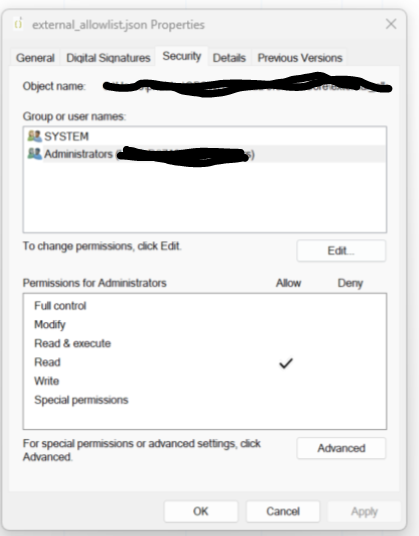
When the configuration has been done. Admin should change the permission of the file external_allowlist.json
Linux
Windows
We should only allow read for Admin and SYSTEM account
Enabling the Feature
The feature is automatically enabled when the external_allowlist.json file exists:
If the content of external_allowlist.json is in right format -> allow the commands in the file
If the content of external_allowlist.json is in wrong format or empty -> it means that zero commands has been configured -> MetaDefender Core's admin users cannot set any command to either external scanner nor Post-Actions
Using the Web Interface
After configuring the allowlist:
External Scanner and Post Action configuration screens will display a combo box with allowlisted commands
Commands that are not on the allowlist will be marked with a warning icon
When editing non-compliant configurations, warning messages will appear:
For Post Actions: "Your action does not comply with security rules. Please choose an action from the approved list."
For External Scanners: "Your scanner does not comply with security rules. Please choose a scanner from the approved list."