
How can the Temp folder be changed?
This article applies to all MetaDefender Core V4 and V5 releases deployed on Windows and Linux systems.
Temporary folder is used to store temporary files processed by MetaDefender Core and its engines.
The temporary files will be cleaned up once the processing is done.
The use of high speed IO disk for temp folder is recommended.
Ensure sufficient space is allocated for the temp drive.
It can be changed by configuring your MetaDefender Core settings as below:
Linux
Add tempdirectory parameter under
[global]section of the configuration file for the server is located in/etc/ometascan/ometascan.conf
Windows
Open Regedit
Under
HKEY_LOCAL_MACHINE\SOFTWARE\OPSWAT\Metascan\globaladd new string value namedtempdirectory
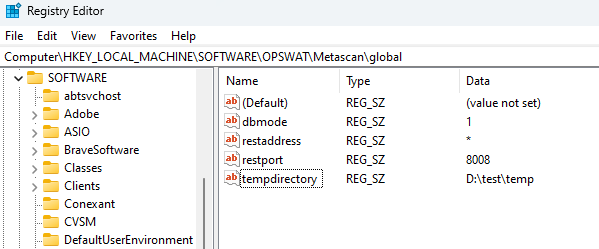
Restart MetaDefender Core service
If you need help configuring TEMP folder, please create a support case or chat with our support engineer.