
Do I need to change this?
Most users can leave these settings at their defaults. MetaDefender Core already rotates and manages log files automatically. The default values match the behavior that has been in place for years:
Rotate when the log file reaches 1 GB or 24 hours have passed (whichever comes first)
Keep up to 30 rotated (compressed) log files
Adjust these settings only if you need to control disk usage more tightly, meet a retention policy, or align with your operations team’s logging standards.
What is log rotation and retention?
MetaDefender Core writes diagnostic logs to a file on disk (the Log file path in Settings → Logs). Over time that file grows. Log rotation automatically:
Closes the current log file when it gets too large or too old
Compresses it and starts a fresh log file
Deletes the oldest rotated files when the count exceeds your retention limit
Retention here means how many old rotated log files are kept — not how many days logs are stored. If you set Maximum rotated files to 10, MetaDefender Core keeps the active log plus up to 10 compressed archives; older ones are removed.
Where to find the settings
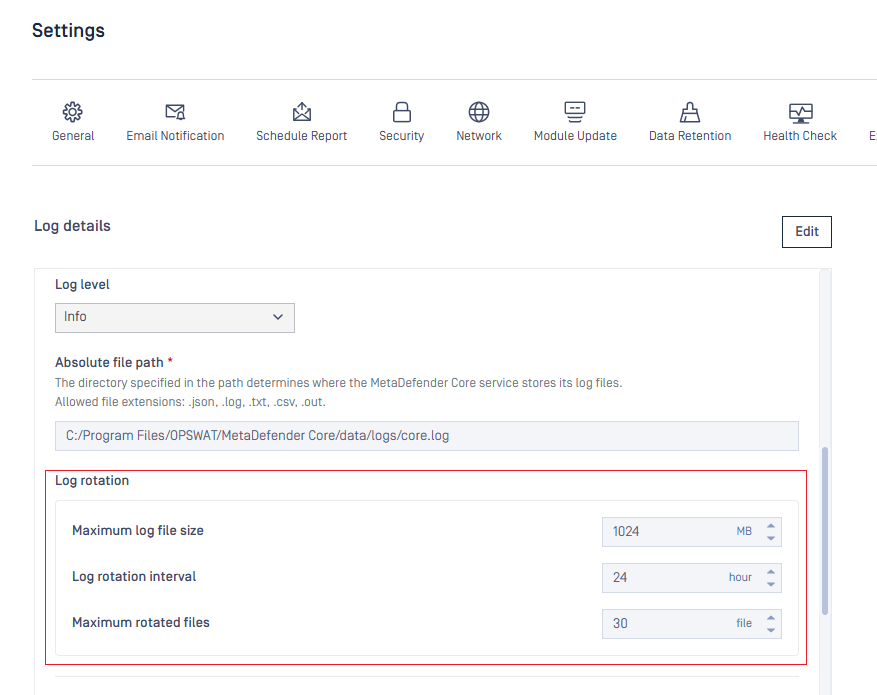
Settings → Logs → Log file (below Absolute file path)
Rotation runs when either the size limit or the time limit is reached — whichever happens first.
Setting | What it controls | Default | Allowed range |
|---|---|---|---|
Maximum log file size (MB) | Rotate when the active log reaches this size | 1024 (1 GB) | 1–2048 |
Log rotation interval (hours) | Rotate when this many hours pass since the last rotation | 24 | 1–48 |
Maximum rotated files | How many compressed rotated files to keep | 30 | 1-30 |
How it works in practice
Example with defaults (1024 MB / 24 hours / 30 files):
MetaDefender Core writes to
ometascan.logWhen the file hits 1 GB or 24 hours pass, Core compresses it (e.g.
core.log-20260628.gz) and starts a newometascan.logUp to 30 compressed files are kept; the oldest are deleted when a new rotation occurs
After you save changes:
Changing only the three rotation/retention fields takes effect immediately — no MetaDefender Core restart is needed
Changing the Absolute file path still requires a Core restart (same as before)
When should I customize it?
Consider changing these values when:
Goal | Example adjustment |
|---|---|
Reduce disk usage | Lower Maximum log file size (e.g. 512 MB) or Maximum rotated files (e.g. 10) |
Keep more history | Increase Maximum rotated files (up to 30) |
Rotate more often | Lower Maximum log file size or Log rotation interval (e.g. 12 hours) |
Compliance / ops policy | Set values your team specifies for file size, rotation frequency, or archive count |
What these settings affect — and what they do not
Affected:
MetaDefender Core main log file (the path configured under Log file)
Engine logs — the Maximum rotated files value is applied when engine processes start (engine log cleanup on startup)
Not affected:
NGINX web server logs
OCM data-transporter logs
Other log types outside the MetaDefender Core log file path
Upgrades and settings backup
Upgrading from an older MetaDefender Core version automatically applies the default values (1024 / 24 / 30) if they were not previously set
Importing an older settings backup without these fields also receives the same defaults
Export/import of settings includes all three fields when present