Installation
nac_v8.0.9
Search this version
Installation
Installation
Title
Message
Create new category
What is the title of your new category?
Edit page index title
What is the title of the page index?
Edit category
What is the new title of your category?
Edit link
What is the new title and URL of your link?
Dell Wired (URL redirect + ACL)
Copy Markdown
Open in ChatGPT
Open in Claude
Dell OS6 supports Dynamic ACLs with Redirect-ACLs and URL-Redirect starting with version 6.6.3.0. This can allow devices to be blocked and redirected to remediation pages without the need for a quarantine VLAN.
Below are example configuration commands for Dell OS6 switch:
Note – In this example the MetaAccess NAC RADIUS Server / Policy Server is <NAC-IP> (replace this <NAC-IP> with the IP of your MetaAccess NAC VM)
Note – Replace the VLAN number on the example port configuration with the desired default VLAN for the port.
######################################
# Layer 3 DHCP prerequisites #
######################################
interface vlanX (Layer 3 interface for enforced network)
ip helper-address X.X.X.X (DHCP server)
ip helper-address <NAC-IP> (IP address of MetaAccess NAC Enforcer)
!
######################################
# Layer 2 Switch Configuration #
######################################
# ACL config
ip access-list sc_initial_acl
1000 permit every
exit
ip access-list sc_quarantine_acl
deny udp any any eq domain
deny udp any any eq 67
deny tcp any <NAC-IP> 0.0.0.0 eq http
deny tcp any <NAC-IP> 0.0.0.0 eq 443
deny tcp any <NAC-IP> 0.0.0.0 eq 8443
deny tcp any 198.31.193.211 0.0.0.0 eq http
deny tcp any 198.31.193.211 0.0.0.0 eq 443
deny tcp any 198.31.193.211 0.0.0.0 eq 8443
permit every
exit
# RADIUS config
aaa accounting dot1x default start-stop radius
aaa accounting update periodic 5
authentication enable
authentication dynamic-vlan enable
dot1x system-auth-control
aaa authentication dot1x default radius
aaa authorization network default radius
!
aaa server radius dynamic-author
client <NAC-IP> server-key XXXX
auth-type any
exit
!
radius server auth <NAC-IP>
name "Default-RADIUS-Server"
usage authmgr
key XXXX
exit
!
radius server acct <NAC-IP>
name "Default-RADIUS-Server"
key XXXX
exit
!
radius server vsa send authentication
!
ip device tracking
!
# HTTP/HTTPS Must be enabled for url-redirect VSAs from the NAC to have desired effect.
ip http server
ip http secure-server
# Uplink ports and other ports except for test port (NAC enforcement will not be applied)
interface GiX/X/X
dot1x port-control force-authorized
authentication port-control force-authorized
exit
!
# Port for initial test client and later for other clients (NAC enforcement will be applied)
interface GiY/Y/Y (client test port)
switchport mode general
authentication port-control auto
authentication host-mode multi-auth
authentication max-users 2
authentication periodic
dot1x timeout tx-period 15
dot1x max-reauth-req 1
authentication order dot1x
exit
copy running-config startup-config
####################################################################
# Examples of other types of ACL exceptions (if required): #
####################################################################
remark allow PXE boot
deny udp any host x.x.x.x eq tftp
deny udp any host x.x.x.x range 1025 5000
remark allow authentication to domain controller
deny tcp any host x.x.x.x eq 53
deny udp any host x.x.x.x eq 53
deny tcp any host x.x.x.x eq 88
deny udp any host x.x.x.x eq 88
deny udp any host x.x.x.x eq 123
deny tcp any host x.x.x.x eq 135
deny udp any host x.x.x.x eq 137
deny tcp any host x.x.x.x eq 139
deny tcp any host x.x.x.x eq 389
deny udp any host x.x.x.x eq 389
deny tcp any host x.x.x.x eq 445
deny udp any host x.x.x.x eq 445
deny tcp any host x.x.x.x eq 3268
›
We can use the command below to check that a device connected to a given port is having the Redirect ACL applied properly.
console# show authentication clients gigabitethernet 1/0/24
Interface...................................... Gi1/0/24
Mac Address.................................... EC:F4:BB:D3:3C:DB
User Name...................................... Tester1
VLAN Assigned Reason........................... RADIUS Assigned VLAN (1774)
Host Mode...................................... multi-auth
Method......................................... 802.1X
Control Mode................................... auto
Session time................................... 37484
Session timeout ............................... 0
Session Termination Action..................... Default
Filter ID......................................
RADIUS Framed IPv4/IPv6 address................
DACL...........................................
Redirect ACL................................... IP-REDIRECT-IN-00000004#d
Redirect URL................................... https://portal.myweblogon.com:8443/deniedAccess.!^
Acct SessionId................................. Tester1:1800000004
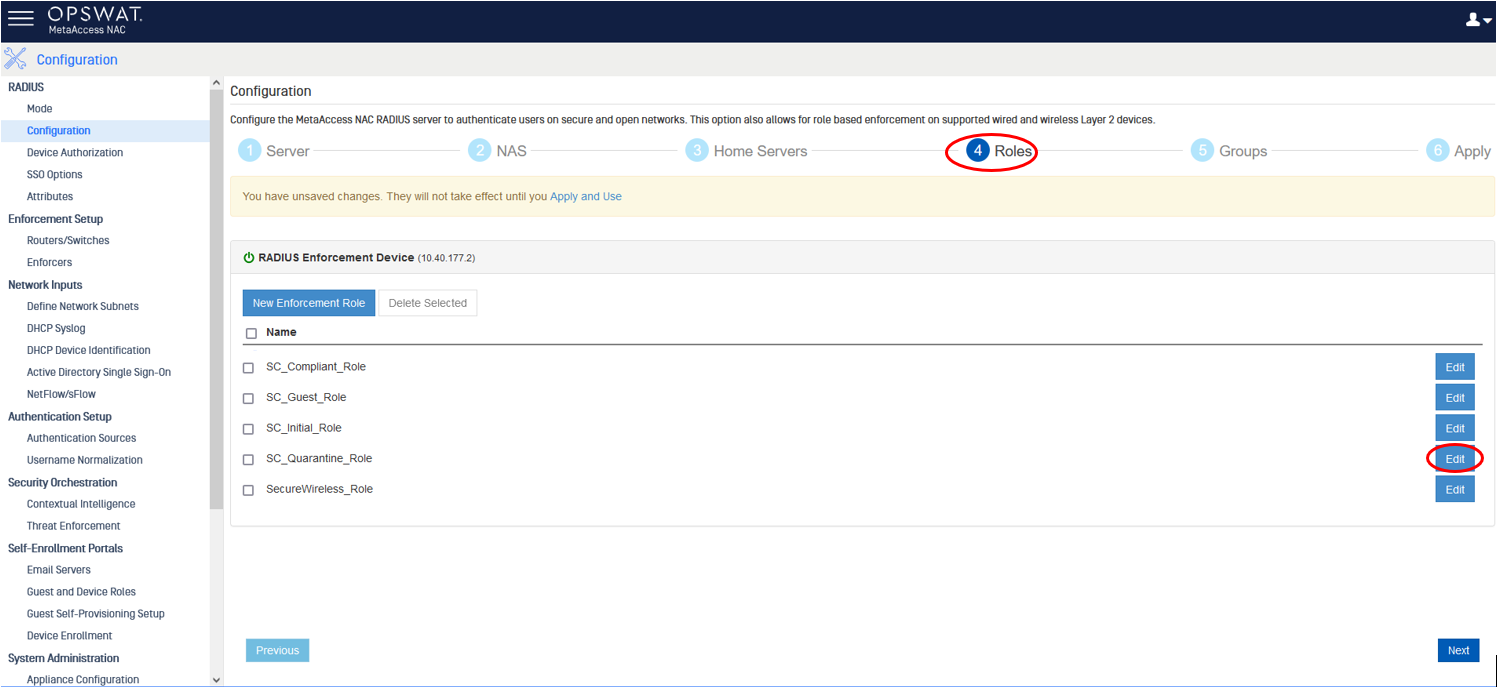
From NAC:

We can manually input Cisco-AVPair and the value.

Last updated on
Was this page helpful?
Next to read:
Aruba Wireless Controller ArubaOS 8null
Discard Changes
Do you want to discard your current changes and overwrite with the template?
Archive Synced Block
Message
Create new Template
What is this template's title?
Delete Template
Message