TACACS+ Installation and Configuration

Summary

This document provides the steps necessary to complete the download and configuration of the TACACS+ CentOS 7 VM.

The TACACS+ configuration already contains configuration for the most common use cases including AD/LDAP integration, privilege levels and per-command authorization. The configuration can be customized to meet the specific requirements of the environment.

TACACS+ OVA Download

Navigate to the URL below and initiate the download of the TACACS+ CentOS 7 OVA. Import the OVA into your existing ESXi infrastructure. The OVA was built on ESXi6.5 and VM Hardware Version 13.

https://nac-downloads.opswat.com/IE/tacacs/OPSWAT-TACACS+-VM.ova

The VM image requires 4Gig of dedicated memory with 40Gig thin provisioned storage partition and 2 vCPUs.

TACACS+ VM Configuration

The default username and password are below:

user = root

password = P@55w0rD

It is highly recommended that you change the default password. To do this type passwd and hit enter. You will be prompted to type in the new password.

Configure networking:

# vi /etc/sysconfig/network-scripts/ifcfg-ens160

Change the following fields to the desired setting for your network

IPADDR=x.x.x.x
NETMASK=x.x.x.x
GATEWAY=x.x.x.x
DNS1=x.x.x.x
DNS2=x.x.x.x

# systemctl restart network.service

Configure the desired hostname for the server:

# hostnamectl set-hostname hostname.your.domain

Reboot for the hostname change to take effect.

TACACS+ Configuration - AD/LDAP

# vi /usr/local/etc/tac_plus.cfg

#!/usr/local/sbin/tac_plus
id = spawnd {
listen = {
port = 49
}
spawn = {
instances min = 1
instances max = 10
}
background = yes
}

id = tac_plus {
access log = /var/log/tac_plus/access/%Y%m%d.log
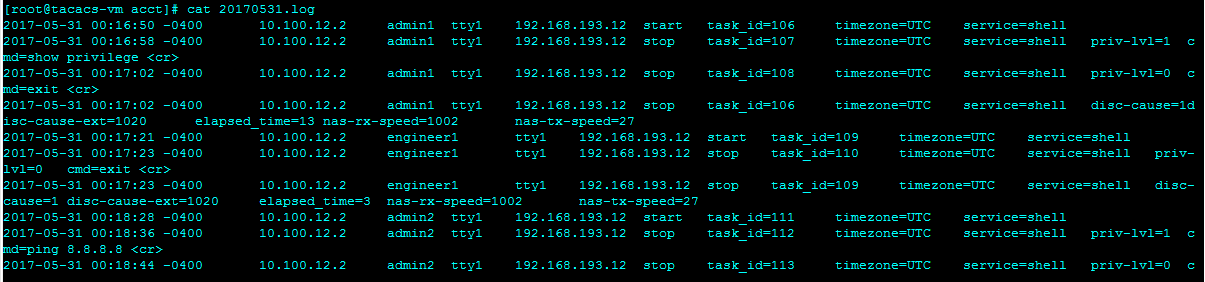
accounting log = /var/log/tac_plus/acct/%Y%m%d.log
authentication log = /var/log/tac_plus/authentication/%Y%m%d.log
authorization log = /var/log/tac_plus/authorization/%Y%m%d.log
#debug = ALL
mavis module = external {
script out = {
# Require group membership:
if (undef($TACMEMBER) && $RESULT == ACK) set $RESULT = NAK
# Don.t cache passwords:
if ($RESULT == ACK) set $PASSWORD_ONESHOT = 1
}
setenv LDAP_SERVER_TYPE = "microsoft"
###################################################

TACACS+ Configuration - Privilege Level Concept

#################################################################################
# The following can be used to assign a privilege level to users based on group #
# Note: AD groups need to be prefaced with “TACACS” when created on the AD #
# server, e.g. TACACSNetEngPriv in AD, NetEngPriv in tac_plus.cfg. #
#################################################################################
group = NetEngPriv {
enable = login
default service = permit
service = shell {
default command = permit
default attribute = permit
set priv-lvl = 15
}
}
group = NetAdminPriv {
default service = permit
service = shell {
default command = permit
default attribute = permit

TACACS+ Configuration - Per Command Authorization

##################################################################################
# As an alternative to privilege levels, the following configuration can be used #
# to assign specific commands that a user is allowed to issue #
# Note: Privilege level defaults to 1 #
##################################################################################
group = NetAdminCmd {
default service = deny
service = shell {
default command = deny
default attribute = deny
cmd = ping { permit .* }
cmd = show { permit .* }
cmd = traceroute { permit .* }
cmd = terminal { permit [length].* }
cmd = exit
}
}

TACACS+ Configuration - Validation

Once the desired changes have been made to the configuration, the tac_plus configuration will need to be verified and the service restarted in order for the changes to take effect.

################################################################################
# If changes have been made to this file, the tac_plus service must be #
# restarted in order for them to take effect #
# #
# Pre-flight check - /usr/local/sbin/tac_plus -P /usr/local/etc/tac_plus.cfg #
# Make sure there are no errors returned #
# #
# Restart the service #
# systemctl restart tac_plus.service #
# #
# Make sure that the service is running #
# systemctl status tac_plus.service –l #
################################################################################
[root@tacacs-vm ~]# /usr/local/sbin/tac_plus -P /usr/local/etc/tac_plus.cfg
[root@tacacs-vm ~]# systemctl restart tac_plus.service
[root@tacacs-vm ~]# systemctl status tac_plus.service –l
● tac_plus.service - TACACS+ Service
Loaded: loaded (/etc/systemd/system/tac_plus.service; enabled; vendor preset:
disabled)
Active: active (running) since Tue 2017-05-30 17:57:09 EDT; 12s ago
Main PID: 5709 (tac_plus)
CGroup: /system.slice/tac_plus.service
├─5709 tac_plus: 0 connections, accepting up to 600 more
├─5710 tac_plus: 0 connections
└─5711 perl /usr/local/lib/mavis/mavis_tacplus_ldap.pl
May 30 17:57:09 tacacs-vm.impulse.com systemd[1]: Started TACACS+ Service.
May 30 17:57:09 tacacs-vm.impulse.com systemd[1]: Starting TACACS+ Service...
May 30 17:57:09 tacacs-vm.impulse.com tac_plus[5709]: startup (version 201705210930)
May 30 17:57:09 tacacs-vm.impulse.com tac_plus[5709]: epoll event notification mechanism

Device Configuration - Cisco Example

Note – In the event the device is unable to connect to the TACACS+ server, the device will resort back to using the local access credentials after a default or specified time-out period.

conf t
!
aaa new-model
!
aaa authentication login default local group tacacs+
aaa authentication login telnet group tacacs+ local
aaa authentication login console group tacacs+ local
aaa authentication enable default group tacacs+ enable
aaa authorization exec default group tacacs+ local
aaa authorization commands 0 default group tacacs+ local
aaa authorization commands 1 default group tacacs+ local
aaa authorization commands 15 default group tacacs+ local
aaa accounting update newinfo
aaa accounting exec default start-stop group tacacs+
aaa accounting commands 0 default start-stop group tacacs+
aaa accounting commands 1 default start-stop group tacacs+
aaa accounting commands 15 default start-stop group tacacs+
!
tacacs-server host x.x.x.x

End-to-End - Validation

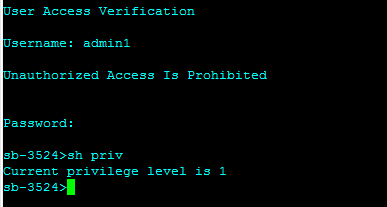
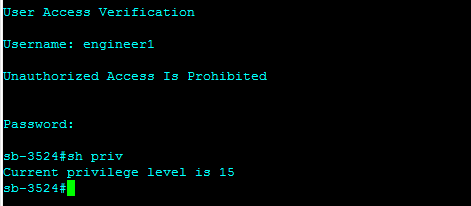
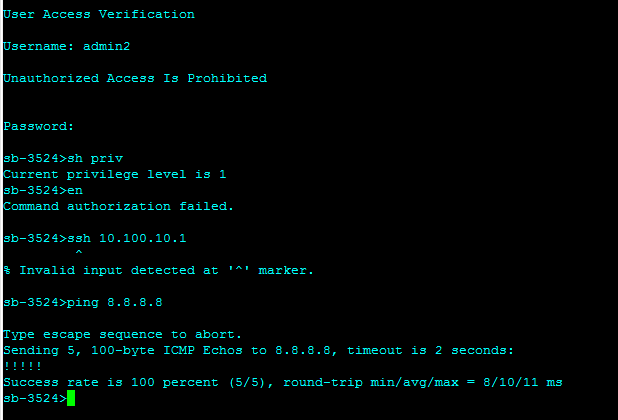
In order to validate the result on the switch, log in as a user in one of the TACACS+ AD groups and issue the show privileges command for privilege level concept or “?” for per command authorization.

Privilege Level Concept


Per-Command Authorization

TACACS+ Logging Examples

Access log:


Accounting log:

Authentication log:


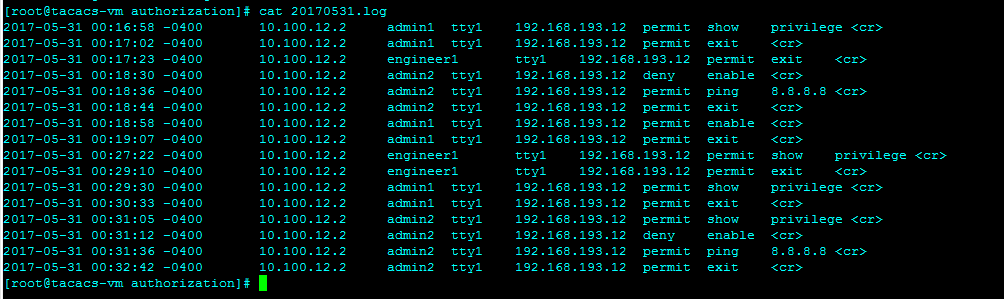
Authorization log: