
This article applies to all MetaDefender Sandbox releases.
To prevent timeout when exporting large reports in PDF format, please follow these steps:
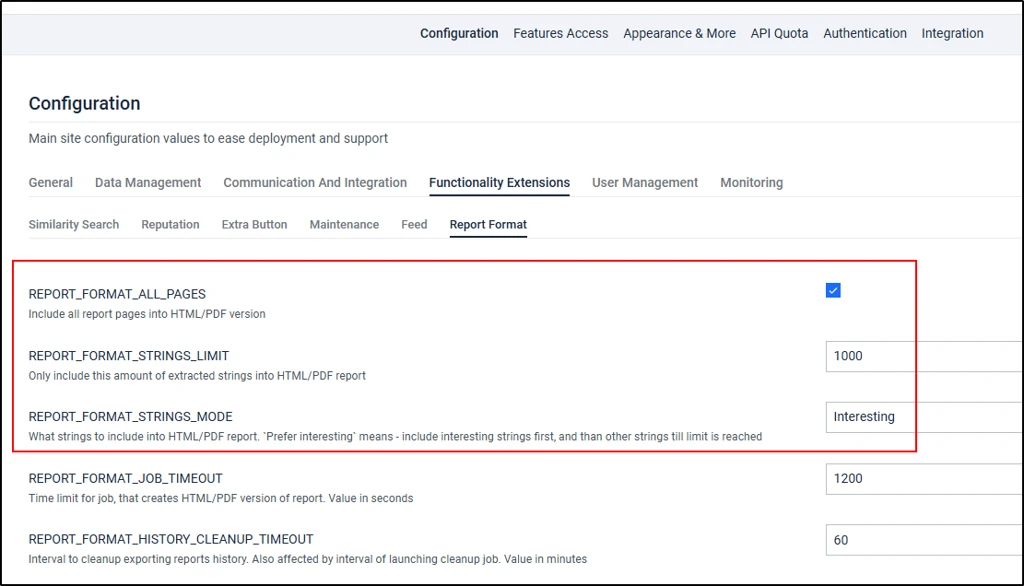
Navigate to Admin panel -> Settings -> Functionality Extensions -> Report format
Check the REPORT_FORMAT_ALL_PAGES checkbox to reveal the new settings
Reduce the limit of extracted strings included in the generated PDF by editing the REPORT_FORMAT_STRINGS_LIMIT - Only include this amount of extracted strings into HTML/PDF report
You can also configure the extracted strings to only include interesting ones by changing the REPORT_FORMAT_STRINGS_MODE - What strings to include into HTML/PDF report:
All - include all strings
Prefer interesting - include interesting strings first, and than other strings till limit is reached
Interesting - include only interesting strings
If Further Assistance is required, please proceed to log a support case or chat with one of our support engineers.