
The purpose of deploying multiple MetaDefender MFT HA Controller™ instances is to place them behind a load balancer. The load balancer distributes incoming user requests across all available HA Controller peers. The load balancer can be any third-party solution.
MetaDefender MFT HA Controller™ health check
Each MetaDefender MFT HA Controller™ exposes a dedicated health endpoint at:
http://<your-ha-controller-address>:<port>/ha-controller/health
This endpoint allows the Load Balancer to periodically verify the status of each controller. You can configure the load balancer to poll this endpoint at regular intervals, and only forward user requests to instances that respond successfully to the health check.
Condition | HTTP Status | Meaning |
|---|---|---|
Application is healthy | 200 OK | The service is functioning normally and can handle traffic. |
Application is unhealthy | 503 Service Unavailable | The service isn’t ready to handle traffic and should be treated as unhealthy by load balancers and orchestrators. |
Load Balancer modes
The Load Balancer can operate in TCP mode (Layer 4) or HTTP mode (Layer 7). Both modes can distribute traffic to multiple MetaDefender MFT HA Controller™ instances.
HTTP Mode
When using HTTP mode on the load balancer, it should be configured to append the X-Forwarded-For (XFF) header so that the original client IP is included with each forwarded request.
Additionally, the MetaDefender® MFT application must be configured to trust the load balancer’s IP address as a forwarder, this means adding the load balancer and each MetaDefender MFT HA Controller™’s IP to the list of trusted forwarders so that the X-Forwarded-For header is accepted and used to determine the client’s real address.
Trusted Forwarder configuration
Below is an example Trusted Forwarder setup with a load balancer in front of three MetaDefender MFT HA Controller™ instances.
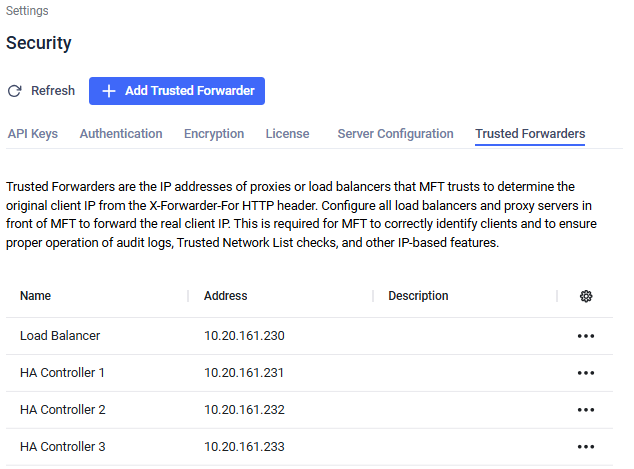
You can find more information about Trusted Forwarder configuration here.
Example
Below is an example HAProxy configuration showing how to set up HAProxy as an HTTP load balancer in front of your MetaDefender MFT HA Controller™ peers. In this example, the Load Balancer performs health checks against a custom health endpoint and uses the round-robin algorithm to distribute requests among the MetaDefender MFT HA Controller™ instances. The three peers are listed in the web_backends section with health checks enabled.
You can find more details about HAProxy configuration in the official HAProxy documentation