This Installation Guide provides step-by-step instructions for installing MetaDefender ICAP Server in your own Kubernetes cluster in whatever environment you have it deployed.
This guide is for IT infrastructure architects, administrators and DevOps professionals who are seeking to prevent potential malicious traffic being allowed in their environments. Threat Prevention is ensured for both productivity files that might be uploaded and for known vulnerabilities that can be identified for all running services/applications. The vulnerability scanning is checking known vulnerabilities for unpatched OS and running applications.
Using Kubernetes technology provides us with some features that distinct it from other type of deployments. These are the main features:
Service discovery and load balancing. See Configuration on K8S
Storage orchestration. Allows you to automatically mount a storage system. See Configuration on K8S
Automated rollouts and rollbacks. See Upgrade Strategy on K8S
Automatic bin packing. You tell Kubernetes how much CPU and memory (RAM) each container needs. Configuration on K8S
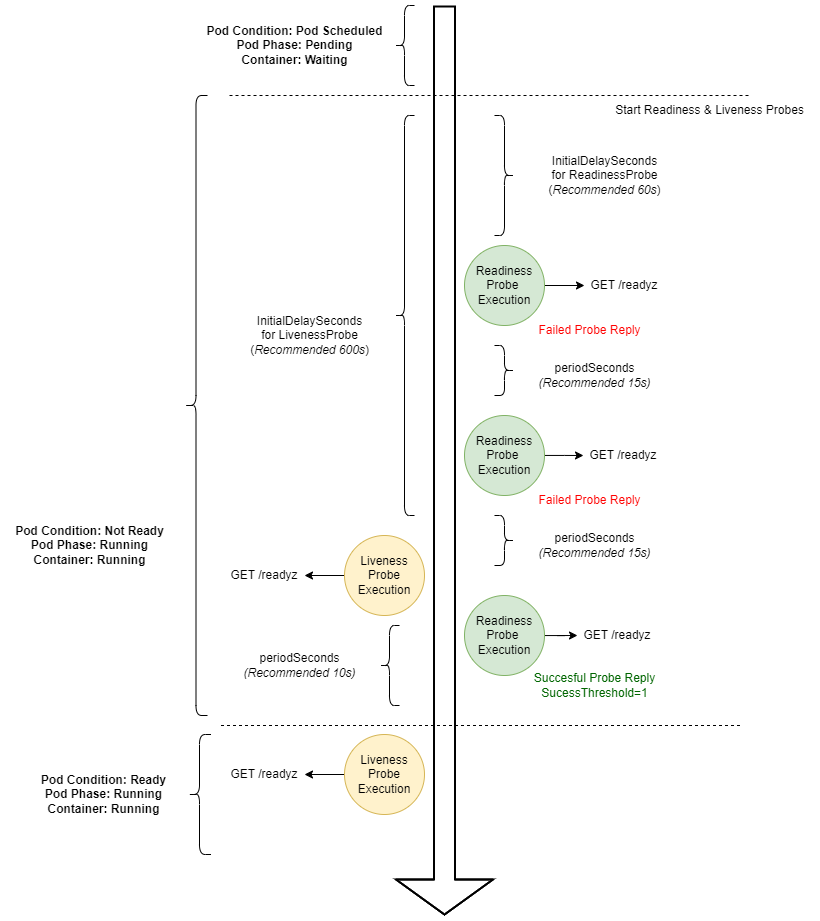
Self-healing. Kubernetes restarts containers that fail, replaces containers, kills containers that don't respond to your user-defined health check, and doesn't advertise them to clients until they are ready to serve. Se Kubernetes Probes explained below
Secret and configuration management. Kubernetes lets you store and manage sensitive information. See MetaDefender ICAP Server Kubernetes (K8S) components
Horizontal scaling. Scale your application up and down. See Replication & HA on K8S
There are recommended configuration for each of the features to use by default when deploying MetaDefender Core in a Kubernetes cluster.
Kubernetes Probes
The Kubernetes probes are needed to control the correct behavior of the application on this environment. Each probe need to use the health check endpoint (/readyz)
Readiness Probe ( Check /readyz endpoint to know if the Health Check is OK )
initialDelaySeconds= 60periodSeconds= 10successThreshold= 1timeoutSeconds= 10
Liveness Probe ( Check /readyz endpoint to know if the Health Check is OK after Pod is ready)
initialDelaySeconds= 90timeoutSeconds= 10periodSeconds= 10failureThreshold= 3