
Overview
MetaDefender for Salesforce is an installed package in Salesforce that integrates OPSWAT’s file scanning and security features into your Salesforce environment. Occasionally, you may need to confirm which version of the package is currently installed, for example, for troubleshooting, support requests, or upgrade planning.
This guide explains how to locate the version number within Salesforce Setup.
Steps to Check the Installed Version
Log in to Salesforce
Ensure you are logged in with an account that has System Administrator or equivalent permissions to view installed packages.
Open the Setup Menu
Click the gear icon (⚙️) in the upper-right corner of Salesforce.
Select Setup from the dropdown menu.
Navigate to Installed Packages
In the left-hand Quick Find search bar, type:
Installed PackagesClick on Installed Packages under the Apps > Packaging section.
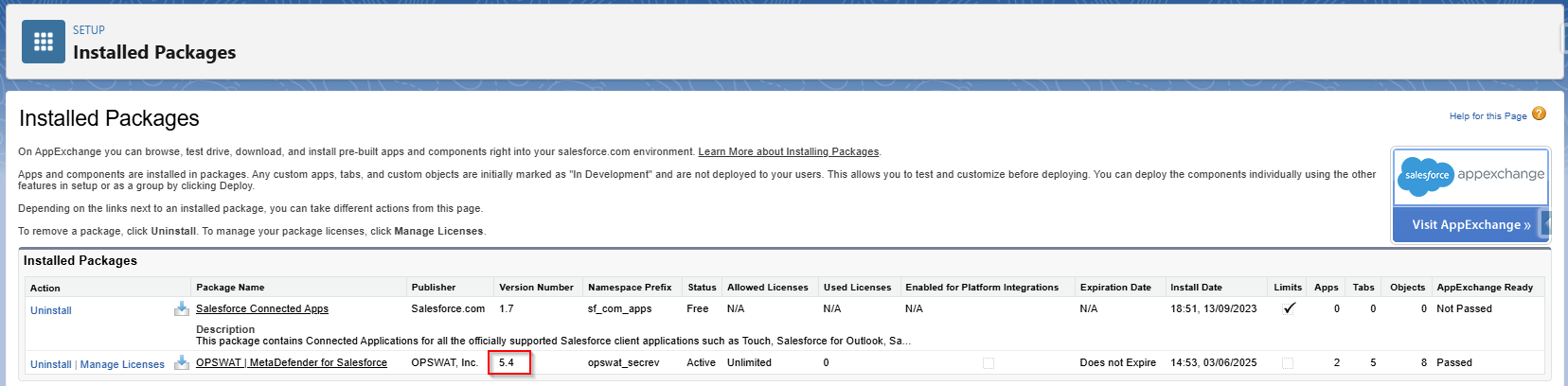
Locate MetaDefender for Salesforce
In the list of installed packages, look for:
Package Name: OPSWAT | MetaDefender for SalesforcePublisher: OPSWAT, Inc.
Check the Version Number
In the Version Number column, you will see the installed version. For example: Version Number:
5.4(as in the screenshot provided)
If Further Assistance is required, please proceed to log a support case or chatting with our support engineer.