
Overview
MetaDefender for Salesforce ensures that every file uploaded to your Salesforce platform is scanned and sanitized to prevent malware and zero-day threats. This integration leverages MetaDefender Cloud, which directly connects with MetaDefender for Salesforce to provide real-time scanning and sanitization of uploaded content.
MetaDefender Cloud Subscription (scanning service)
MetaDefender Cloud operates under a paid subscription model. The subscription terms depend on the specific service package purchased. Upon subscribing, end-users will receive an API Key, which is valid for a defined period based on the subscription duration.
It’s essential to renew the MetaDefender Cloud subscription before the expiration date to maintain uninterrupted scanning service. Failure to do so will result in scanning operations being suspended once the key expires.
To check the expiration date, follow the steps below in MetaDefender for Salesforce:
Navigate to OPSWAT Settings → MetaDefender → Account Settings
Under Scan Server, select: MetaDefender Cloud
Enter the API Key provided by OPSWAT. The system will automatically detect and display the Expiration Date associated with the API Key.
Below is a sample configuration interface from OPSWAT Settings:
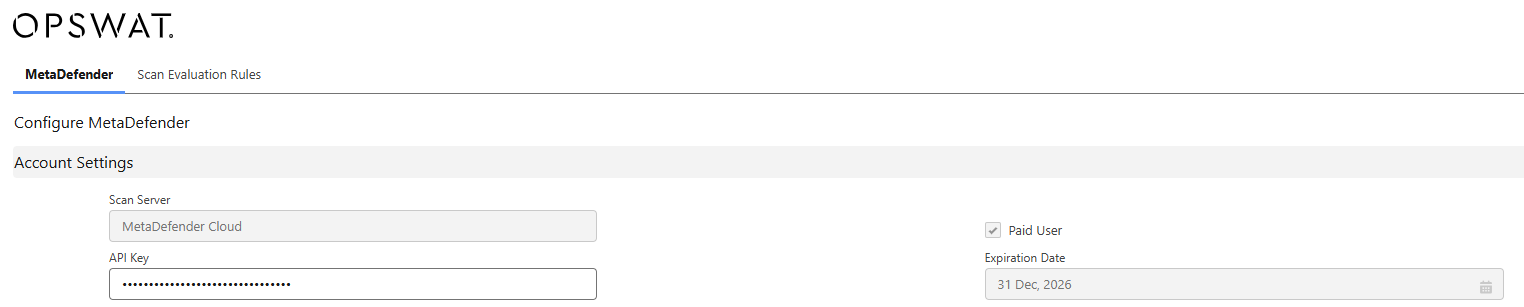
If the expiration date is approaching, please ensure to renew your MetaDefender Cloud subscription to avoid interruption in the scanning service.
Support:
If Further Assistance is required, please proceed to log a support case or chatting with our support engineer.