
Overview
Administrators in MetaDefender for Salesforce (MDFS) can configure notifications so that end-customers are alerted whenever an infected file is uploaded. This ensures that users are immediately aware of the issue and can take corrective actions.
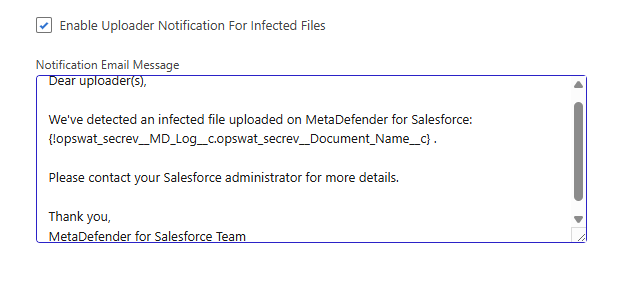
Notifications can be enabled directly from the OPSWAT Settings page. Administrators have the option to:
Enable or disable notifications for infected file uploads.
Use the default email content provided by MDFS.
Customize the email template to align with organizational requirements.
What This Means
When the Uploader Notification for Infected Files setting is enabled, email alerts are triggered whenever a file uploaded to Salesforce is scanned by MDFS and flagged as infected.
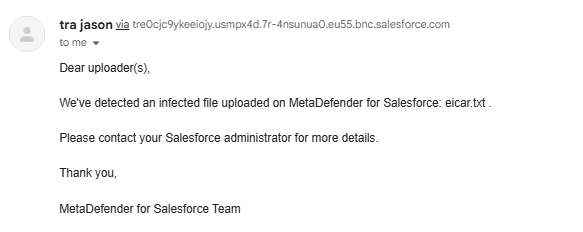
End-customers: Receive an email notification informing them that their uploaded file was infected. By default, end-customers receive an email similar to the following when their uploaded file is detected as infected:
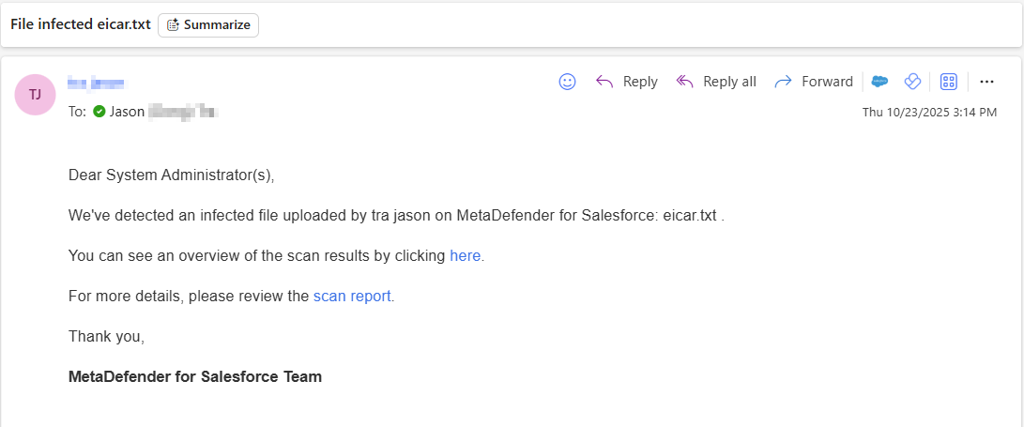
Administrators: Also receive an email alert by default, allowing them to investigate further.
These notifications are automatically triggered to:
Inform end-users that their file could not be processed due to infection.
Prompt them to contact their Salesforce administrator for next steps.
Provide administrators with immediate awareness so they can investigate and mitigate risks quickly.
Support:
If further assistance is required, please proceed to log a support case or chatting with our support engineer.