The sharing and reuse of pre-trained AI models has become a widespread practice. After training a model like ChatGPT, we need to save those weights (already trained model) somewhere. These files aren't just simple data - they're complex formats like Pickle, Pytorch and TensorFlow, each with their own serialization style.
Developers frequently download models from public repositories like Hugging Face, Kaggle, and others to accelerate innovation and avoid redundant training efforts. Attackers are now targeting the AI model supply chain by injecting malware, backdoors, and malicious logic into serialized model files. These compromised models can be difficult to detect using conventional security tools and may lead to remote code execution (RCE) attacks, data leak, or sabotage of downstream AI tasks.
MetaDefender Aether's LLM Scanner statically analyzes LLM files across the most popular serialization formats Pickle, PyTorch, TensorFlow, Keras,SafeTensors, GGUF, and ONNX, providing robust detection for the most critical attack vectors.
Supported Model-File Threat Vectors
Several LLM model formats can introduce security risks:
Format | Framework | Extension | Description | Tagging |
|---|---|---|---|---|
Pickle | Generic Python |
| Python’s default serialization format; allows arbitrary code execution during deserialization. |
|
Pytorch | Pytorch |
| Uses Pickle internally to store model weights and architecture, vulnerable to embedded code execution. |
|
Tensorflow | TensorFlow |
| Protocol Buffers format used to store SavedModels. Can include Lambda Layer in KerasMetadata to allow arbitrary code execution. |
|
Keras | Keras / TensorFlow |
| HDF5 format used by Keras; Lambda layers serialized with marshal can enable code execution. |
|
SafeTensors | Hugging Face |
| Safe by design for the weights themselves, but the header and the gaps between tensors can hide tampering or a polyglot. |
|
GGUF | llama.cpp / GGML |
| The chat template is an expression that can be turned into code execution, and malformed headers are built to crash or exploit the loaders that read them. |
|
ONNX | ONNX Runtime |
| A graph can point to external files by path (a traversal risk), call custom operators that run code, or carry a logic-level backdoor that only triggers on certain inputs. |
|
How LLM Scanner Statically Analyzes Threats
LLM Scanner provides comprehensive security analysis for LLM files, identifying potential threats before they can impact AI workflows.
Key Capabilities
Support for Multi-Serialization Format Parsing: Enables comprehensive detection across major AI model formats, including Pickle, Protocol Buffers, Marshal, HDF5, GGUF, and SafeTensors serialization.
Content-Based Format Detection: Determines the true format from the file's own bytes rather than its extension, so a renamed payload cannot slip past on its name alone.
Dedicated Pickle Structure Analysis: Walks the Pickle stack opcode by opcode with a purpose-built disassembler to parse its structure and extract artifacts.
Deep Static Analysis: Disassembles and analyzes serialized objects inside
pkl,ptandh5files.Graph-Level Threat Detection: Identifies unsafe TensorFlow operators and custom graph nodes in
.pbmodels, and external references, custom operators, and backdoored logic in.onnxgraphs.Container & Header Inspection: Vets
.safetensorsand.ggufheaders for malformed structures, polyglot payloads, and chat-template code execution.Uncovering Deliberate Evasion Techniques: Exposes the hidden logic of complicated evasion techniques.
Memory-Safe Streaming at Scale: Streams multi-gigabyte models with a bounded memory footprint, parsing even the largest models without loading them whole.
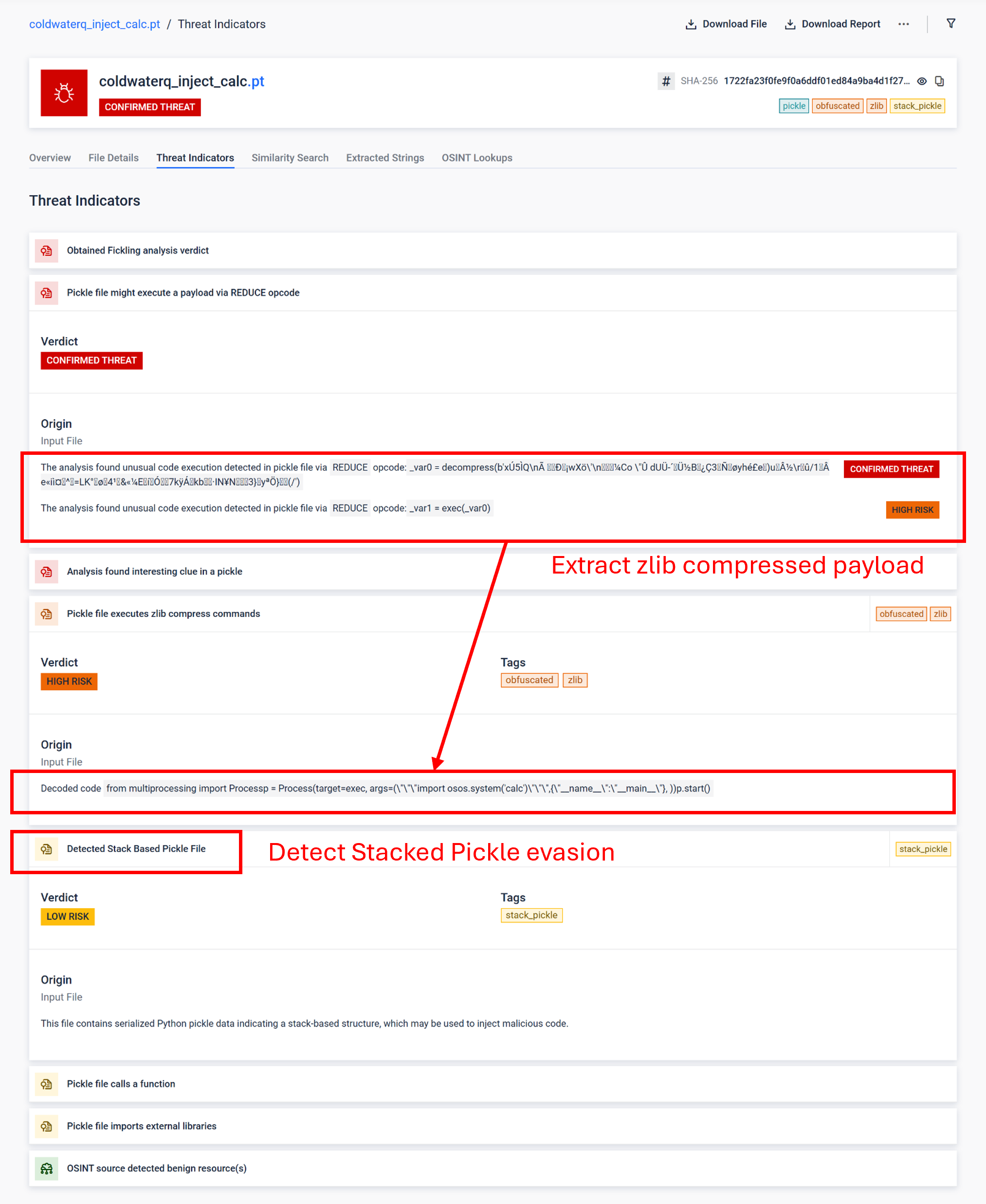
Showcase Report: Detect Stack Pickle Technique and its Malicious Contents
Stacked Pickle can be utilized as a trick to hide malicious behavior. By nesting multiple Pickle objects and injecting the payload across layers then combined with compression or encoding. Each layer looks benign on its own, therefore many scanners and quick inspections miss the malicious payload.
LLM Scanner peels those layers one at a time: it parses each Pickle object, decodes or decompresses encoded segments, and follows the execution chain to reconstruct the full payload. By replaying the unpacking sequence in a controlled analysis flow, the sandbox exposes the hidden logic without running the code in a production environment.