
Term | Detail |
|---|---|
Problem | OPSWAT Central Management times out even though the console was working. The tray icon did not transition to the running status. |
Cause | OPSWAT Central Management service's current status cannot be retrieved by the tray icon. |
Troubleshooting | Check the log at ProgramData\OPSWAT\Central\Logs\powershell_error.txt |
Solution | Ensure Powershell is working properly on the affected system. |
OPSWAT Central Management is set to time out after 10 minutes unless its status transitions to running, as shown on the tray icon.
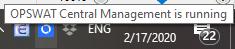
One possible cause for the timeout is that the Windows Management Instrumentation (WMI) service is not working properly, creating an error in Powershell. The log at ProgramData\OPSWAT\Central\Logs\powershell_error.txt should show a message similar to the example below.
In this case, the command Get-NetTCPConnection cannot be run in Powershell due to a corrupted WMI repository. Please consult Windows's troubleshooting to remedy this problem.