
To apply distinct MetaDefender Core Workflow rules to specific group(s), navigate to the "Groups" menu item.
Info
Beware, the dropdown list only displays workflows that are present on every MetaDefender Core.
Assign Core Workflow rule for the Group
Assigning a Core Workflow to a Group can be done by following these steps:
Navigate to the Users/Groups menu and click on the three dots next to the desired Group and select Edit Group

In the displayed modal, disable the Use Default Workflow Settings option and select the desired workflow rule
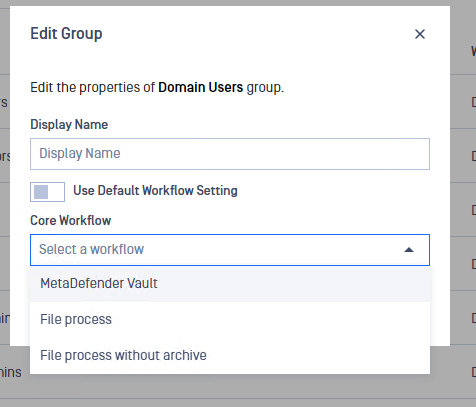
In the displayed modal, you can also setup a Display Name for the selected group.
Info
If set, the display name will be shown to users instead of the group's original name when selecting the group in which they want their uploaded file to be approved
Was this page helpful?
Operating