
This guide helps you choose the right MetaDefender Managed File Transfer™ deployment for your organization and understand the hardware needed to support your workload.
Which Deployment Is Right for Me?
Start with how many users will be actively uploading files at the same time (not total registered users). Then pick the tier that matches:
Small | Medium | Large | |
|---|---|---|---|
You need this if... | A small team shares files on a predictable schedule | Multiple teams or mixed human + automation workloads | Large-scale operations with hundreds of simultaneous uploaders |
Concurrent uploading users | < 100 | 100-200 | 200-400 |
Typical use case | Departmental file sharing, periodic batch uploads | Cross-team collaboration, automated integrations | Enterprise-wide deployment, CI/CD pipelines + human users |
Not sure about your concurrency? Count the peak number of users uploading at the exact same moment - not per day. Most organizations find their concurrent count is 5-10% of total users. For example, 1,000 registered users typically means 50-100 concurrent uploaders.
Recommended Hardware
Feature | Small Deployment | Medium Deployment | Large Deployment |
|---|---|---|---|
Concurrent Uploading Users | < 100 | 100-200 | 200-400 |
CPU Cores | 4-8 | 8 | 8-12 |
RAM | 8 GB | 16 GB | 16 GB |
CPU Clock (base / turbo) | >= 2.0 / >= 3.0 GHz | >= 2.0 / >= 3.0 GHz | >= 2.0 / >= 3.0 GHz |
Network (client <-> MetaDefender® MFT ) | 1 Gbps | 1 Gbps | 1-10 Gbps |
Storage Backend | Local SSD or SMB | Local SSD or SMB | Local SSD or SMB |
"Concurrent Uploading Users" means users actively uploading files at the same time, not just logged in or browsing. Logged-in users who are browsing, downloading, or idle do not count toward this number.
Need more than 400 concurrent uploaders? MetaDefender MFT High Availability Controller™ scales beyond single-instance limits - capacity grows linearly with additional nodes. Contact your OPSWAT sales representative for HA sizing guidance.
Expected Throughput
The tables below show whata a single MetaDefender® MFT server can handle. Use these to estimate whether your chosen deployment tier meets your daily volume requirements.
How to read these tables: "Files/hr" is the total system throughput. "Avg Time/file" is how long each individual user waits for their upload to complete. As more users upload simultaneously, per-user wait grows but the system continues processing at high volume.
Common Files (≈5 MB)
Represents typical office documents (Word, Excel, PDF, PowerPoint), email attachments, scanned images, and small reports. This is the most common file size in day-to-day business file transfers.
Concurrent Uploading Users | Files/hr | Files/day | Avg Time/file |
|---|---|---|---|
50 | ≈ 25,000 | ≈ 600,000 | ≈ 7 s |
100 | ≈ 21,000 | ≈ 504,000 | ≈ 17 s |
200 | ≈ 18,000 | ≈ 432,000 | ≈ 45 s |
400 | ≈ 14,000 | ≈ 336,000 | ≈ 2 min |
Large Files (≈50 MB)
Represents large spreadsheets, CAD drawings, high-resolution media, software packages, and archive bundles. These are bandwidth-intensive workloads where network and disk I/O become significant factors.
Concurrent Uploading Users | Files/hr | Files/day | Avg Time/file |
|---|---|---|---|
50 | ≈ 4,500 | ≈ 108,000 | ≈ 40 s |
100 | ≈ 5,200 | ≈ 124,800 | ≈ 1.2 min |
200 | ≈ 3,700 | ≈ 88,800 | ≈ 3.4 min |
400 | ≈ 2,900 | ≈ 69,600 | ≈ 8 min |
At high concurrency, the server prioritizes stability and fair resource distribution across all active users. Total throughput decreases gradually and per-user wait grows as more users share server resources. A larger MetaDefender® MFT server maintains lower per-user wait times under heavier load.
MetaDefender MFT High Availability Controller™ Deployment
MetaDefender MFT High Availability Controller™ provides automatic failover and service continuity. An MetaDefender MFT HA Controller™ sits in front of your MetaDefender® MFT nodes and routes all traffic to the currently active node. If the active node becomes unavailable, the HA Controller automatically fails over to a standby node.
HA uses a Single Active Node strategy - all client traffic routes through the HA Configuration Tool™ to one active MetaDefender® MFT node at a time. The standby node is idle until failover occurs.
When to Use HA
Your organization requires service continuity - upload/download availability must survive a single server failure
You need zero-downtime maintenance - take one node offline for updates while the other serves traffic
Compliance or SLA requirements mandate redundant infrastructure
MetaDefender MFT HA Controller™ Architecture
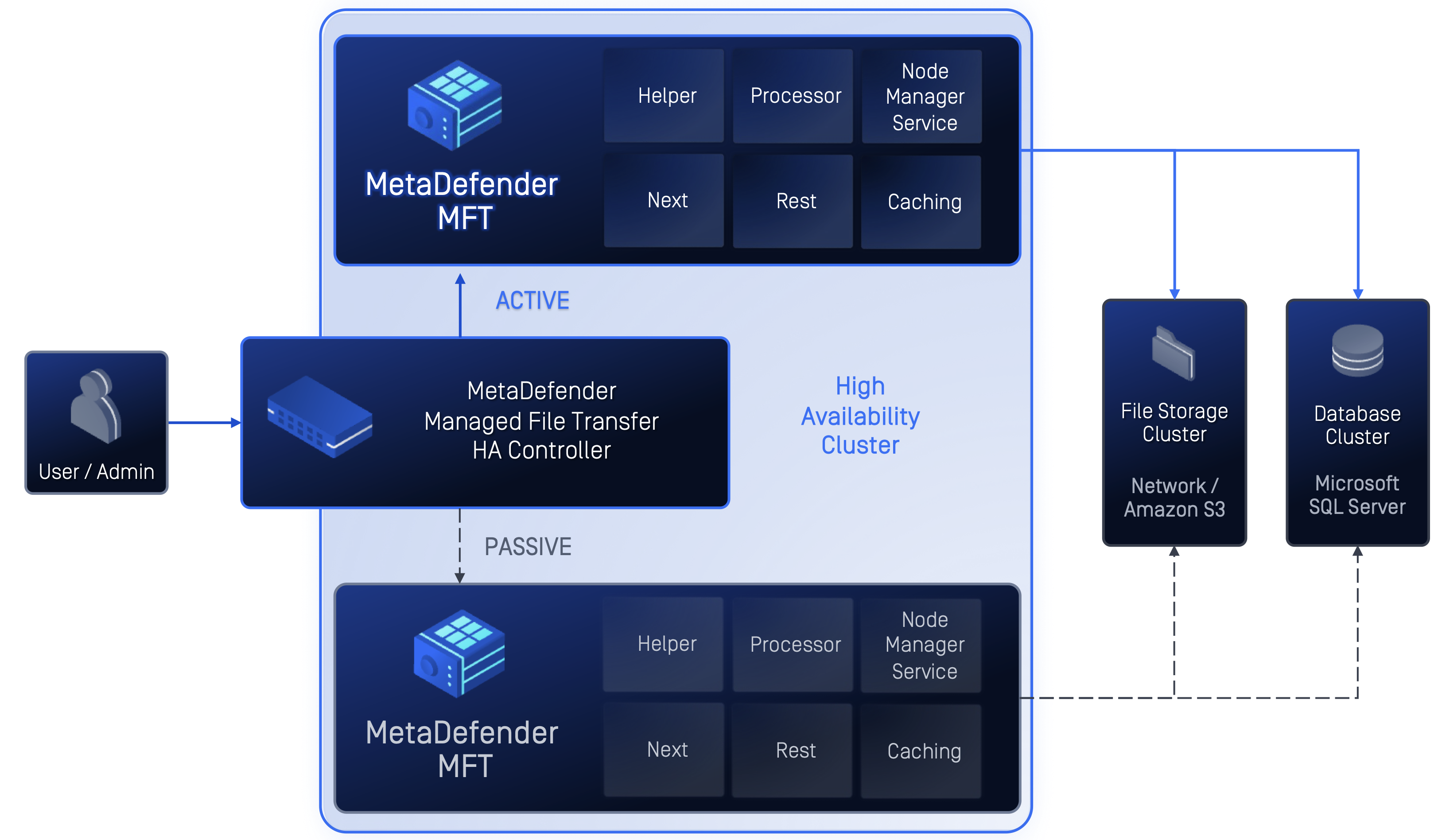
MetaDefender MFT HA Controller™ Sizing
The MetaDefender MFT HA Controller™ streams all upload and download traffic between clients and the active MetaDefender® MFT node. Its CPU requirements scale with the throughput it must proxy.
Feature | Small HA | Medium HA | Large HA |
|---|---|---|---|
Concurrent Uploading Users | < 100 | 100-200 | 200-400 |
CPU Cores | 4 | 8 | 8-12 |
RAM | 4 GB | 8 GB | 8-16 GB |
CPU Clock (base / turbo) | >= 2.0 / >= 3.0 GHz | >= 2.0 / >= 3.0 GHz | >= 2.0 / >= 3.0 GHz |
Storage | SSD | SSD | SSD |
Network | 1 Gbps | 1 Gbps | 1-10 Gbps |
Critical sizing rules:
CPU: HA Controller CPU cores ≥ MetaDefender® MFT node CPU cores. The HA Controller handles TLS termination, HTTP connection management, and body streaming for every concurrent upload. Under sizing the HA Controller makes the proxy the bottleneck instead of the backend server.
RAM: HA Controller RAM ≈ half of MetaDefender® MFT node RAM (minimum 4 GB). The proxy buffers active upload/download streams in memory. More concurrent connections and larger files require more buffer space.
MetaDefender® MFT Node Sizing (HA Mode)
Each MetaDefender® MFT node in an HA cluster should be sized identically to a standalone MetaDefender® MFT
server - use the same Recommended Hardware table above. In Single Active Node mode, only one node handles traffic at a time.
Shared Infrastructure
Component | Recommendation |
|---|---|
File Storage | Shared SSD-backed storage (SMB share or SAN) accessible by all MetaDefender® MFT nodes. All storage types (permanent, temporary, processed, archive) should point to the shared location. |
SQL Server | Shared database accessible by all MetaDefender® MFT nodes. Same sizing as standalone deployment. |
Network (MetaDefender MFT HA Controller™ ↔ MetaDefender® MFT ) | Low latency (< 1 ms), same subnet preferred. 1 Gbps minimum. |
HA Sizing Examples
Deployment | HA Controller | Each MFT Node | SQL Server | File Storage |
|---|---|---|---|---|
Small (50 CUU) | 4 vCPU, 4 GB RAM | 8 vCPU, 8 GB RAM | 4 vCPU, 8 GB RAM | SSD share |
Medium (200 CUU) | 8 vCPU, 8 GB RAM | 8 vCPU, 16 GB RAM | 4 vCPU, 8 GB RAM | SSD share |
Large (400 CUU) | 12 vCPU, 8 GB RAM | 12 vCPU, 16 GB RAM | 4 vCPU, 8 GB RAM | NVMe share |
HA Proxy Overhead
The MetaDefender MFT HA Controller™ adds a small performance overhead compared to connecting directly to a MetaDefender® MFT server:
File Size | Concurrency | Latency Overhead |
|---|---|---|
≈5 MB | < 100 CUU | ≈0.5 s additional per upload |
≈5 MB | 100-200 CUU | Negligible (+3%) |
≈50 MB | < 300 CUU | Negligible |
≈50 MB | 300-400 CUU | Negligible |
With the MetaDefender MFT HA Controller™ sized at 1:1 CPU ratio with the MetaDefender® MFT node, the proxy adds minimal overhead. The MetaDefender® MFT server remains the performance bottleneck in a properly sized deployment.
Failover Behavior
During a failover event, there is a brief service interruption:
Metric | Expected Value |
|---|---|
Failover detection | 1-2 seconds |
New node activation | 5-15 seconds |
Total outage window | ≈10-20 seconds |
In-flight uploads | Require re-upload after failover completes |
New uploads after failover | Succeed immediately |
Completed uploads are never affected by failover — they are safely stored on the shared file storage. Only uploads that were actively transferring during the brief failover window need to be re-initiated by the client.
SQL Server Sizing Notes
MetaDefender® MFT requires a SQL Server database. For production deployments, we recommend placing SQL Server on a separate host from the MetaDefender® MFT server. SQL Server Express is viable for small deployments (< 100 concurrent uploading users) if your data stays under 10 GB; SQL Server Standard is recommended for medium and large deployments.
For SQL Server hardware requirements, see SQL Server 2022 Hardware Requirements.
MetaDefender Core™ Sizing Notes
When MetaDefender Core™ is integrated, each uploaded file undergoes multi-engine deep content inspection - simultaneous scanning by multiple anti-malware engines, file type verification, and optionally Deep Content Disarm and Reconstruction (Deep CDR) and Proactive DLP. File inspection throughput depends entirely on your MetaDefender Core™ deployment - the number of scan engines enabled, workflow configuration, and hardware resources allocated. The MetaDefender® MFT server itself has ample headroom during scanning and is not the bottleneck.
To size MetaDefender Core™ for your expected workload:
Follow the MetaDefender Core™ Recommended System Configuration.
Adjust the queue size based on your expected concurrent file volume.
Consider adding MetaDefender Core™ instances for higher throughput requirements.
MetaDefender Core™ inspection throughput scales independently from MetaDefender® MFT. For detailed scan performance guidance, refer to the MetaDefender Core™ documentation or contact your OPSWAT sales representative.
How We Tested
The throughput numbers above are based on load testing with real-world file types (PDF, Word, Excel, EXE, JPG, PNG, MP4, ZIP) ranging from 100 KB to 2 GB.
These are guidelines - your results will depend on:
Network speed - the biggest factor for large file workloads.
Hardware - dedicated enterprise servers will typically outperform these numbers.
MetaDefender Core™ configuration - see MetaDefender Core™ Sizing Notes above.
Storage backend - Local SSD is fastest. SMB is comparable for uploads. S3 downloads are slower.
HA deployment - the HA Controller adds minimal overhead when properly sized (see HA Proxy Overhead above).
We recommend running your own performance validation to confirm optimal configuration for your environment.
Test Environment
Standalone Benchmarks
Component | Spec |
|---|---|
MetaDefender® MFT Server | 8 vCPU, 16 GB RAM, NVMe SSD, Windows Server 2022 |
SQL Server | 4 vCPU, 8 GB RAM, NVMe SSD, SQL Server 2025 Express |
MetaDefender® MFT Version | 3.11.2 |
MetaDefender Core™ Version | 5.18.0 |
HA Benchmarks
Component | Spec |
|---|---|
HA Controller | 4-8 vCPU, 4 GB RAM, SSD, Windows Server 2022 |
MetaDefender® MFT Nodes (x2) | 8 vCPU, 8 GB RAM, SSD, Windows Server 2022 |
SQL Server | 2 vCPU, 4 GB RAM, SSD |
Shared File Storage | 2 vCPU, 2 GB RAM, 200 GB SSD, SMB shares |
Network | All nodes on same 1 Gbps subnet |
These numbers represent conservative baseline estimates. Production deployments with dedicated hardware will typically perform better.
Next Steps
Ready to install? See the MetaDefender® MFT Installation Guide.
Planning a large or HA deployment? Contact your OPSWAT sales representative for custom sizing guidance.
Have questions? Reach out to OPSWAT Support.