
Knowledge Base
v4.8.6
Search this version
How to get the Device ID for the USB Allowing list workflow?
Check Your Version:
This article applies to MetaDefender Kiosk for Windows - All versions.
MetaDefender Kiosk provides the ability to filter listed USB devices for scanning. Below are 2 methods to get the Device ID for the USB device with the Kiosk workflow.
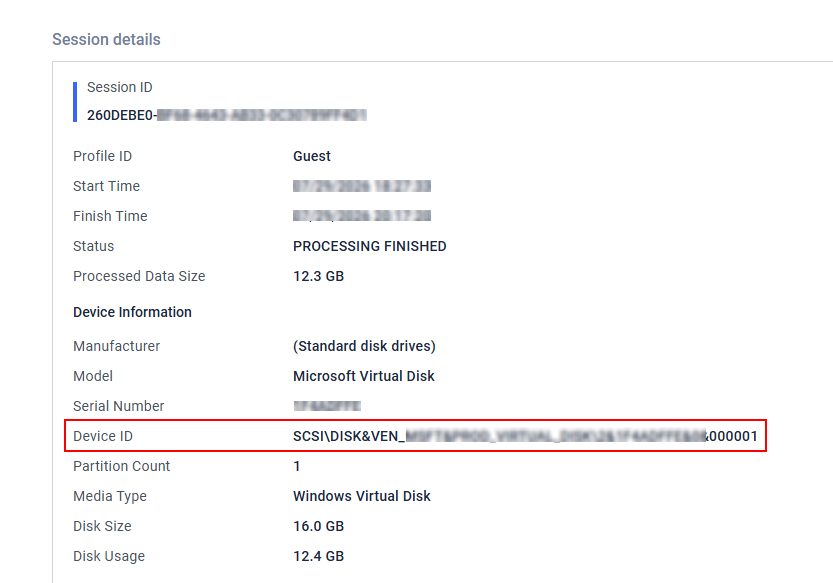
METHOD 1: Scan the USB with the MD Kiosk once:
With this method, you will need to scan the USB with the MD Kiosk one by one to get the Device ID from the scan report.
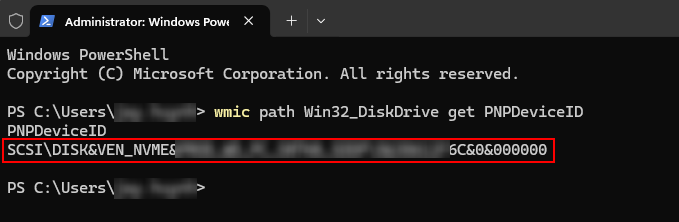
METHOD 2: Use the WMIC command to query the Device ID from CMD:
With this method, you can actively collect the Device ID without scanning the USB with the MetaDefender Kiosk.
wmic path Win32_DiskDrive get PNPDeviceID
Support:
If Further Assistance is required, please proceed to log a support case or chat with our support engineer.
Last updated on
Was this page helpful?
Knowledge Base
Knowledge Base
Configuration & Setup
Error & Troubleshooting