
Overview
MetaDefender Kiosk 4.8.3 includes an optional telemetry feature that sends a small amount of anonymized, aggregated usage and health information to OPSWAT. This data helps OPSWAT understand how Kiosk is used in the field, improve product quality, and identify potential issues early.
Telemetry does not contain any file names, file contents, user identities, or customer-specific data.
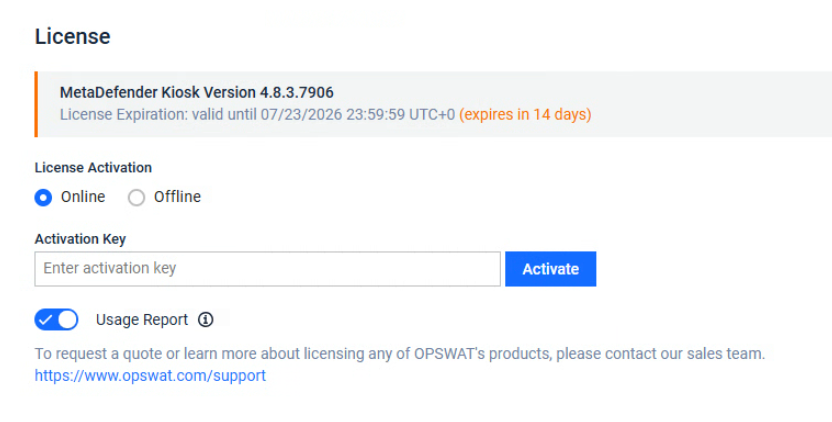
How It Works
When MetaDefender Kiosk telemetry is enabled, the Kiosk device periodically transmits lightweight metrics over a secure connection to a secure OPSWAT collector endpoint.
Scan activity metrics are accumulated locally as running totals and reported after each scan session completes.
Device health metrics (CPU, memory, heartbeat) are measured and sent every 60 seconds.
Is Telemetry Optional?
Yes — telemetry is entirely opt-in and customer-controlled.
Scenario | Behavior | |
|---|---|---|
License permits usage analytics | Toggle turned off | Collection and transmission stop immediately — no restart required. |
Toggle turned on | Collection and transmission resume immediately — no restart required. | |
License does not permit usage analytics (Please reach out to OPSWAT Support for more details) | Toggle greyout and turned off | The toggle is visible but locked off. No data is collected or sent. |
If the Usage Report toggle is not visible, it means the telemetry feature is not enabled. No data is collected or transmitted from your device.
What Data Is Collected
Scan Activity Metrics
Metric | Description |
|---|---|
Completed scan sessions | Number of scans that finished normally |
Aborted scan sessions | Number of scans that were interrupted or cancelled |
Total files scanned | Number of files presented for scanning |
Total data scanned | Volume of data scanned (in bytes) |
Files fully processed | Number of files that completed the full scan pipeline |
Files allowed | Number of files permitted through to the user |
Files blocked | Number of files blocked by policy |
Files skipped | Number of files excluded (e.g., by type or policy rule) |
Total scan time | Combined time spent scanning across all sessions |
Device Health Metrics
Metric | Description |
|---|---|
Memory usage | Current memory consumption of the Kiosk software |
CPU usage | Current CPU consumption of the Kiosk software |
Heartbeat signal | Confirms the device is online and operational |
What Is NOT Collected
To be explicit, MetaDefender Kiosk telemetry never collects:
File names or file contents
Usernames, operator identities, or personal information
Physical location or IP addresses of the device
Customer network topology or configuration details
Scan results or threat details for individual files
Frequently Asked Questions
Q: Can I enable telemetry for some Kiosks but not others?
A: Yes. The Usage Report toggle is per-device and can be configured independently on each Kiosk through WebMC.
Q: Does disabling telemetry affect Kiosk functionality?
A: No. Disabling telemetry has no impact on scanning, policy enforcement, or any other Kiosk feature.
Q: How quickly does the opt-out take effect?
A: Immediately. Once the toggle is turned off, no further data is collected or transmitted — no restart is needed.
Q: Is the data encrypted in transit?
A: Yes. All telemetry data is transmitted over a secure, encrypted connection.
Q: Can I completely disable telemetry so it can never be turned on?
A: Yes. Contact OPSWAT Support to have the Usage Analytics feature removed from your license. Once disabled at the license level, the Usage Report toggle will be greyed out and turned off — no data will ever be collected or transmitted from the device.
Q: I don't see the Usage Report toggle on my License page. Does that mean data is being collected?
A: No. If the Usage Report toggle is not visible, it means the telemetry feature is not enabled on your license. No data is collected or transmitted from your device.