Title
Create new category
Edit page index title
Edit category
Edit link
NGINX Ingress Controller Integration
OMetaScan NGINX Ingress Controller Configuration
The configuration of OMetaScan NGINX Ingress Controller is similar to the NGINX Ingress Controller Introduction - NGINX Ingress Controller (kubernetes.github.io)
ConfigMaps
ConfigMaps allow you to decouple configuration artifacts from image content to keep containerized applications portable.
The ConfigMap API resource stores configuration data as key-value pairs. The data provides the configurations for system components for the nginx-controller.
| Name | Type | Default | Usage |
|---|---|---|---|
| enable-ometascan | bool | “false” | Enable or Disable ometascan module globally Note: You must enable this config to use ometascan module |
Annotations
| Name | Type | Default | Usage |
|---|---|---|---|
| nginx.ingress.kubernetes.io/ometascan-send-timeout | number | 60 | Sets a timeout for transmitting a request to the proxied server. The timeout is set only between two successive write operations, not for the transmission of the whole request. If the proxied server does not receive anything within this time, the connection is closed. |
| nginx.ingress.kubernetes.io/ometascan-read-timeout | number | 86400 (1 day) | Defines a timeout for reading a response from the proxied server. The timeout is set only between two successive read operations, not for the transmission of the whole response. If the proxied server does not transmit anything within this time, the connection is closed. |
| nginx.ingress.kubernetes.io/ometascan-pre-cache-size | number |
(maximum number of Nginx) | Config maximum caching size per request. |
| nginx.ingress.kubernetes.io/ometascan-pre-cache | "true" or "false" | "false" | Turn on/off pre-caching request when sending to ICAP Server |
| nginx.ingress.kubernetes.io/ometascan-pass | string | No default | Sets the protocol and address of a ICAP server and an optional URI to which a location should be mapped. Note: Must have it for enable annotation |
| nginx.ingress.kubernetes.io/ometascan-methods | string | GET HEAD POST PUT PATCH DELETE | This directive specifies HTTP request methods that are considered by ometascan_pass. HTTP request methods not listed will be skipped completely. The following HTTP methods are allowed: GET, HEAD, POST, PUT, PATCH, and DELETE |
| nginx.ingress.kubernetes.io/ometascan-connect-timeout | number | 60 | Defines a timeout for establishing a connection with a proxied server. It should be noted that this timeout cannot usually exceed 75 seconds. |
You can add these Kubernetes annotations to specific Ingress objects to customize their behavior.
OMetaScan NGINX Ingress on Minikube
Requirement
Minukube: https://minikube.sigs.k8s.io/docs/
NGINX Ingress with OMetascan module images on docker hub
- For example:
- latest image: opswat/nginx-ingress
- or specific the tag: opswat/nginx-ingress:controller-1.5.1_ometascan-1.0.0_r1
- For example:
MD ICAP Server at least version v5.1.0 which has already enable NGINX integration NGINX Integration Configurations
Pre-setup
Enable Nginx ingress on Minikube
- start minikube
minikube start- enable the NGINX Ingress controller, run the following command
minikube addons enable ingress- Verify that the NGINX Ingress controller is running
kubectl get pods -n ingress-nginxThe output is similar to:
NAME READY STATUS RESTARTS AGEingress-nginx-admission-create-bl9nk 0/1 Completed 0 34singress-nginx-admission-patch-9vh4f 0/1 Completed 1 33singress-nginx-controller-cc8496874-fxnkb 0/1 Running 0 34sChange default Nginx Ingress image to Nginx Ingress with OMetascan module image
- Update the default image to opswat/nginx-ingress using the following command:
kubectl patch deployment ingress-nginx-controller -n ingress-nginx \ --patch '{"spec": {"template": {"spec": {"containers": [{"name": "controller","image": "opswat/nginx-ingress"}]}}}}'- Verify that the images is changed:
kubectl get deploy ingress-nginx-controller -n ingress-nginx -o jsonpath='{.spec.template.spec.containers}'the output:
[ { "image": "opswat/nginx-ingress", "imagePullPolicy": "IfNotPresent", "name": "controller", "resources": {}, "terminationMessagePath": "/dev/termination-log", "terminationMessagePolicy": "File" }]- Verify that the NGINX Ingress controller is replaced and running
kubectl get pods -n ingress-nginxThe output is similar to:
NAME READY STATUS RESTARTS AGEingress-nginx-admission-create-cc6mr 0/1 Completed 0 3m6singress-nginx-admission-patch-zbw6w 0/1 Completed 1 3m6singress-nginx-controller-78d6c7744f-q8qnd 1/1 Running 0 30sEnable OMetascan Module
- Set enable-ometascan: "true" to turn on the OMetascan module on ConfigMaps of ingress-nginx-controller:
cat <<EOF | kubectl apply -f -apiVersion: v1data: enable-ometascan: "true"kind: ConfigMapmetadata: name: ingress-nginx-controller namespace: ingress-nginx labels: app.kubernetes.io/name: ingress-nginx app.kubernetes.io/part-of: ingress-nginxEOFDeploy Echo Server as Service A
refer to: https://github.com/Ealenn/Echo-Server#kubernetes
cat <<EOF | kubectl apply -f -apiVersion: v1kind: Namespacemetadata: name: echoserver---apiVersion: apps/v1kind: Deploymentmetadata: name: echoserver namespace: echoserverspec: replicas: 5 selector: matchLabels: app: echoserver template: metadata: labels: app: echoserver spec: containers: - image: ealen/echo-server:latest imagePullPolicy: IfNotPresent name: echoserver ports: - containerPort: 80 env: - name: PORT value: "80"---apiVersion: v1kind: Servicemetadata: name: echoserver namespace: echoserverspec: ports: - port: 80 targetPort: 80 protocol: TCP type: ClusterIP selector: app: echoserverEOFExample:
/path1rewrite to/subpathA(use ometascan)/path2rewrite to/subpathB(use ometascan)- Only PUT methods
- Max client body size 100 Mb
/path3rewrite to /subpathC(do not use ometascan)

cat <<EOF | kubectl apply -f -apiVersion: networking.k8s.io/v1kind: Ingressmetadata: name: ingress-rule-a namespace: echoserver annotations: nginx.ingress.kubernetes.io/rewrite-target: /subpathA nginx.ingress.kubernetes.io/ometascan-pass: "http://10.40.161.167:8043"spec: rules: - host: testserver.com http: paths: - path: /path1 pathType: Prefix backend: service: name: echoserver port: number: 80---apiVersion: networking.k8s.io/v1kind: Ingressmetadata: name: ingress-rule-b namespace: echoserver annotations: nginx.ingress.kubernetes.io/rewrite-target: /subpathB nginx.ingress.kubernetes.io/ometascan-pass: "http://10.40.161.167:8043" nginx.ingress.kubernetes.io/ometascan-methods: "PUT" nginx.ingress.kubernetes.io/client-body-buffer-size: 100Mspec: rules: - host: testserver.com http: paths: - path: /path2 pathType: Prefix backend: service: name: echoserver port: number: 80---apiVersion: networking.k8s.io/v1kind: Ingressmetadata: name: ingress-rule-c namespace: echoserver annotations: nginx.ingress.kubernetes.io/rewrite-target: /subpathCspec: rules: - host: testserver.com http: paths: - path: /path3 pathType: Prefix backend: service: name: echoserver port: number: 80EOFOMetaScan NGINX Ingress on Kubenetes
Requirements
- An existing K8S cluster
- Helm CLI
- NGINX Ingress with OMetascan module images:
# pull latest imagedocker pull opswat/nginx-ingress#or specific the tagdocker pull opswat/nginx-ingress:controller-1.5.1_ometascan-1.0.0_r1- An existing MD ICAP Server on Kubernetes
Instructions
Example:

1.Install NGINX Ingress Controller via Helm Chart
helm repo add ingress-nginx https://kubernetes.github.io/ingress-nginxOutput:

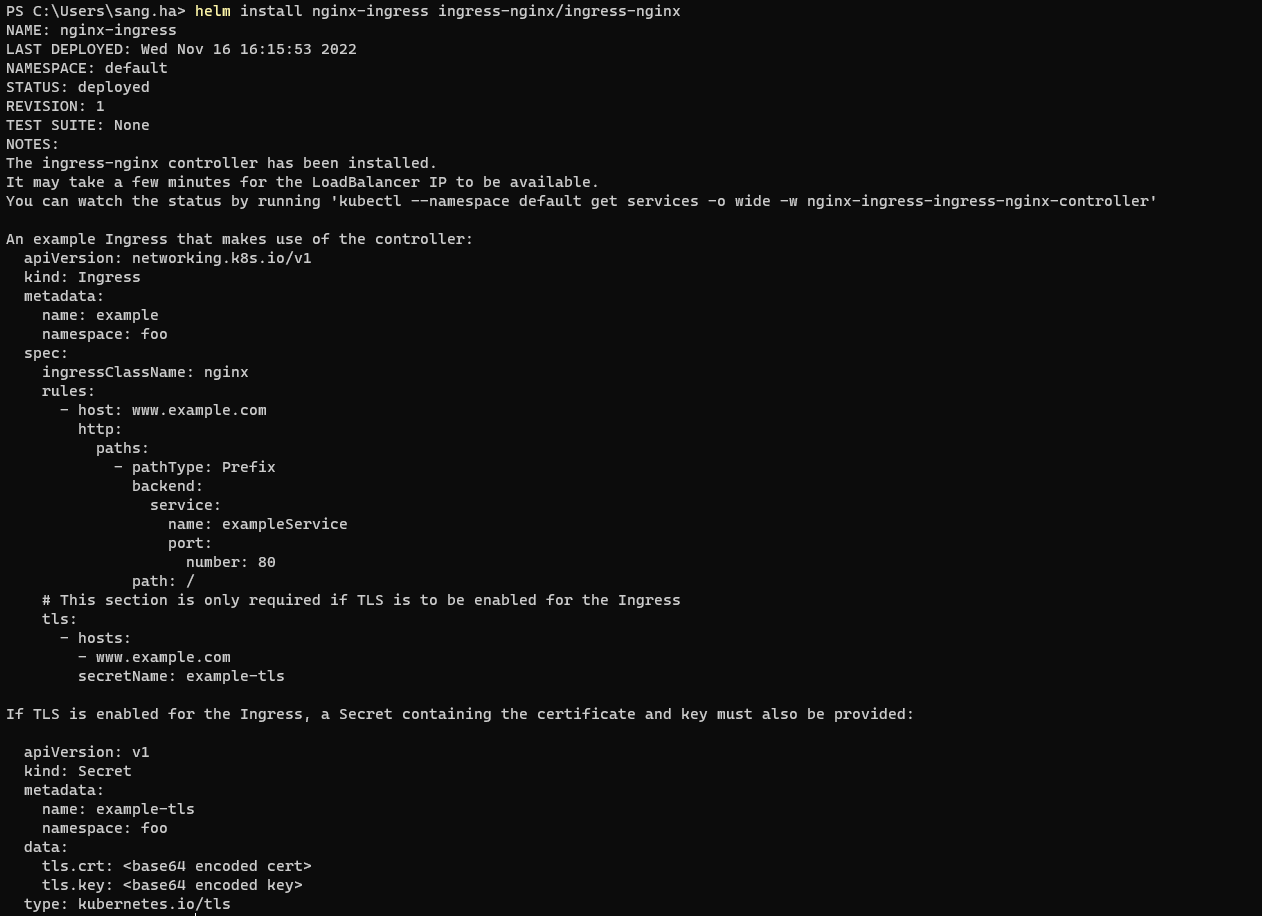
helm install nginx-ingress ingress-nginx/ingress-nginxOutput:

Verify the result install nginx-ingress as cli:
kubectl get pods -A | grep nginx-ingressOutput:

Make sure your nginx install with status of the pod nginx-ingress is running!
2. Replace The Ingress Controller Image
To replace the ingress controller image, we need to patch the existing k8s resource (deployment, DaemonSet, etc.) for the existing ingress controller to include the new image. For this, edit the ingress-controller-patch-image.yml file and replace the container name to match the existing controller and run the following command (replace 'deployment' and 'ingress-nginx-controller' with your specific resource type and name for the controller):
ingress-controller-patch-image.yml
---spec: template: spec: containers: - name: controller # Container name within the Deployment/DaemonSet of the ingress controller image: opswat/nginx-ingresskubectl patch deployment nginx-ingress-ingress-nginx-controller --patch-file ingress-controller-patch-image.ymlOutput:

update-configmap-ingress-controller.yml
apiVersion: v1kind: ConfigMapmetadata: name: nginx-ingress-ingress-nginx-controller # Name of the existing ConfigMap used by the ingress controller namespace: default # Namespace of the ingress controllerdata: enable-ometascan: "true"kubectl apply -f update-configmap-ingress-controller.ymlOutput:

3. Deploy A Service To Test with MetaDefender ICAP Server
3.1.Create deployment sample:
kubectl create deployment backend --image=gcr.io/google-samples/hello-app:1.0Output:

3.2.Expose service sample:
kubectl expose deployment backend --port=8080 --type=ClusterIPOutput:

3.3.Create file ingress for sample app:
ingress-be.yml
apiVersion: networking.k8s.io/v1kind: Ingressmetadata: name: ingress-be-rule-a annotations: nginx.ingress.kubernetes.io/rewrite-target: /subpathA nginx.ingress.kubernetes.io/ometascan-pass: "http://md-icapsrv:8043" # Replace with the address and port of an existing ICAP instace, for example, if ICAP is running in the same cluster: http://<ICAP_SERVICE_NAME>.<ICAP_NAMESPACE>.svc.cluster.local:<ICAP_PORT> spec: ingressClassName: nginx rules: - host: testserver.com http: paths: - path: /subpathA pathType: Prefix backend: service: name: backend port: number: 8080---apiVersion: networking.k8s.io/v1kind: Ingressmetadata: name: ingress-be-rule-b annotations: nginx.ingress.kubernetes.io/rewrite-target: /subpathB nginx.ingress.kubernetes.io/ometascan-pass: "http://md-icapsrv:8043" # Replace with the address and port of an existing ICAP instace, for example, if ICAP is running in the same cluster: http://<ICAP_SERVICE_NAME>.<ICAP_NAMESPACE>.svc.cluster.local:<ICAP_PORT> nginx.ingress.kubernetes.io/ometascan-methods: "PUT" nginx.ingress.kubernetes.io/client-body-buffer-size: 100Mspec: ingressClassName: nginx rules: - host: testserver.com http: paths: - path: /subpathB pathType: Prefix backend: service: name: backend port: number: 8080---apiVersion: networking.k8s.io/v1kind: Ingressmetadata: name: ingress-be-rule-c annotations: nginx.ingress.kubernetes.io/rewrite-target: /subpathCspec: ingressClassName: nginx rules: - host: testserver.com http: paths: - path: /subpathC pathType: Prefix backend: service: name: backend port: number: 8080kubectl apply -f ingress-be.ymlOutput:

Add the following line to the bottom of the /etc/hosts file on your computer (you will need administrator access):
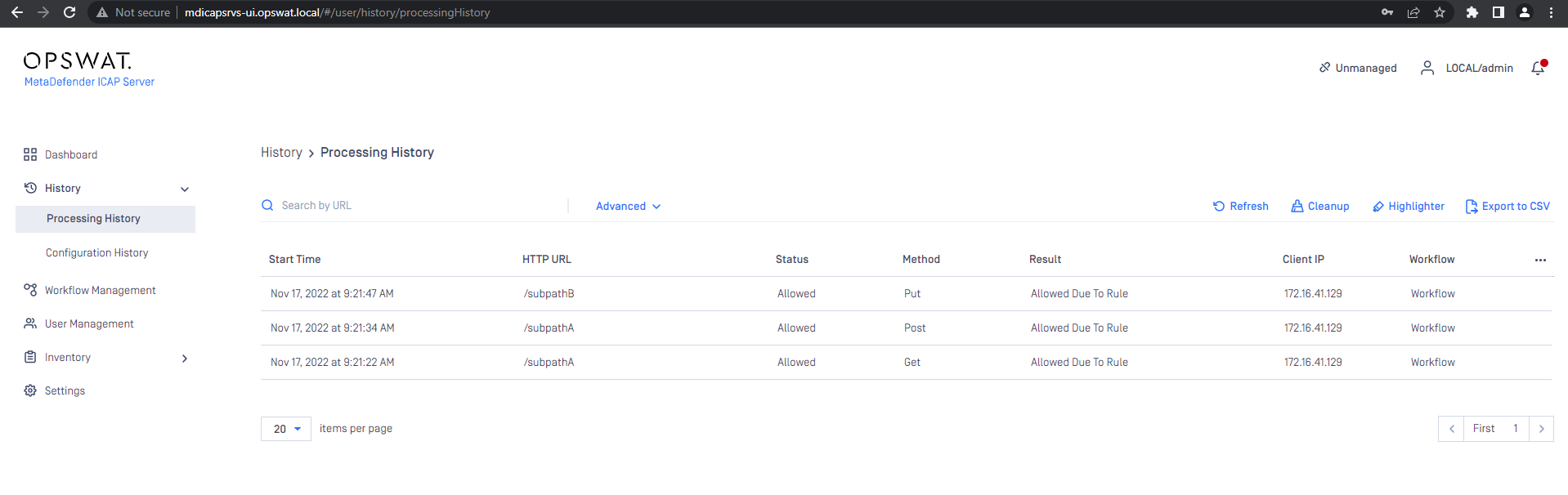
10.40.162.150 testserver.com mdicapsrvs-ui.opswat.localSend requests to Backend:curl -X GET testserver.com/subPathAcurl -X POST testserver.com/subPathAcurl -X PUT testserver.com/subPathBcurl -X GET testserver.com/subPathBcurl -X GET testserver.com/subPathCThe expected MD ICAP Server will scan requests