
Understanding SOAP message format
In a nutshell, SOAP message is an XML document.
Consider the following SOAP message:
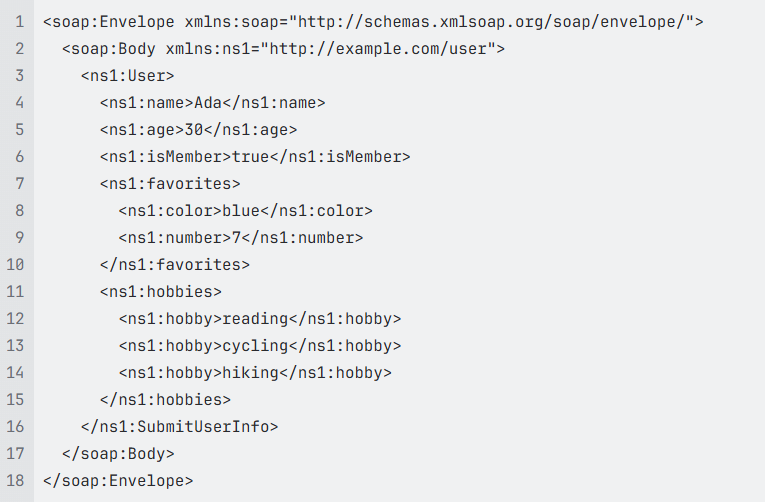
In this example, the SOAP message represents a person named Ada, including:
The tag <soap:Envelope> is the root element which encapsulates the entire message and defines it as a SOAP message
The tag <soap:Body> contains actual data or payload of the message
Namespace:
xmlns:ns1="http://example.com/user"defines a custom XML namespace to prevent name collisionsThe tags <ns1:name>, <ns1:age>, and <ns1:isMember> are primitive fields which represent basic properties of the user - a string (name), number (age), and boolean (isMember).

Value for the tag <ns1:favorites> is a nested object

We can consider <ns1:favorites> is the parent tag for the tag <ns1:color> and <ns1:number>
<ns1:hobbies> and **<ns:hobby>**tags are used to define a list or an array of values

The tags<ns1:name>, <ns1:age>, <ns1:isMember>, <ns1:favorites>, and <ns1:hobbies> are siblings and have the same level
You can learn more about SOAP message at SOAP Specifications
Rules to create a node path
Identify the leaf node where Base64-encoded data is stored. This could be within a specific value or in an element of a nested object or an element of an array.
It is easier to start building the path from the leaf node and go backward to find the immediate parent nodes until reaching the root node which is represented by /
Use "/" to separate the nodes.
Use the index to access an element of an array
Do not input the index to access 1st element
From 2nd element, input the access index (start with 2)
Despite the syntax looks like XPath, it doesn’t support all XPath syntax.
Examples
Base64-encoded data is stored in a specific key
Take the same JSON object above as an example and encode the value of the key “color” in Base64:
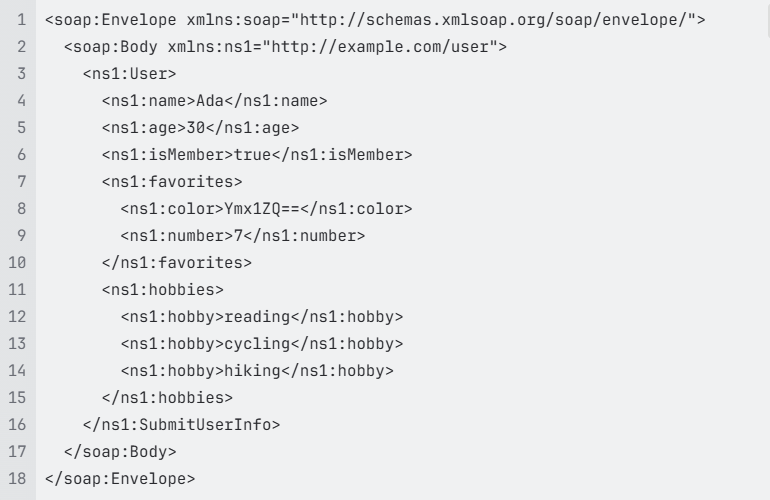
Now, the leaf node contains the Base64 encoded data is the tag <ns1:color>. Its immediate parent tag is <ns1:favorites>, so we have ns1:favorites/ns1:color. Then the immediate parent of <ns1:favorites> is <ns1:User>, so we have the node path is ns1:User/ns1:favorites/ns1:color. Go up one level to find the immediate parent of <ns1:User>, we have soap:Body/ns1:User/ns1:favorites/ns1:color. Go up one more leve, we reach the root note <soap:Envelope>. Thus, the final path is soap:Envelope/soap:Body/ns1:User/ns1:favorites/ns1:color
Base64-encoded data is stored in an element of an array
Consider the sample SOAP message above with base64-encoded data stored in an element of an array
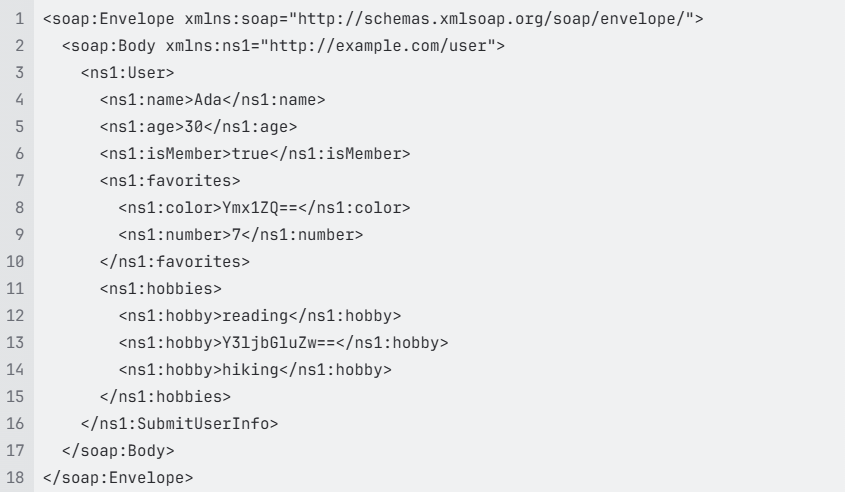
In this example, the leaf node contains the Base64 encoded data is the tag <ns1:hobby>Y3ljbGluZw==</ns1:hobby>.
Its immediate parent key is an array <ns1:hobbies> and it is the second element in the array, so we have ns1:hobbies/ns1:hobby[2]. Follow the sample steps above to find the immediate parent of <ns1:hobbies> and so on. We have the full node path to the Base64-encoded data:

If Further Assistance is required, please proceed to log a support case or chatting with our support engineer.