Installation
v5.12.0
Search this version
Installation
Installation
Title
Message
Create new category
What is the title of your new category?
Edit page index title
What is the title of the page index?
Edit category
What is the new title of your category?
Edit link
What is the new title and URL of your link?
Non-root support
Copy Markdown
Open in ChatGPT
Open in Claude
How to run the container with non-root access via Docker Container
Step 1: get the docker image from docker hub (Refer to: Docker image published on OPSWAT Docker Hub)
Step 2: launch docker image with non-root option
- specific UID:GID = 1000:1000 to enable non-root support
- beside that, below environment variable require to run the doc
- MD_USER=admin
- MD_PWD=admin
- ACCEPT_EULA=true
- DB_USER=postgres
- DB_PWD=postgres
- DB_MODE=1
- DB_HOST=localhost
- DB_PORT=5432
- DB_TYPE=local
Bash
docker run --user 1000:1000 -it \-e MD_USER=admin -e MD_PWD=admin \-e ACCEPT_EULA=true -e DB_HOST=localhost \-e DB_MODE=1 -e DB_TYPE=local -e DB_USER=postgres -e DB_PWD=posgres \-e DB_PORT=5432 opswat/metadefendericapsrv-debian:5.8.0Step 3: verify the UID:GID works properly
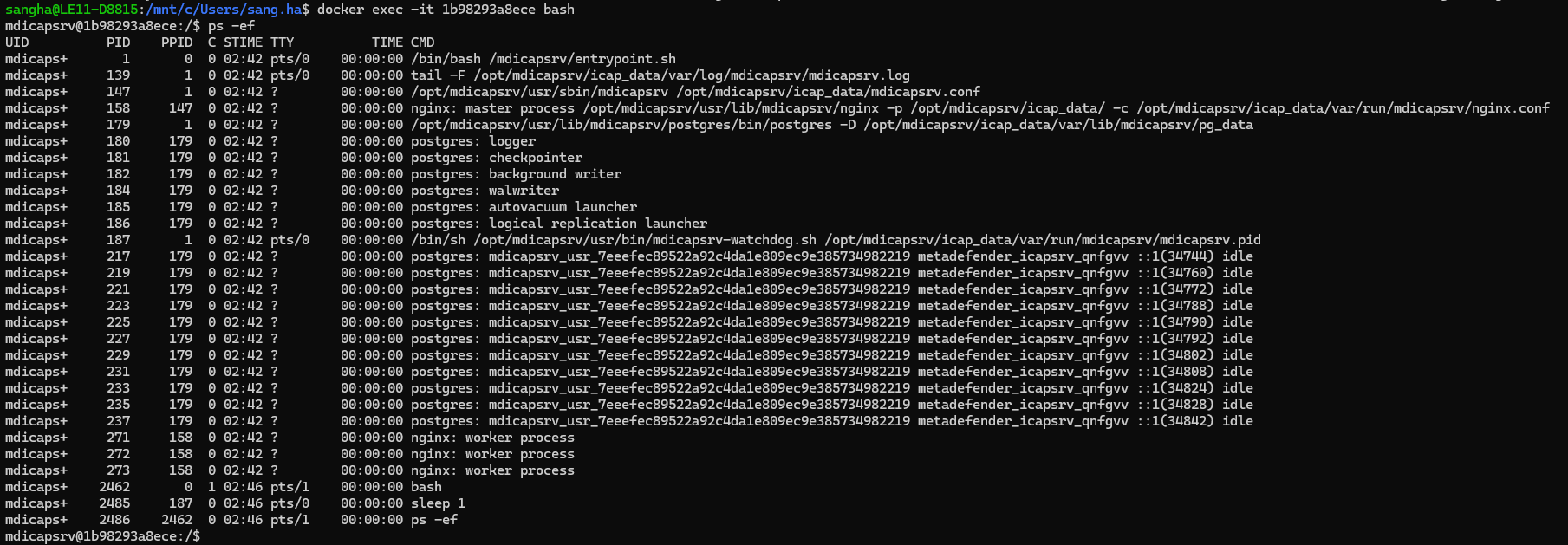
run command inside container to see the process mdicapsrv is running
Bash
ps -ef
How to customer the UID and GID value?
The default value of UID and GID is 1000, these default value can be customized via Docker toolkit on My OPSWAT Portal and rebuild a new image (refer to Using build tool kit with your own docker image)
Step 1: modify RUN_UID and RUN_GID value in file Dockerfile
Step 2: Rebuild docker image
Bash
cd <build-kit-directory>docker build --build-arg VERSION=5.8.0 -t oharbor.opswat.com/icap/mdicapsrv-debian:5.8.0 .Type to search, ESC to discard
Type to search, ESC to discard
Last updated on
Was this page helpful?
Next to read:
Using build tool kit with your own docker imageDiscard Changes
Do you want to discard your current changes and overwrite with the template?
Archive Synced Block
Message
Create new Template
What is this template's title?
Delete Template
Message
